Arabic Shopify store: how to set up a bilingual RTL storefront
How to build a bilingual Arabic Shopify store: pick an RTL-ready theme, add and translate Arabic, set up language URLs in Markets, fix the RTL details apps miss and test checkout.
If you sell on Shopify and want an Arabic Shopify store alongside your English one, this guide is for you. It walks through the order we follow on real projects: choosing a theme that handles right-to-left (RTL) layouts, adding and translating Arabic, setting up language URLs, fixing the details that usually break, and testing before launch. You'll come away knowing what Shopify does for you, what it doesn't, and what to ask your developer.
The short version: Shopify handles more of this natively than it used to, but a good Arabic storefront is still a design job, not just a translation job. Treat it as a second storefront that shares your products, and you'll avoid most of the problems we're asked to fix.
What Shopify supports for Arabic and RTL today
Shopify has steadily improved its right-to-left support. According to Shopify's Help Center and changelog, the latest versions of themes in the Horizon family support right-to-left languages such as Arabic, Hebrew and Urdu, and checkout and customer accounts also render in RTL when a shopper views them in one of those languages. That's a big change from the days when every RTL store needed heavy theme surgery.
Here is how the pieces fit together:
- Languages live in Settings > Languages in Shopify admin. You add Arabic there, translate it, then publish it.
- Translations are managed in Shopify's free Translate & Adapt app or a third-party translation app. Both write into the same translation layer, so your theme reads them the same way.
- Markets decide which languages are offered on which domain or subfolder, and Shopify adds hreflang tags for markets that have their own URL.
-
The theme decides whether the layout actually mirrors. In Liquid, the
request.locale.directionproperty returnsrtlorltr, and a well-built theme uses it to set thedirattribute on the page.
So the platform does its part. Whether your store looks right in Arabic depends mostly on the theme, the apps you've installed and the care taken with content.
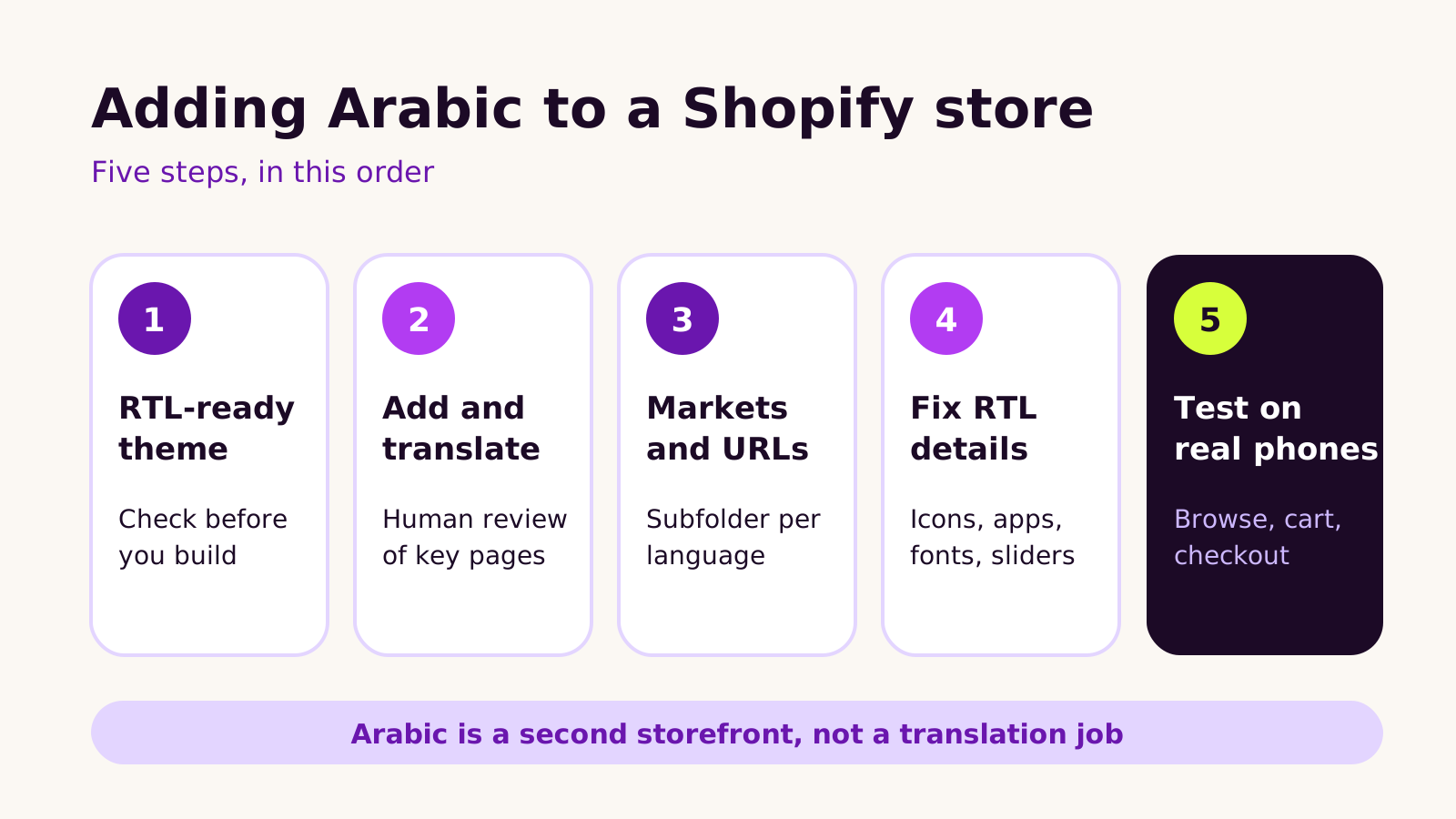
Step 1: choose a theme that is genuinely RTL-ready
This is the decision that saves or costs the most time. Before you commit to a theme, or before you commission a custom one, check how it behaves in Arabic.
How to check a theme quickly
- 1 Install the theme as an unpublished copy and add Arabic as a language (it can stay unpublished).
- 2 Preview the theme in Arabic using the language selector in the theme editor or the preview link.
- 3 Look at the header, mega menu, product page, cart drawer and footer. Does the whole layout mirror, or only the text alignment?
- 4 Open it on a phone. Mobile menus and slide-out cart drawers are where partial RTL support usually shows.
If you're on an older or heavily customized theme, don't assume it will flip cleanly. We often find hard-coded left and right values in CSS that should use logical properties such as margin-inline-start. Fixing those is very doable, but it's work to plan for. If you're weighing a new build, our guide to choosing a custom or premium Shopify theme covers the trade-offs, and RTL support belongs on that checklist.
Step 2: add Arabic and translate it properly
Once Arabic is added under Settings > Languages, you can translate products, collections, pages, navigation, theme text, notifications and metafields. Translate & Adapt can auto-translate content, and that's a useful first draft. It isn't a finished product.
We'd always have a fluent Arabic speaker review, at minimum:
- Product titles and the first lines of descriptions, because these show in search results and collection grids.
- Navigation labels and buttons, where machine translation often picks a literal word nobody uses in shopping.
- Shipping, returns and policy pages, where meaning matters more than style.
- Email and SMS notifications, which are easy to forget and are the first thing a new customer reads after ordering.
Don't forget the content that isn't text. Banners with English words baked into the image need an Arabic version, and alt text should be translated too. Theme sections often let you set a different image per language; if yours doesn't, that's a sign the theme wasn't built with bilingual stores in mind.
Fonts
Many popular Latin display fonts have no Arabic characters, so the browser silently falls back to a system font. The result can look mismatched next to your brand typography. Choose an Arabic typeface that pairs with your English one in weight and tone, and load it only for the Arabic locale so English pages stay light.
Step 3: set up language URLs in Shopify Markets
How Arabic pages are addressed matters for search and for shoppers sharing links. In Shopify Markets you can assign languages to your primary domain, to subfolders or to separate domains. For most bilingual stores we prefer a language subfolder on the main domain, such as /ar, because it keeps one domain's search history working for both languages and is simple to manage.
Points to check under Settings > Markets and the market's domain and language settings:
- Arabic is published and assigned to the domains or subfolders you expect.
- The default language for each market is the one most of that market's shoppers want.
- Hreflang tags appear in the page source for both language versions. Shopify generates these for markets with a distinct URL.
- The language switcher sends people to the same page in the other language, not to the home page.
If you sell in several currencies as well, plan the currency and language setup together, since both are controlled from Markets. We covered a similar structure for another platform in our Webflow Localization guide for multi-market sites; the planning questions about locales and redirects apply on Shopify too.
Step 4: fix the RTL details that usually break
A theme can mirror its own layout perfectly and still look broken because of everything layered on top. These are the issues we check on every Arabic Shopify store:
- App widgets. Reviews, chat bubbles, upsell pop-ups and size guides are often built left-to-right. Check each one in Arabic and ask the app's support whether it supports RTL.
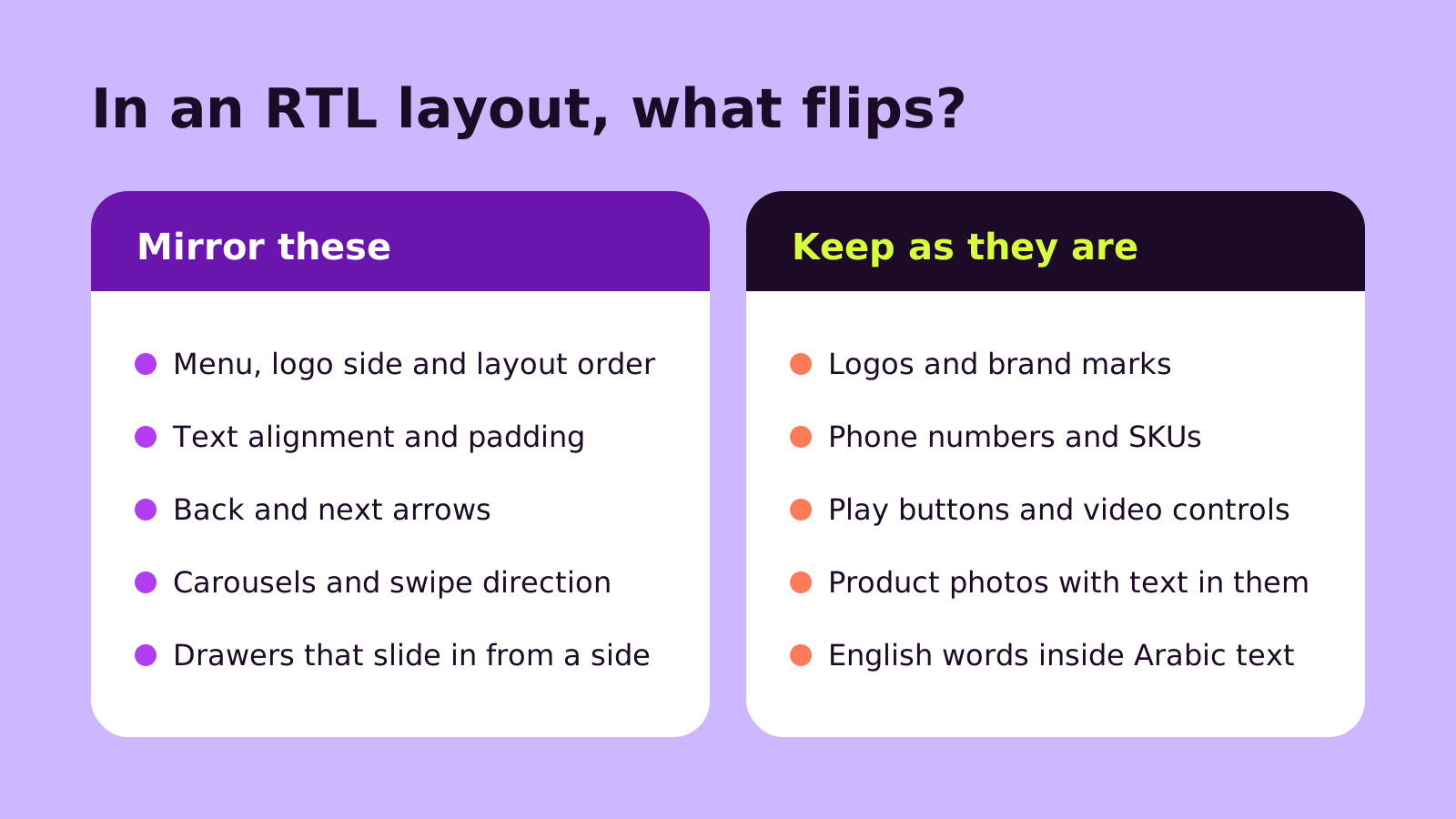
- Icons with a direction. Back and next arrows, breadcrumbs and "continue" chevrons should mirror. A play button or a clock icon should not.
- Carousels. Swipe direction and the order of slides should match reading direction.
- Mixed text. Brand names, SKUs, prices and phone numbers inside Arabic sentences run left to right. Wrap them correctly so punctuation doesn't jump to the wrong end of a line.
- Forms. Email and phone fields usually read better left-aligned even on an Arabic page.
Every app you remove is one less thing to make RTL-friendly. If the store has gathered apps over the years, run an audit of your Shopify apps before the Arabic launch; it often turns a long fix list into a short one.
Step 5: test like a shopper, on real phones
Preview tools are useful, but most shoppers will meet your Arabic store on a phone. Test the full journey in Arabic on at least one iPhone and one Android device: land on a collection from search, filter, open a product, add to cart, open the cart drawer, and go through checkout to the payment step. Then do the same in English to make sure nothing regressed.
Check speed while you're there. Extra fonts and translation scripts can slow pages down, so compare Arabic and English pages in PageSpeed Insights. Our notes on Core Web Vitals and what to fix first explain which numbers to watch.
Questions people ask
Can one Shopify store run in both Arabic and English?
Yes. You add Arabic as a second language in the same store, so products, inventory and orders stay in one place. Shoppers switch language with a selector, and each language can have its own URL.
Do I need a separate theme for Arabic?
No, as long as your theme supports RTL. A single theme reads the shopper's language and changes direction. A separate theme or store only makes sense when the Arabic catalog, pricing or brand is genuinely different.
Will checkout show in Arabic?
Shopify's checkout supports Arabic and renders right-to-left for Arabic shoppers. Your checkout branding and any checkout apps should still be tested in Arabic before launch.
Is machine translation good enough?
It's a good starting point for long catalogs. For navigation, product titles, policies and notifications, we'd always add a review by a fluent speaker, because these shape trust more than any other text on the site.
A checklist for your Arabic Shopify store
- Theme previewed in Arabic on desktop and mobile, with the full layout mirroring.
- Arabic added and published, with key content reviewed by a fluent speaker.
- Arabic banners, alt text and notifications in place.
- An Arabic typeface that pairs with your brand font, loaded only where needed.
- Language URLs, hreflang and the language switcher checked in Markets.
- Every app widget tested in Arabic, and unused apps removed.
- Full purchase journey tested on real phones in both languages.
If you'd like a hand planning or building a bilingual storefront, our Shopify development team is happy to talk it through, or you can start a conversation here.
(over to you)
Planning a build like this?
Tell us what you're building and we'll come back with ideas and next steps.