Node.js 26 LTS upgrade: a plan for business apps and APIs
Node.js 26 became LTS on 28 October 2026. A practical Node.js 26 LTS upgrade plan: what changed, what breaks, how to test on both versions, and fixes for the problems teams hit.
Node.js 26 became the Active LTS release on the twenty-eighth of October 2026, and it is now the version to plan production around. Node.js 22 reaches end of life at the end of April 2027, so apps still on it have a few months to move.
The upgrade is usually small, but a few things break. Old internal stream modules have been removed, the http writeHeader method is gone, and native add-ons must be rebuilt for the new version. Linux servers may also need the libatomic library installed.
Our approach is simple. List every place Node runs, including build servers and scheduled jobs. Scan your code and dependencies for removed APIs. Run your tests on both your current version and Node.js 26 at the same time. Then test on staging with real traffic patterns and go live with a rollback ready. Upgrade the runtime on its own, not alongside a framework upgrade.
If your app or API needs this move and you would like help planning it, talk to a Node.js developer before the deadline gets close.
If your website, store integration or internal tool runs on Node.js, this is for you. On 28 October 2026 Node.js 26 (codename "Lithium") moved into Active Long Term Support with release 26.13.0. That makes a Node.js 26 LTS upgrade the sensible next step for most production apps, and it starts a clock for anything still on Node.js 22. Below we explain what actually changed, what tends to break, and the upgrade plan we follow on client APIs and Next.js sites.
The problem: your app runs on a version with an end date
Most business owners never think about the Node.js version behind their site. It was picked when the project was built, and it quietly keeps working. The trouble is that every Node.js release line has an end-of-life date, and after that it stops getting security fixes.
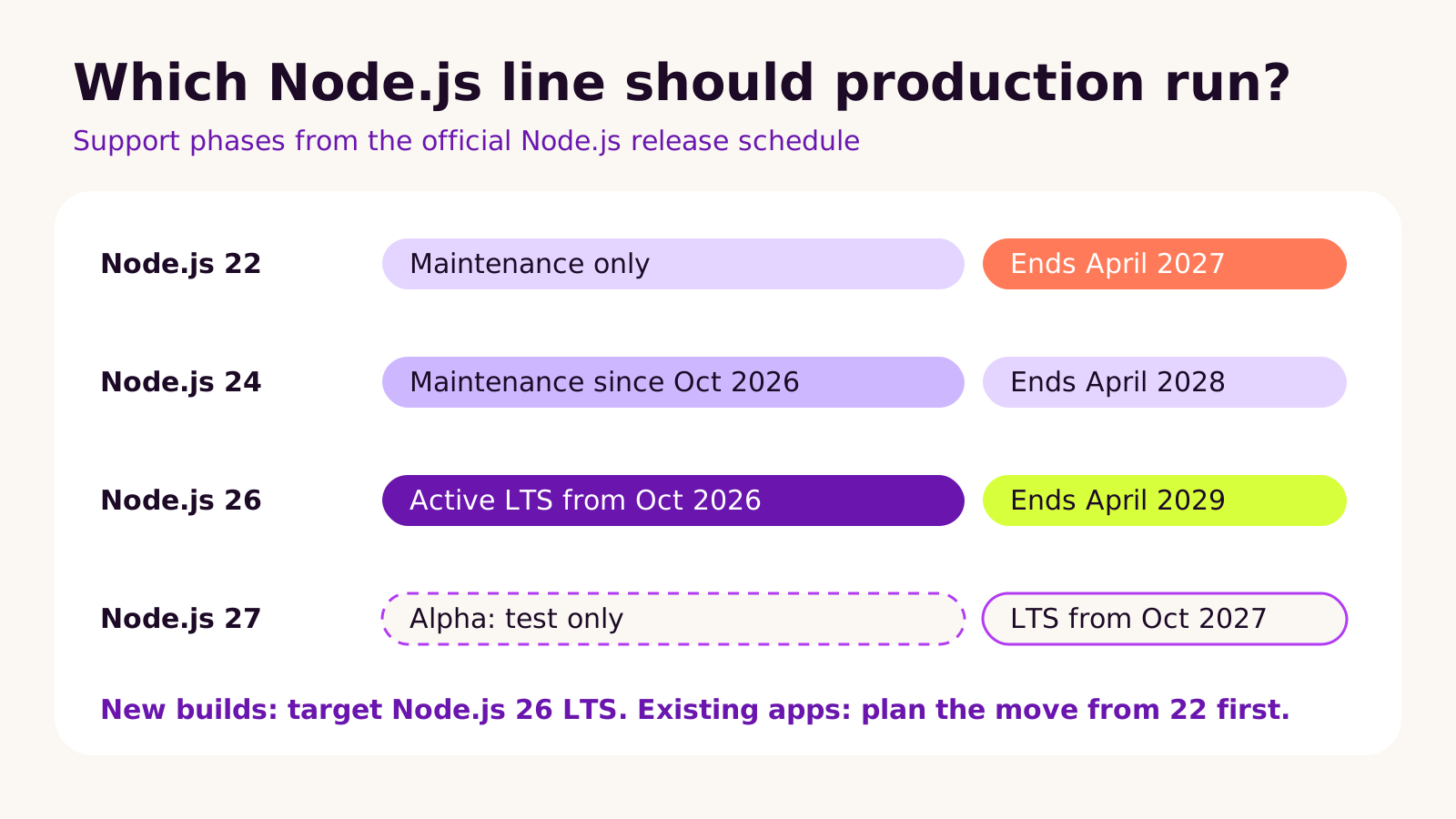
Here is where things stand in November 2026, from the official release schedule:
| Release line | Status now | End of life |
|---|---|---|
| Node.js 22 "Jod" | Maintenance only | 30 April 2027 |
| Node.js 24 "Krypton" | Maintenance since October 2026 | 30 April 2028 |
| Node.js 26 "Lithium" | Active LTS since 28 October 2026 | 30 April 2029 |
| Node.js 27 | Alpha, not for production | LTS planned for October 2027 |
If you're on Node.js 22, the deadline is close enough that it belongs in your next quarter's plan. If you're on 24, you're safe for now, but new features and performance work land on 26 first. And if a developer tells you your app is on Node.js 20 or older, it's already past end of life and should move first.
How Node.js releases and LTS actually work
A Node.js major version spends its first six months as "Current". That period is for library authors and early adopters to find problems. Once that window closes, the project promotes it to LTS, and from then on it only gets carefully backported fixes. That's why the 26.13.0 release notes say nothing changed apart from the LTS label: the code you'd run is the same as 26.12.1, it's just now the line the project commits to supporting.
The breaking changes all arrived back in April and May 2026 with Node.js 26.0.0. The ones we see matter in real projects are:
-
Old stream modules removed.
_stream_readable,_stream_writable,_stream_duplex,_stream_transform,_stream_passthroughand_stream_wrapare gone. Your own code rarely uses them, but older dependencies sometimes do. -
res.writeHeader()removed. Useres.writeHead(). This turns up in older custom HTTP servers and middleware. -
module.register()is runtime-deprecated and--experimental-transform-typesis removed, which affects some custom loaders and TypeScript setups. - Native add-ons need rebuilding. The add-on ABI version changed, so packages with compiled code (image processing, some database drivers, password hashing) must be reinstalled against Node.js 26.
- Linux binaries link against libatomic (since Node.js 25), which some slim container images don't include.
There's also good news. Node.js 26 ships V8 14.6 and turns on the Temporal API by default, a much saner way to handle dates, time zones and durations than Date. It's worth knowing about for booking, scheduling and reporting features, but you don't need to adopt it to upgrade.
One more change affects planning beyond this year. Node.js 26 is the last line under the old odd/even model. From Node.js 27, there's one major release a year, every major becomes LTS, and a six-month Alpha channel replaces the odd-numbered releases. In practice, that means one predictable upgrade each autumn.
How to run a Node.js 26 LTS upgrade safely
We treat a runtime upgrade as its own small project, not something slipped in alongside other work. Here's the order we follow.
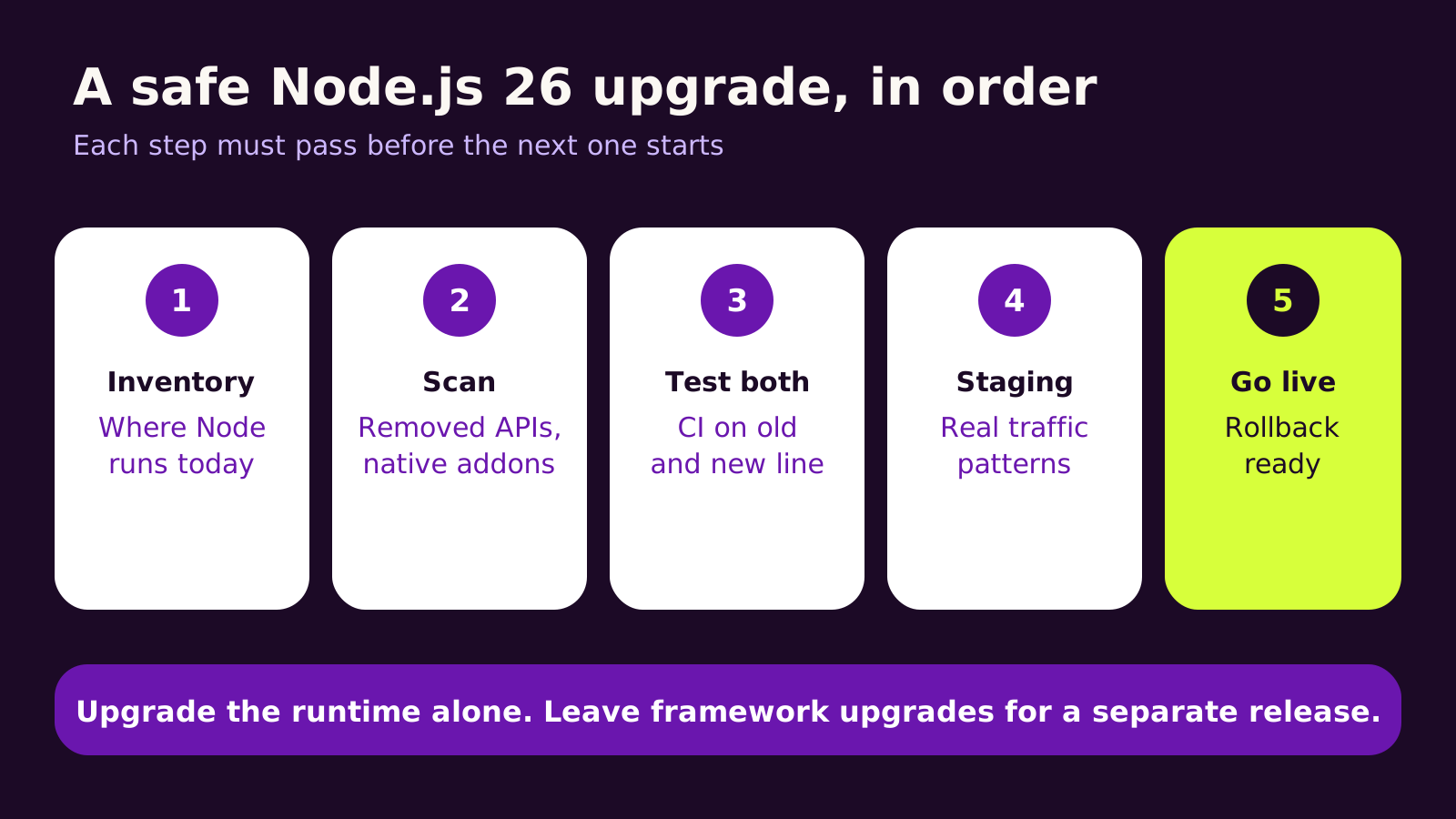
1. Inventory every place Node.js runs
The web server is the obvious one. The ones people forget are the CI pipeline, the build step on your host, scheduled jobs, serverless functions, Docker base images and developer laptops. Write down where the version is set in each: .nvmrc, the engines field in package.json, the Dockerfile FROM line, or a runtime setting in your hosting dashboard. Also confirm your host offers Node.js 26 as a runtime before you plan dates around it.
2. Scan for removed APIs and compiled packages
Run your test suite with deprecation tracing on, and search your code and dependencies for the removed APIs:
# show where deprecated APIs are called during tests
NODE_OPTIONS=--trace-deprecation npm test

# look for APIs removed in Node.js 26
grep -rnE "_stream_(readable|writable|duplex|transform|passthrough|wrap)|\.writeHeader\(" src node_modules --include=*.js | head -50

# list packages with native (compiled) code
find node_modules -name "*.node" -not -path "*/test/*"
Any hit inside node_modules usually means a dependency needs updating, not that you need to patch it yourself.
3. Test on both versions at once
Run CI on your current line and on Node.js 26 side by side until both pass. This GitHub Actions job goes in .github/workflows/test.yml; change 24 to whatever version you run today:
name: test
on: [push, pull_request]
jobs:
  test:
    runs-on: ubuntu-latest
    strategy:
      matrix:
        node: [24, 26]
    steps:
      - uses: actions/checkout@v5
      - uses: actions/setup-node@v5
        with:
          node-version: ${{ matrix.node }}
          cache: npm
      - run: npm ci
      - run: npm test
When both pass, set "engines": { "node": ">=26" } in package.json and update .nvmrc to 26 so every machine agrees.
4. Stage it with real traffic patterns
Deploy to staging and exercise the parts tests miss: webhooks from your store or CRM, file uploads, scheduled jobs, PDF or image generation, and anything that talks to a payment provider. Watch memory and response times for a day if you can.
5. Go live with a rollback ready
Keep the previous image or runtime setting one click away. Most hosts let you redeploy the last build, but check that the rollback also restores the old Node.js version, not just the old code.
What we've learned from runtime upgrades
Most upgrades between LTS lines are uneventful when the dependencies are current. The painful ones are apps that skipped several years of package updates, because the runtime upgrade then drags a pile of major dependency upgrades with it. If that's you, budget for the dependency work separately and be honest about it.
We'd move straight from 22 to 26 rather than stopping at 24. Both jumps involve similar testing effort, and 26 gives you the longer runway. The exception is a host or platform that doesn't offer 26 yet; then 24 is a perfectly sound interim step.
Troubleshooting
-
Symptom: the app crashes on start with "Cannot find module '_stream_readable'". Cause: an old dependency, often a stream or HTTP helper, requires a removed internal module. Fix: run
npm lsto find which package pulls it in and update it, or replace it with the modernnode:streamequivalent. -
Symptom: "was compiled against a different Node.js version" or "NODE_MODULE_VERSION" errors. Cause: a native add-on built for the old version. Fix: delete
node_modulesand reinstall withnpm cion Node.js 26; don't copynode_modulesbetween images. -
Symptom: the
nodebinary fails in a container with an error aboutlibatomic.so.1. Cause: a slim Linux base image missing the library. Fix: install it in the Dockerfile (for examplelibatomic1on Debian-based images) or use the official Node.js 26 image. -
Symptom: "res.writeHeader is not a function" on some requests. Cause: older custom middleware. Fix: replace the call with
res.writeHead(). -
Symptom: CI passes but production still reports the old version. Cause: the hosting dashboard or Dockerfile pins its own version. Fix: log
process.versionat start-up and check it after each deploy.
Questions people ask
Do I have to upgrade to Node.js 26 right now?
Not if you're on Node.js 24, which is supported until April 2028. If you're on 22, plan the move well before its end of life in April 2027 so you aren't upgrading under pressure.
Will the upgrade change how my website looks or behaves?
It shouldn't. A runtime upgrade is invisible to visitors when it's done properly. Problems show up in back-end behavior, such as a webhook or image step failing, which is why staging tests matter.
Should we test on the Node.js 27 Alpha?
Only if you maintain a library or have a long-lived product with good test coverage. For most business apps, waiting for 27 to reach LTS in October 2027 is fine.
Why it matters for your business
An unsupported runtime is a quiet risk: everything works until a security issue is found that will never be patched on your version. Planning a Node.js 26 LTS upgrade now keeps your APIs, integrations and storefront builds on a supported footing until 2029, and it's far cheaper as planned work than as an emergency. If your Node.js app also handles store or CRM events, our guide to building reliable webhook receivers in Node.js pairs well with this upgrade. Running Next.js? Read our Next.js 16.4 upgrade plan and schedule it as a separate release. For the wider picture, our website security checklist for small businesses covers patching beyond the runtime.
Quick checklist: list where Node.js runs, scan for removed APIs and native add-ons, test on both versions in CI, stage with real traffic, then go live with a rollback ready.
If you'd like a hand planning or running the move, our Node.js development team is happy to talk it through with you.
(over to you)
Planning a build like this?
Tell us what you're building and we'll come back with ideas and next steps.