Next.js multi-language website: i18n routing and RTL done right
How to build a Next.js multi-language website with the App Router: locale URLs, proxy redirects, translations, Arabic RTL layouts, hreflang and fixes for the problems teams hit.
A multi-language Next.js website works best when the language lives in the URL, the direction is set on the server, and the CSS is written to mirror itself.
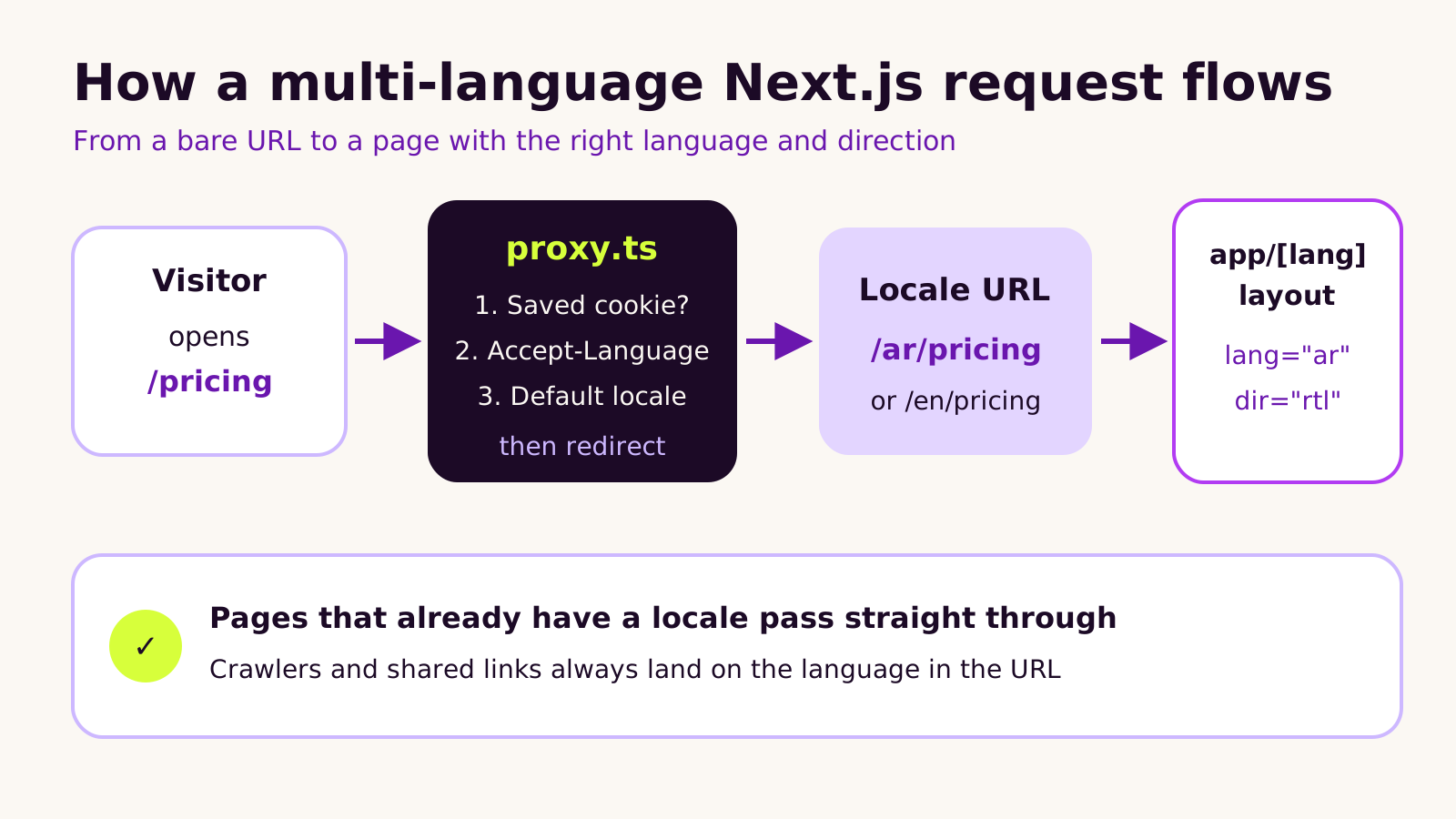
In the App Router, put every page under a language folder, so English and Arabic each have their own address. Use the proxy file only to send visitors who open a URL without a language to the right version, checking their saved choice first, then their browser language, then your default. Never redirect a URL that already names a language.
Set the lang and dir attributes in the root layout on the server, and load an Arabic font with next font. Keep interface text in per-language dictionaries, and write spacing with logical properties like margin inline start, so right-to-left layouts flip on their own. Add hreflang links and a self-referencing canonical to every page.
Common problems include the proxy catching images, a crash when a browser sends a wildcard language, and jumbled numbers inside Arabic text. Each has a simple fix covered in the article.
Plan the structure before you build, and review key pages in Arabic with real copy before launch.
If you're planning a Next.js multi-language website, especially one that needs Arabic or another right-to-left language next to English, this guide is for you. It explains how the App Router handles locales in Next.js 16.4, how to set up routing, translations and RTL layouts properly, and the mistakes that quietly hurt search visibility. It's written for marketing leads and founders briefing a developer, with enough detail for the developer too.
Why a second language is harder than it looks
Most teams start with "we'll just translate the pages". Then the questions arrive. Should Arabic visitors land on Arabic automatically? What happens when someone shares an English link with a colleague who reads Arabic? Why does the checkout button sit on the wrong side? Why does Google show the English page to people searching in Arabic?
A second language touches routing, content, layout, fonts, SEO and analytics at once. On Next.js none of it is hard, but there is no single switch. If the foundations are wrong, every new page repeats the problem, and fixing it later means touching the whole site.
How Next.js multi-language routing actually works
In the App Router, Next.js doesn't translate anything for you. It gives you three building blocks, and you decide how to combine them:
-
A locale segment in the URL. Every page lives under a dynamic folder such as
app/[lang]/, so/en/pricingand/ar/pricingare separate, crawlable URLs. The root layout moves inside that folder too, which is what lets you set thelanganddirattributes on<html>per language. -
Proxy. The file called
proxy.tsin Next.js 16 (it wasmiddleware.tsbefore) runs before a request reaches your pages. Its only job here is to send a visitor who opens a bare URL like/pricingto the right locale version. - Dictionaries or a library. Interface text lives in per-language files, loaded in Server Components, so translations don't add weight to the JavaScript sent to the browser.
One point causes a lot of confusion: the i18n option in next.config.js belongs to the older Pages Router. In the App Router you build the routing yourself with the pieces above, or with a library such as next-intl that wraps them.
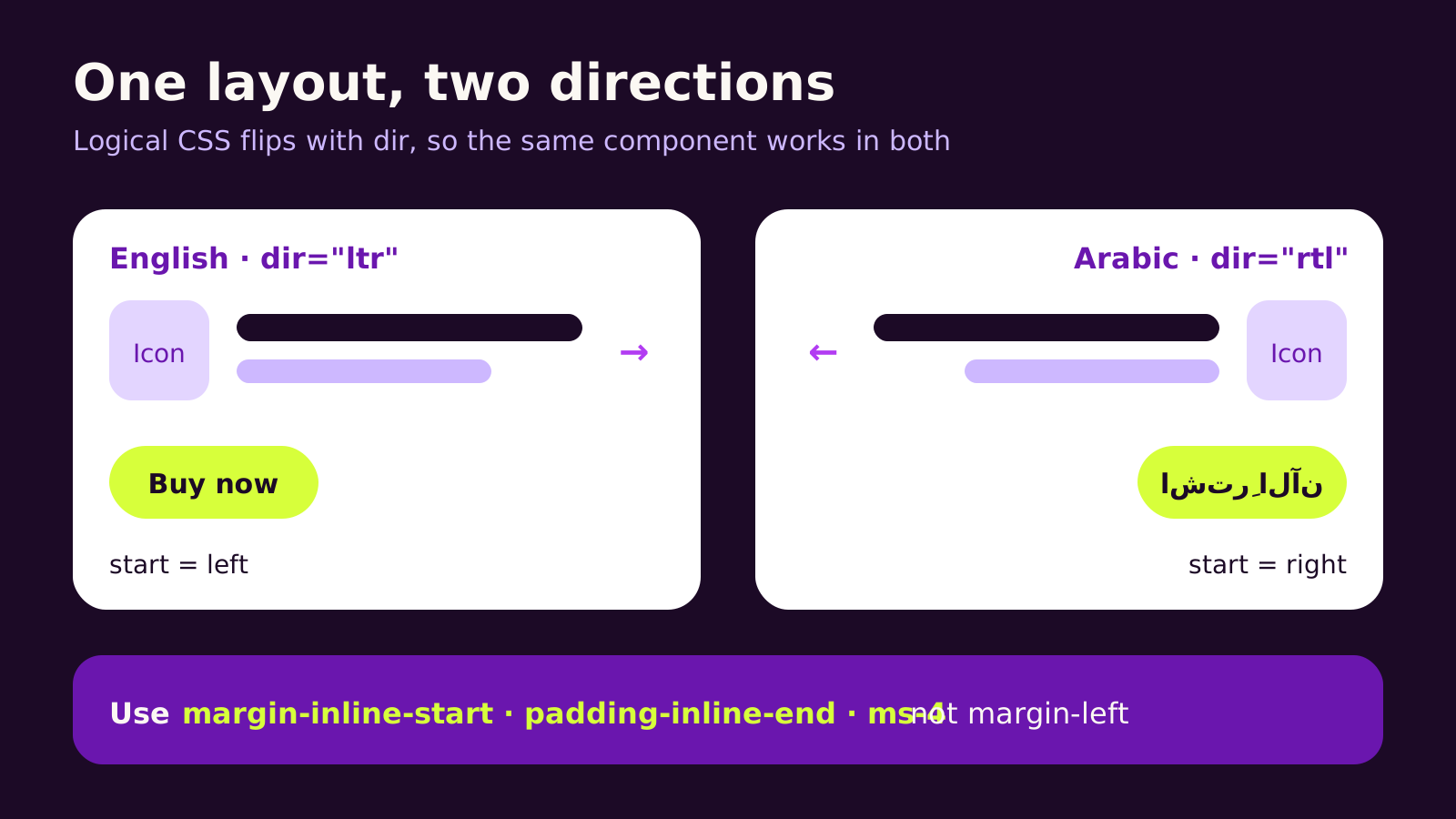
Right-to-left support is mostly a browser feature, not a Next.js one. When <html dir="rtl"> is set, the browser flips text flow, flex rows and grid columns. Anything you've positioned with physical directions, like margin-left, stays where it is. That is where most RTL bugs come from.
Setting up a Next.js multi-language website step by step
1. Decide the URL pattern first
We usually recommend language subfolders (/en/, /ar/) on one domain. It's one deployment, one analytics property and one set of DNS records, and Google's guidance on localized versions supports it. Separate domains per market make sense mainly when each market has its own brand, legal entity or catalogue.
2. Redirect only URLs that have no locale
Put proxy.ts in the project root, next to app/. It checks for a saved language choice first, then the browser's Accept-Language header, then falls back to your default. URLs that already contain a locale pass straight through, which keeps shared links and crawlers on the language they asked for. Install the two helper packages with npm i @formatjs/intl-localematcher negotiator (and @types/negotiator for TypeScript).
// proxy.ts (Next.js 16.4)
import { NextResponse, type NextRequest } from 'next/server'
import { match } from '@formatjs/intl-localematcher'
import Negotiator from 'negotiator'

const locales = ['en', 'ar']
const defaultLocale = 'en'

function getLocale(request: NextRequest) {
  const saved = request.cookies.get('NEXT_LOCALE')?.value
  if (saved && locales.includes(saved)) return saved

  const headers = { 'accept-language': request.headers.get('accept-language') ?? '' }
  // Drop the "*" wildcard, which the matcher rejects
  const languages = new Negotiator({ headers }).languages().filter((l) => l !== '*')
  return match(languages, locales, defaultLocale)
}

export function proxy(request: NextRequest) {
  const { pathname } = request.nextUrl
  const hasLocale = locales.some(
    (l) => pathname === `/${l}` || pathname.startsWith(`/${l}/`)
  )
  if (hasLocale) return

  request.nextUrl.pathname = `/${getLocale(request)}${pathname}`
  return NextResponse.redirect(request.nextUrl)
}

export const config = {
  // Skip Next.js internals, API routes and files such as /logo.svg
  matcher: ['/((?!_next|api|.*\\..*).*)'],
}
Change locales and defaultLocale to match your site. Your language switcher should set the NEXT_LOCALE cookie, so a person who chooses English isn't sent back to Arabic on their next visit.
3. Set language and direction in the root layout
Move the root layout to app/[lang]/layout.tsx and set lang and dir there, on the server, so the very first HTML is already correct. Load an Arabic font with next/font so it's self-hosted and doesn't shift the layout as it loads.
// app/[lang]/layout.tsx
import { notFound } from 'next/navigation'
import { Inter, Noto_Sans_Arabic } from 'next/font/google'
import '../globals.css'

const locales = ['en', 'ar']
const rtlLocales = ['ar']

const latin = Inter({ subsets: ['latin'], variable: '--font-latin' })
const arabic = Noto_Sans_Arabic({ subsets: ['arabic'], variable: '--font-arabic' })

export function generateStaticParams() {
  return locales.map((lang) => ({ lang }))
}

export default async function RootLayout({ children, params }: LayoutProps<'/[lang]'>) {
  const { lang } = await params
  if (!locales.includes(lang)) notFound()

  return (
    <html
      lang={lang}
      dir={rtlLocales.includes(lang) ? 'rtl' : 'ltr'}
      className={`${latin.variable} ${arabic.variable}`}
    >
      <body>{children}</body>
    </html>
  )
}
generateStaticParams pre-renders each language, and it's required when Cache Components are switched on, which Next.js 16.4 now recommends (we covered that in our Next.js 16.4 Cache Components upgrade guide). From Next.js 16.3 you can also read the locale anywhere on the server with import { lang } from 'next/root-params' instead of passing it down as a prop.
4. Load translations on the server
Keep interface strings in dictionaries/en.json and dictionaries/ar.json, load the right one in a Server Component, and keep long-form content (pages, blog posts, product copy) in your CMS with a locale field. For plurals, dates, currencies and rich text in many languages, next-intl saves you rebuilding the same helpers.
5. Write CSS that mirrors itself
Use logical properties: margin-inline-start instead of margin-left, padding-inline-end instead of padding-right, text-align: start instead of left. In Tailwind CSS that means ms-4, me-2, ps-6 and text-start, plus the rtl: variant for the few things that need a manual flip, such as arrow icons (rtl:-scale-x-100).
6. Tell search engines about each version
Add reciprocal hreflang links with alternates.languages in generateMetadata, including an x-default. Relative paths work once metadataBase is set in the root layout.
// app/[lang]/pricing/page.tsx
import type { Metadata } from 'next'

export async function generateMetadata({ params }: PageProps<'/[lang]/pricing'>): Promise<Metadata> {
  const { lang } = await params
  return {
    alternates: {
      canonical: `/${lang}/pricing`,
      languages: { en: '/en/pricing', ar: '/ar/pricing', 'x-default': '/en/pricing' },
    },
  }
}
Our guide to multi-market sites with Webflow Localization covers hreflang checks in more depth; the same rules apply on Next.js.
What we've learned building bilingual Next.js sites
The most common mistake we see is redirecting every request based on the browser language. It feels helpful, but it means a shared Arabic link can open in English, and crawlers, which usually send no language preference, may never see some versions. Redirect bare URLs only, and let the URL win after that.
The second is treating RTL as a final polish step. Retrofitting left and right across hundreds of components is slow. Agree on logical properties from the first component, and add an Arabic page to your design reviews from week one.
We'd reach for a library like next-intl on most sites with more than a handful of interface strings, formatted prices or dates. We'd skip it for a small marketing site with two languages and content that lives mostly in the CMS; plain dictionaries are easier to hand over.
Machine translation is fine for a first draft. For headlines, calls to action and anything legal, have a fluent person review it. Search engines and buyers both notice awkward phrasing.
Troubleshooting
| Symptom | Likely cause | Fix |
|---|---|---|
Images, fonts or robots.txt return 404 or redirect to /en/logo.svg |
The proxy matcher catches static files | Exclude _next, api and paths containing a dot in config.matcher |
| Proxy throws "Incorrect locale information provided" | A client sent Accept-Language: * |
Filter out * before calling match(), as in the example above |
| The Arabic page flashes left-to-right before flipping | dir is set in a Client Component or a useEffect |
Set lang and dir on <html> in the server root layout |
| Phone numbers, prices or product codes appear jumbled in Arabic text | Bidirectional text mixing left-to-right runs inside right-to-left sentences | Wrap them in <bdi> or a <span dir="ltr"> |
| Google shows the English page to Arabic searchers | Missing or one-way hreflang, or canonicals pointing every language at English | Give each page a self-referencing canonical and reciprocal alternates.languages with x-default |
Questions people ask
Does Next.js translate my content automatically?
No. Next.js gives you routing and rendering; the translated words come from your dictionaries, your CMS or a translation service. That separation is useful, because content editors can manage translations without a developer.
Should each language have its own domain?
Usually not. Subfolders on one domain are simpler to build, host and measure. Separate domains are worth it when each market really runs as its own business with its own brand or catalogue.
Can I add Arabic to an existing English-only Next.js site?
Yes. The work is moving routes under app/[lang], adding the proxy, and converting physical CSS to logical properties. The CSS audit usually takes the most time, so start there when you estimate the work.
Why it matters for your business
A buyer who reads your site in their own language, laid out the way they read, trusts it sooner and finds the next step faster. Get the structure right once and every new page, campaign and product launches in both languages without extra engineering. If you also sell through a store, our guide to setting up a bilingual Arabic Shopify storefront covers the commerce side, and our notes on Core Web Vitals in 2026 help you keep both language versions fast.
Quick checklist before launch:
-
Every page lives under
app/[lang], withlanganddirset on the server. - The proxy redirects bare URLs only and respects a saved language choice.
- Components use logical CSS, and directional icons flip in RTL.
-
Each page has a self-referencing canonical, reciprocal hreflang and
x-default. - A fluent reader has reviewed key pages in the finished design.
If you'd like a hand planning or building it, our Next.js development team is happy to talk it through, or you can start a conversation here.
(over to you)
Planning a build like this?
Tell us what you're building and we'll come back with ideas and next steps.
Keep reading
All articles React & Next.js
· 6 min read
Next.js SEO for marketing sites: metadata, sitemaps and schema
Read article
 React & Next.js
· 6 min read
Next.js 16.4: Cache Components by default and how to upgrade
Read article
 React & Next.js
· 6 min read
Next.js security releases: October fixes and the 3 November patch
Read article