WhatsApp max price: how to cap campaign message costs
WhatsApp max price for marketing messages reached general availability on Twilio in November 2026. How the per-message cap works, how to set it on templates, and fixes for common problems.
WhatsApp now lets businesses put a ceiling on what they pay for each delivered marketing message. Twilio made this Max Price feature generally available in November 2026, while Meta's own docs still call it beta.
A max price is a cap, not a budget. It sits on the marketing template, and Meta bills at or below it. It's optional, and templates without a cap keep standard billing. A low cap in a busy period can mean fewer messages get delivered.
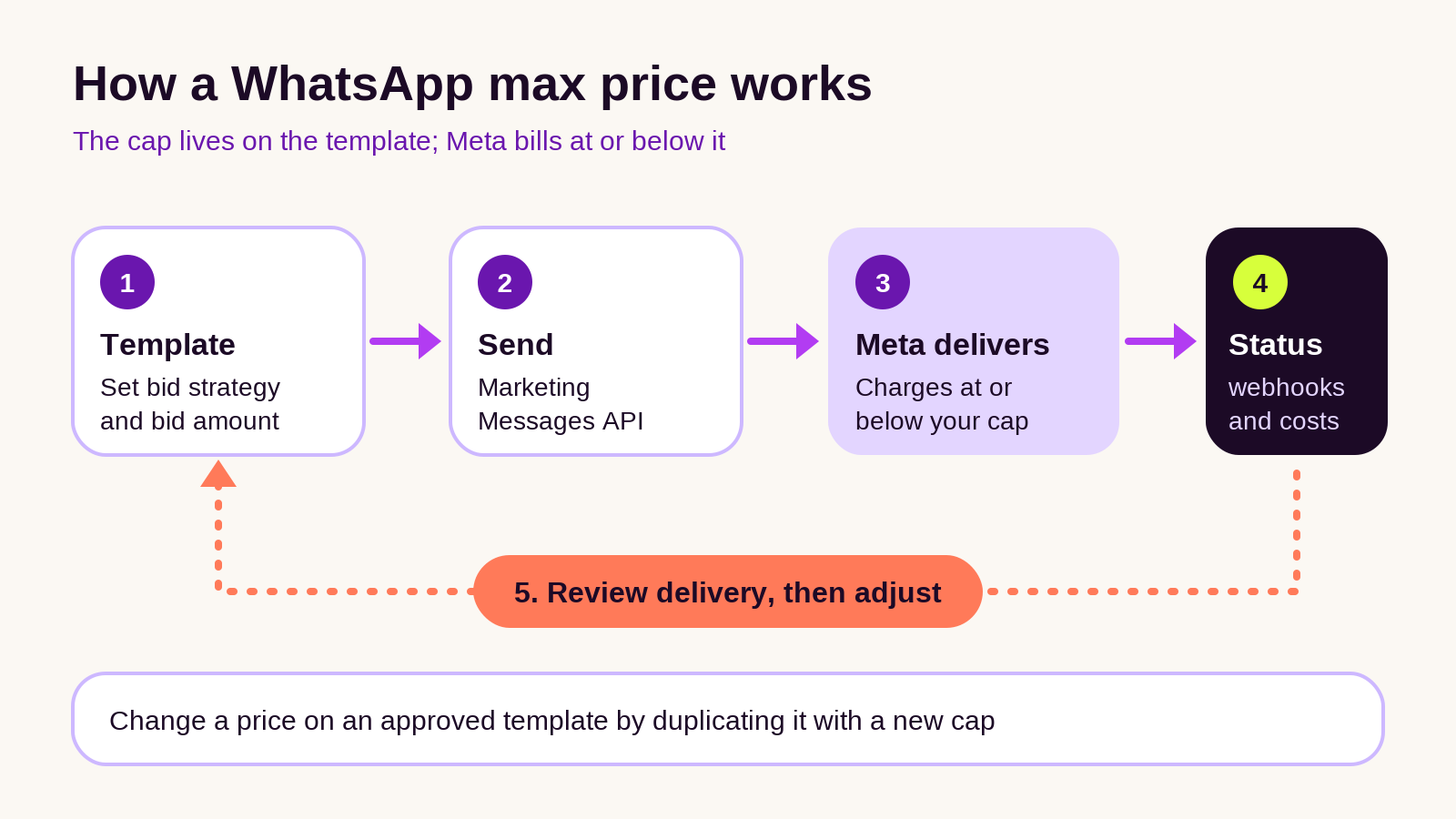
You can set it through a provider such as Twilio, in WhatsApp Manager, or directly through Meta's API using the optimization spec on the template. To change the price on an approved template, duplicate it with a new cap.
Our advice: start with a cap at your current rate, split urgent and routine campaigns into separate templates, track delivery through status webhooks, and keep a register of who can change caps.
If you'd like help reviewing your WhatsApp automation, the Crest Design team is happy to take a look.
If your business sends WhatsApp campaigns through an automation, a CRM or a messaging provider, the WhatsApp max price setting is now something you should decide on deliberately. This post is for owners and marketing leads who pay for those campaigns and the developers who wire them up. You'll learn what a max price is, where it's set, how to add it to your templates and what to watch after you switch it on.
The recent change: on November 17, 2026, Twilio announced general availability of Max Price for WhatsApp marketing messages. Meta's own developer documentation still labels the feature as beta and describes it as early-stage, so we treat it as ready to use but worth watching closely. Either way, if you send marketing templates at any volume, it now belongs in your campaign setup.
The problem: campaign costs you can't plan
Marketing templates are the WhatsApp messages a business starts, such as a launch announcement, an abandoned-browse nudge or a seasonal offer. Each delivered one is billed. Until now, the usual approach was to accept the standard rate for each send and find out the total later.
That works until campaigns grow. A store that sends from Shopify Flow, a CRM that triggers sequences, and a provider dashboard used by the marketing team can all spend from the same WhatsApp Business Account. Nobody owns the ceiling. The question that follows is always the same: what will next month's WhatsApp bill look like, and which automation drove it?
How WhatsApp max price actually works
A max price is a ceiling, not a budget. You tell Meta the most you're willing to pay for each delivered marketing message, and Meta bills at or below that figure. It doesn't stop a campaign after a total spend; it limits the price per delivery.
Three details matter more than the rest:
-
It lives on the template. In Meta's API the cap sits in an
optimization_specobject on the message template, with abid_amountexpressed per thousand deliveries and the bid strategy set toLOWEST_COST_WITH_BID_CAP. The olderbid_specobject was replaced in mid-2026. - It's optional. Messages sent from templates without a max price keep the standard per-message billing. You can run both side by side.
- It trades price for reach. Because Meta optimizes delivery within your cap, a cap set low for a busy period can mean fewer of those messages get delivered. A cap set at your current rate behaves much like today.
Meta also supports a per-message multiplier that scales the template's bid up or down for an individual send. Meta's guidance is to prefer setting the right bid on the template rather than leaning on multipliers, and we agree: one clear price per template is much easier to audit.
How to set a max price on your templates
How you set it depends on how you send. There are three common routes.
Through a provider such as Twilio
Twilio sets the bid through a bid_amount parameter on the content template, so you'll add it when you create a marketing template in the Content API or Content Template Builder. Its Message Cost Estimate resource returns estimates at several bid levels, which is a sensible starting point before you pick a figure. Twilio also requires acceptance of Meta's Marketing Messages API terms, and its docs note that the account must be billed in a currency Meta supports for Max Price.
In WhatsApp Manager
Meta's documentation covers a WhatsApp Manager experience for max price, including controls over who can see it. This suits teams that build templates by hand and send in modest volumes.
Directly through Meta's API
If your developer calls Meta's Graph API from your own back end, the cap goes into the template request. Here's a minimal Node.js example (Node 18 or later, saved as an .mjs file) that creates a marketing template with a max price. Keep the token and bid in environment variables, never in code.
// create-template.mjs
const { WABA_ID, WA_TOKEN, GRAPH_VERSION, BID_PER_THOUSAND } = process.env;

const res = await fetch(
  `https://graph.facebook.com/${GRAPH_VERSION}/${WABA_ID}/message_templates`,
  {
    method: "POST",
    headers: {
      Authorization: `Bearer ${WA_TOKEN}`,
      "Content-Type": "application/json",
    },
    body: JSON.stringify({
      name: "winter_collection_launch",
      language: "en",
      category: "MARKETING",
      components: [
        {
          type: "BODY",
          text: "Hi {{1}}, our winter collection is live. Reply STOP to opt out.",
          example: { body_text: [["Sam"]] },
        },
      ],
      optimization_spec: {
        bid_strategy: "LOWEST_COST_WITH_BID_CAP",
        bid_amount: Number(BID_PER_THOUSAND),
      },
    }),
  }
);

console.log(res.status, await res.json());
Change the template name, body text and example to your own. BID_PER_THOUSAND is your ceiling per thousand deliveries in your account's billing currency, using the units Meta's pricing page describes. Because Meta still marks the feature as beta, check the current template reference for field names before you ship.
Once templates carry a cap, send them as usual and keep listening to message status webhooks. If you don't have a dependable receiver yet, our guide to building reliable webhook receivers in Node.js covers signatures, queues and duplicates.
What we've learned rolling out bid caps
Start with your current rate as the cap. It changes nothing on day one, but it puts every template under an explicit ceiling and gives you a baseline. Then lower it only on campaigns where reach matters less than cost, such as a gentle re-engagement message, and keep launch and time-sensitive templates at a level that protects delivery.
| Approach | Good for | Watch out for |
|---|---|---|
| Standard pricing, no cap | Low volume, simple sends | No ceiling per message |
| Cap at your current rate | A safe first step | Little change in spend on its own |
| Lower cap on selected templates | Non-urgent nurture messages | Fewer deliveries in busy periods |
Two mistakes come up again and again. First, one template gets reused for every campaign, so you can't price urgent and routine sends differently. Create separate templates per campaign type. Second, nobody records which automation uses which template. Keep a short register: template name, cap, owning automation, and who approves changes. That register also belongs in your handover, alongside the account ownership points in our guide to what you should own when you hire an agency.
If campaigns fire from your store, for example a Flow that tags customers and calls a messaging app, put the template choice in the workflow itself. Our Shopify Flow automations guide shows the trigger patterns we use.
Troubleshooting
-
Symptom: template creation fails with an unknown or invalid field. Likely cause: code still sends the old
bid_specobject. Fix: move the bid intooptimization_specand set the bid strategy. - Symptom: you can't change the price on a live template. Likely cause: approved templates don't allow a straight edit of the cap. Fix: duplicate the template with the new max price and point the automation at the copy.
- Symptom: the max price option is missing in your provider account. Likely cause: Meta's Marketing Messages API terms haven't been accepted, or the account is billed in an unsupported currency. Fix: accept the terms on the WhatsApp Business Account and check your provider's currency notes.
- Symptom: delivered counts drop after you lower a cap. Likely cause: the ceiling is below what delivery needs at that time. Fix: raise the cap for that template, or move time-sensitive sends to an uncapped or higher-capped template.
Questions people ask
Do we have to use a max price?
No. It's optional, and templates without one keep standard billing. We'd still add a cap at your current rate so every marketing template has a visible ceiling.
Does it apply to order updates or support replies?
No. Max price is for marketing templates. Utility, authentication and service messages follow their own pricing rules, so check Meta's pricing page for those.
Will a max price lower our bill?
It can help control it, but it isn't a promise of lower spend. It limits the price per delivered message; total spend still depends on how many messages you send and how many are delivered.
Why it matters for your business
If WhatsApp is where your customers reply, campaigns there tend to grow quickly. A max price gives you a lever on cost per message, but only if your templates, automations and reporting are set up to use it. Checklist:
- 1 List every marketing template and the automation that sends it.
- 2 Split urgent and routine campaigns into separate templates.
- 3 Add a cap at your current rate, then adjust selected templates.
- 4 Track delivery and cost through status webhooks.
- 5 Record who can change caps and where.
This is the kind of plumbing our AI and workflow automation service handles, from WhatsApp assistants to CRM routing. If you'd like a second pair of eyes on your WhatsApp setup, tell us how you send today.
(over to you)
Planning a build like this?
Tell us what you're building and we'll come back with ideas and next steps.