HubSpot serverless functions: move off the design manager in time
HubSpot serverless functions built in the design manager can no longer be edited from November 17, 2026 and stop running on February 1, 2027. How to find yours, move them to developer projects and switch URLs safely.
If your HubSpot website uses serverless functions built in the design manager, they need to move to developer projects before February the first, 2027. That is when the old endpoints stop answering, and any form, calculator or lookup that depends on them will quietly break.
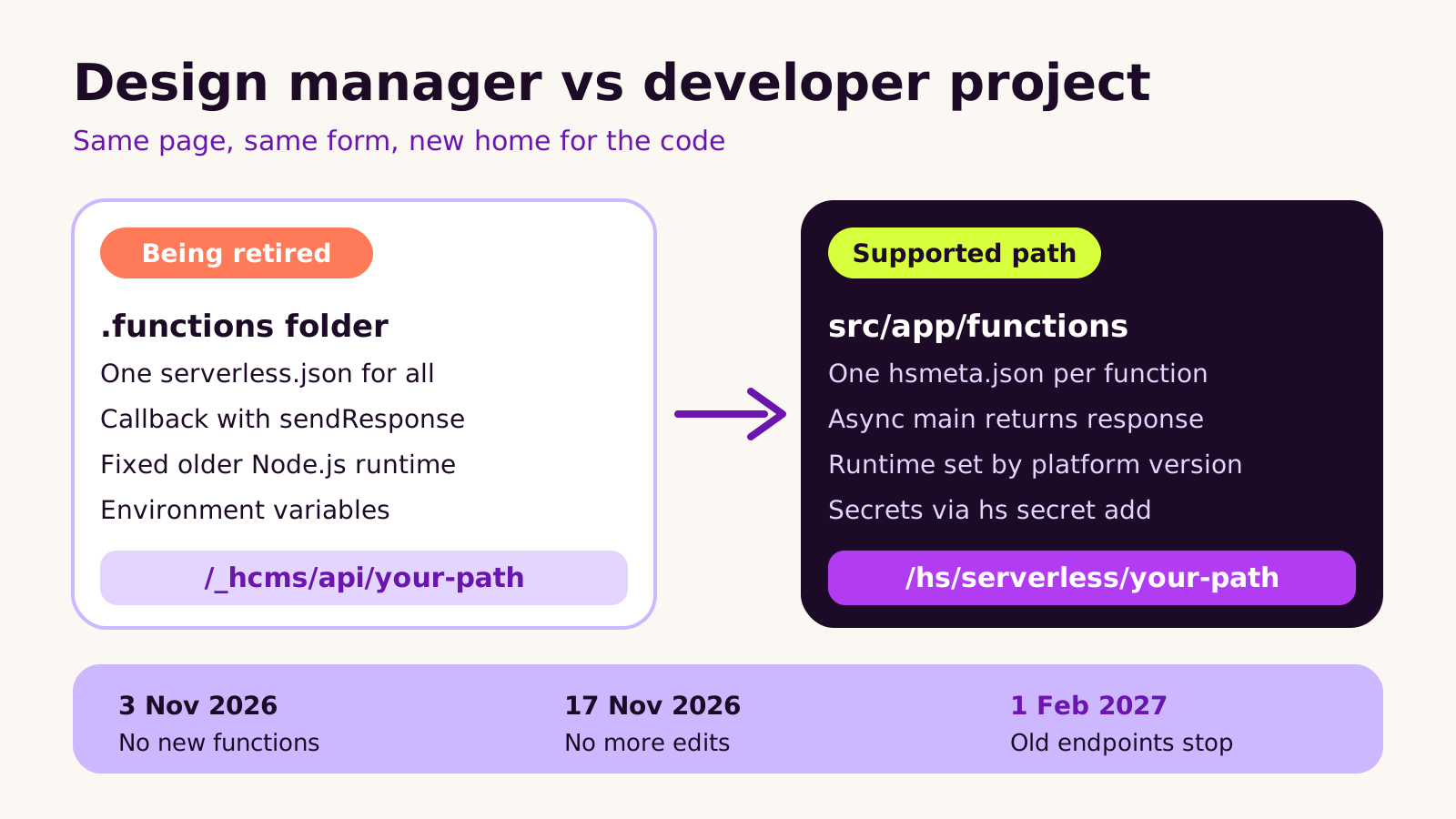
HubSpot changed the rules in November 2026. Since November the third you cannot create new design manager functions, and since November the seventeenth you cannot edit the ones you have. They still run for now, but they are frozen.
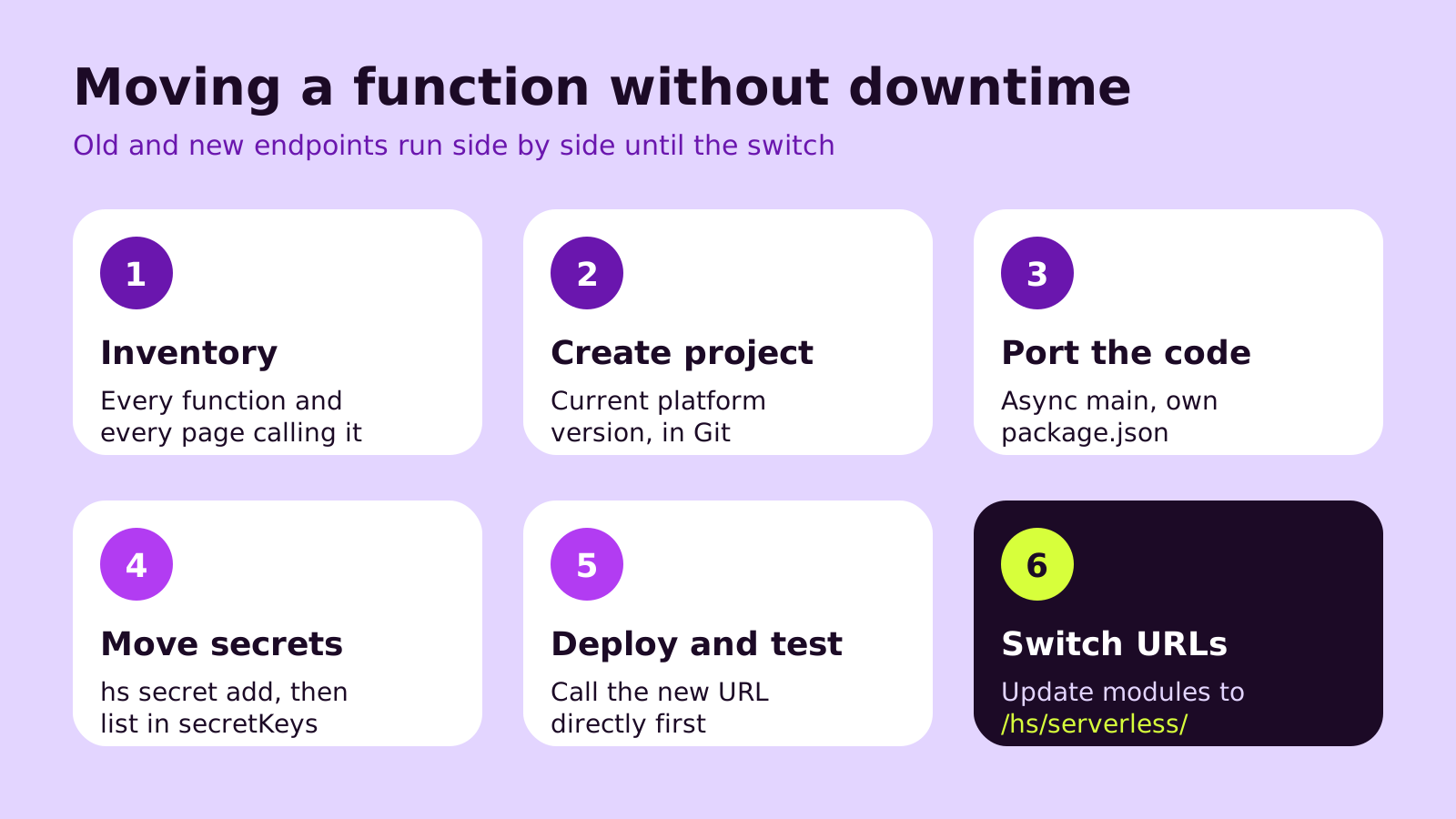
The move has a clear order. First, list every function and every page or module that calls it. Second, create a developer project on the current platform version. Third, port each function to an async main handler with its own config file. Fourth, move environment variables into HubSpot secrets. Fifth, deploy and test the new endpoint directly. Finally, switch your modules from the old api path to the new serverless path.
HubSpot cannot migrate these for you, so plan the work now, while the old functions still run as a fallback. If you would like help, the Crest Design HubSpot team can handle the move.
If your HubSpot website has a form that checks a postcode, a quote calculator, a members-only lookup or anything else that calls code at /_hcms/api/, this is for you. HubSpot serverless functions built in the design manager are being retired: in November 2026 HubSpot stopped new ones from being created (from November 3) and froze edits to existing ones (from November 17). On February 1, 2027 they stop running altogether. This post explains what changed, how the replacement works, and the order we follow to move functions to developer projects without the live site breaking.
The problem: working code you can no longer touch
Most sites that use these functions don't think of them as "serverless" at all. To the marketing team, it's just the bit of the site that fetches stock levels or sends a form to another system. The code usually lives in a .functions folder in the design manager, often written by a developer who has since moved on.
Right now those functions still run. The catch is that nobody can change them. If an API key expires, a third-party service changes its response, or a bug turns up, there is no way to patch the old function. And once February 2027 arrives, every request to a /_hcms/api/ endpoint fails. HubSpot has said it can't migrate them automatically, because each function's code and the pages that call it are specific to your site.
The same changelog entry also retires the older Node.js runtimes for custom code actions in workflows, so if your automations run JavaScript, check those at the same time and move them to Node.js 24.
How HubSpot serverless functions work in developer projects
The old model was simple: drop JavaScript files into a .functions folder, describe every endpoint in one serverless.json, and HubSpot ran them on a Node.js version it could no longer upgrade. That last point is the real reason for the sunset. HubSpot couldn't move those functions forward without breaking them.
In developer projects, a function is part of an app inside a project you build locally and upload with the HubSpot CLI. A few things behave differently, and they matter when you port code:
-
One config file per function. Each function is a pair: a
*-hsmeta.jsonfile with"type": "app-function"and the JavaScript file it points to, both insrc/app/functions/. -
The runtime comes from the project. There's no runtime field. The
platformVersioninhsproject.jsondecides it, and versions from 2026.03 onwards run Node.js 24. Use the current version (2026.09 at the time of writing); 2025.2 doesn't support serverless functions. -
A new public URL. Public functions are served at
/hs/serverless/plus the path you configure, instead of/_hcms/api/. Without anendpointblock, a function can only be called from a UI extension. -
Async handlers. Instead of a callback with
sendResponse, you export an asyncmainthat returns an object withstatusCode,bodyand optionalheaders. -
Secrets, not environment variables. You add each one with
hs secret addand list its name insecretKeys; the code still reads it fromprocess.env. -
Your own dependencies. Nothing is preloaded, so any package you use must be in a
package.jsonin the functions folder.
Public serverless endpoints still require Content Hub Enterprise, so the plan your site is on doesn't change.
How to move a function, step by step
1. Build an inventory
In the design manager, open each .functions folder and note every endpoint in its serverless.json. Then search your theme's modules, templates and any custom JavaScript for _hcms/api. The second list is the one people forget: a function you migrate is only useful once every caller points at the new URL. Note which secrets each function reads, too.
2. Create the project
Install or update the HubSpot CLI, authenticate against the right account with hs account auth, and create a project with an app using hs project create. Put it in Git from the first commit. HubSpot's guidance is to move only the functions and the URLs that call them, and leave templates and modules where they are. We agree: this isn't the moment to rebuild the theme.
3. Port the code
Here is a small lookup function in the new format. The config goes in src/app/functions/stock-check-hsmeta.json:
{
  "uid": "stock_check",
  "type": "app-function",
  "config": {
    "entrypoint": "/app/functions/stock-check.js",
    "secretKeys": ["INVENTORY_API_KEY"],
    "endpoint": {
      "path": "stock-check",
      "methods": ["POST"]
    }
  }
}
And the handler in src/app/functions/stock-check.js. Change the API address and the secret name to match your service; Node.js 24 includes fetch, so no extra package is needed here.
exports.main = async (context) => {
  const { sku } = context.body || {};
  if (!sku) {
    return { statusCode: 400, body: { error: "sku is required" } };
  }
  try {
    const res = await fetch("https://inventory.example.com/v1/stock", {
      method: "POST",
      headers: {
        Authorization: `Bearer ${process.env.INVENTORY_API_KEY}`,
        "Content-Type": "application/json"
      },
      body: JSON.stringify({ sku })
    });
    if (!res.ok) throw new Error(`Upstream returned ${res.status}`);
    const data = await res.json();
    return { statusCode: 200, body: { inStock: data.available } };
  } catch (err) {
    console.error(err);
    return { statusCode: 502, body: { error: "Stock check failed" } };
  }
};
4. Move secrets
Run hs secret add INVENTORY_API_KEY and paste the value when asked. Don't add HubSpot's built-in PRIVATE_APP_ACCESS_TOKEN to secretKeys; it's available already and scoped by the app's permissions.
5. Deploy and test before switching
Upload with hs project upload. Only hsproject.json and src/ are sent. Then call https://your-domain/hs/serverless/stock-check directly with a test request. Because the old function is still running, you can test the new one for as long as you need without touching the live pages.
6. Switch the callers
Change each module or script from /_hcms/api/stock-check to /hs/serverless/stock-check, publish, and watch the app's Logs tab for errors. Keep the old function in place until February as a fallback you can point back to.
What we've learned from these moves
The code changes are usually the quick part. The time goes into finding callers and secrets nobody documented. A few things we'd recommend:
- Retire what you don't need. Some functions turn out to duplicate something HubSpot forms or workflows now do natively. Moving them is wasted effort.
- Watch for path clashes. Endpoint paths are account-wide. If two projects use the same path, the one deployed most recently wins, so agree a naming scheme if several teams or agencies work in one portal.
- Keep the account in your name. The project should live in your Git repository and your HubSpot account, not a freelancer's laptop. Our guide to what you should own when you hire an agency covers this.
- Treat it as a small integration project. If your function receives events from other systems, the patterns in our post on reliable webhook receivers in Node.js apply here too.
Troubleshooting
| Symptom | Likely cause | Fix |
|---|---|---|
| New endpoint returns 404 | The request method isn't in methods, the path doesn't match, or the project wasn't uploaded to this account |
Check the method and path in the hsmeta file, then confirm the build in the project's page in HubSpot |
| A secret is undefined | It was added but not listed in secretKeys, or added to a different account |
Add the name to secretKeys, run hs secret list on the right account, re-upload |
| "Cannot find module" in logs | The old runtime preloaded packages; the new one doesn't | Add the package to package.json in the functions folder and upload again |
| Another endpoint suddenly behaves differently | A second project uses the same path | Rename one path and update its callers |
| You can't save a fix to the old function | Edits have been frozen since November 17, 2026 | Make the fix in the new project and switch that caller first |
Questions people ask
Will my pages break before February 2027?
Not because of the sunset itself. Existing design manager functions keep running until February 1, 2027. The risk before then is that you can't fix them if something else changes.
Do I need a developer for this?
Yes, in most cases. It involves the HubSpot CLI, JavaScript and Git, and someone needs to test each caller. It is usually a contained piece of work rather than a rebuild.
Do the URLs on my pages have to change?
Yes. Every call to /_hcms/api/ needs to point at /hs/serverless/ instead, which is why the inventory of callers matters as much as the code.
Why it matters for your business
These functions tend to sit on the pages that make money: quote forms, booking checks, gated content. When they fail, they often fail quietly, and you hear about it from a customer. Moving them now, while the old versions still run as a fallback, is the low-stress way to do it. It also leaves you with code in version control, on a current runtime, that the next developer can actually maintain.
Your checklist: list functions and callers, create a project on the current platform version, port each handler, move secrets, test the new URL, switch callers, then retire the old function.
If you'd like a hand, our HubSpot CMS development team can plan and handle the move, or you can tell us about your portal.
(over to you)
Planning a build like this?
Tell us what you're building and we'll come back with ideas and next steps.