HubSpot service keys: replacing legacy private app integrations
HubSpot stopped new legacy private apps on October 26, 2026. How HubSpot service keys work, when you need a project-based app instead, and how to move integrations to date-based API paths safely.
If your website, store or internal tools talk to HubSpot through a legacy private app, now is the time to plan its replacement. Since October 26, 2026, existing HubSpot accounts can no longer create new legacy private apps, and HubSpot plans to end support for legacy apps and the older numbered APIs in September 2027.
The main replacement is HubSpot service keys. A service key is an account-level credential for system-to-system REST calls, limited to the scopes you choose. It can't receive webhooks or power UI extensions, so integrations that need those move to a project-based app instead, and software installed in many accounts uses a public OAuth app.
The safe path has five steps. List every integration and who owns it. Match each one to the right replacement. Create a key with only the scopes it uses. Switch old v3 paths to the new date-based versions. Then test in a sandbox and retire the old token.
Start with the inventory this month, and ask whoever built your integrations for a written migration plan.
This guide is for teams whose website forms, store, ERP or reporting tools push data into HubSpot through a legacy private app. If that's you, HubSpot service keys are now the credential HubSpot points you to, and you'll learn how they work, when they're the wrong choice, and how to move an integration across without losing data.
The change that makes this urgent: on October 26, 2026, HubSpot switched off the creation of new legacy private apps in existing accounts (new accounts lost the option on September 28, 2026). Apps you already have keep working for now. But HubSpot has also announced that legacy apps and the numbered v1 to v3 APIs lose support in September 2027, so every integration built the old way has a clock on it.
The problem: your integrations were built on something that's being retired
For years, the quickest way for a developer to connect a website or internal system to HubSpot was a private app: create it in settings, tick some scopes, copy the access token, paste it into the server. Plenty of contact forms, booking tools, order syncs and dashboards still run that way.
Three things now go wrong for businesses in that position:
- You can't make another one. Need a second integration, or need to rebuild a sandbox and recreate the app? The old route is closed.
- Nobody remembers what's connected. Tokens were often created by a freelancer or a staff member who has since left, and they're sitting in environment files nobody has opened in a while.
-
The API paths are also changing. Most old integrations call URLs like
/crm/v3/objects/contacts. HubSpot has moved to date-based API versions, and the numbered ones are on the same retirement track.
None of this breaks your site today. The risk is a rushed migration next year, done by someone guessing what each token was for.
How HubSpot service keys actually work
A service key is an account-level credential for one system talking to another. HubSpot introduced service keys in public beta in February 2026 as the replacement for legacy private apps, and they sit on the newer developer platform. You create the key inside the HubSpot account, choose its scopes, and your server sends it as a Bearer token on REST requests.
The important part is what a service key doesn't do. It only authenticates REST API calls. It can't receive webhook events, it can't power a UI extension or an app card on a record, and it doesn't use the wider app features of the developer platform. That's a deliberate narrowing: a key is a data pipe, not an app.
Two more details shape how you set one up:
-
Scopes are granular. You grant object-level scopes such as
crm.objects.contacts.readorcrm.objects.deals.write, so a form integration doesn't need access to deals at all. - A key can't exceed its creator. You can only grant scopes your own HubSpot user already has. If a contractor with limited permissions creates the key, the key is limited too.
Alongside the credential change, HubSpot now versions its APIs by date. Paths carry a YYYY-MM version, released twice a year (March and September), and each version is supported for a fixed window before it retires. So /crm/v3/objects/contacts becomes /crm/objects/2026-09/contacts. For many CRM endpoints that's a path change; for some, request bodies or response shapes differ, which is why you test rather than find-and-replace.
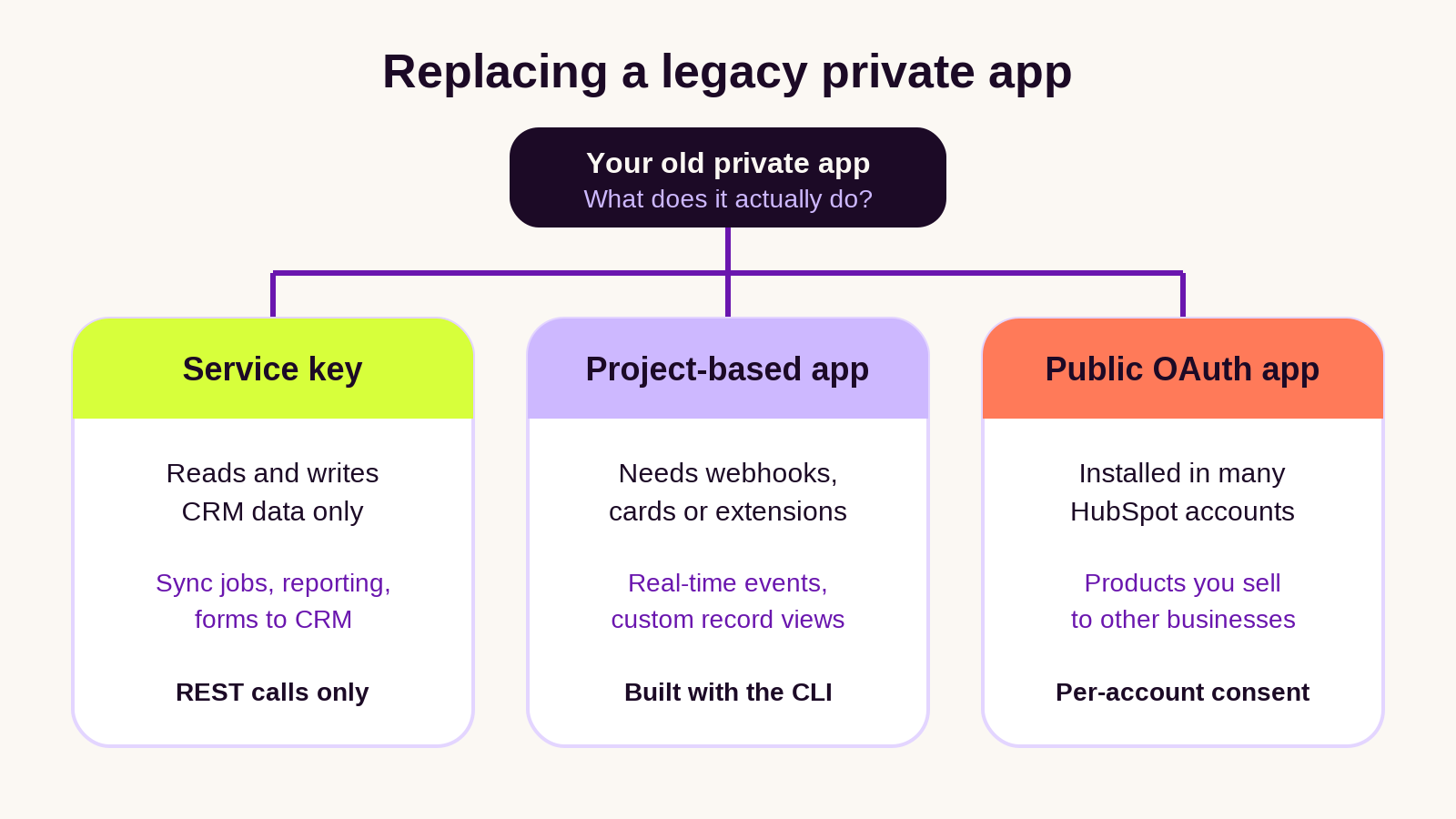
| What the integration does | Replacement | Why |
|---|---|---|
| Sends form or order data into the CRM, runs nightly syncs or reports | Service key | Plain REST calls inside one account |
| Reacts to HubSpot events, shows custom cards on records | Project-based app | Webhooks and UI extensions need an app |
| Software you install in many clients' HubSpot accounts | Public app with OAuth | Each account grants consent separately |
How to move an integration to a service key
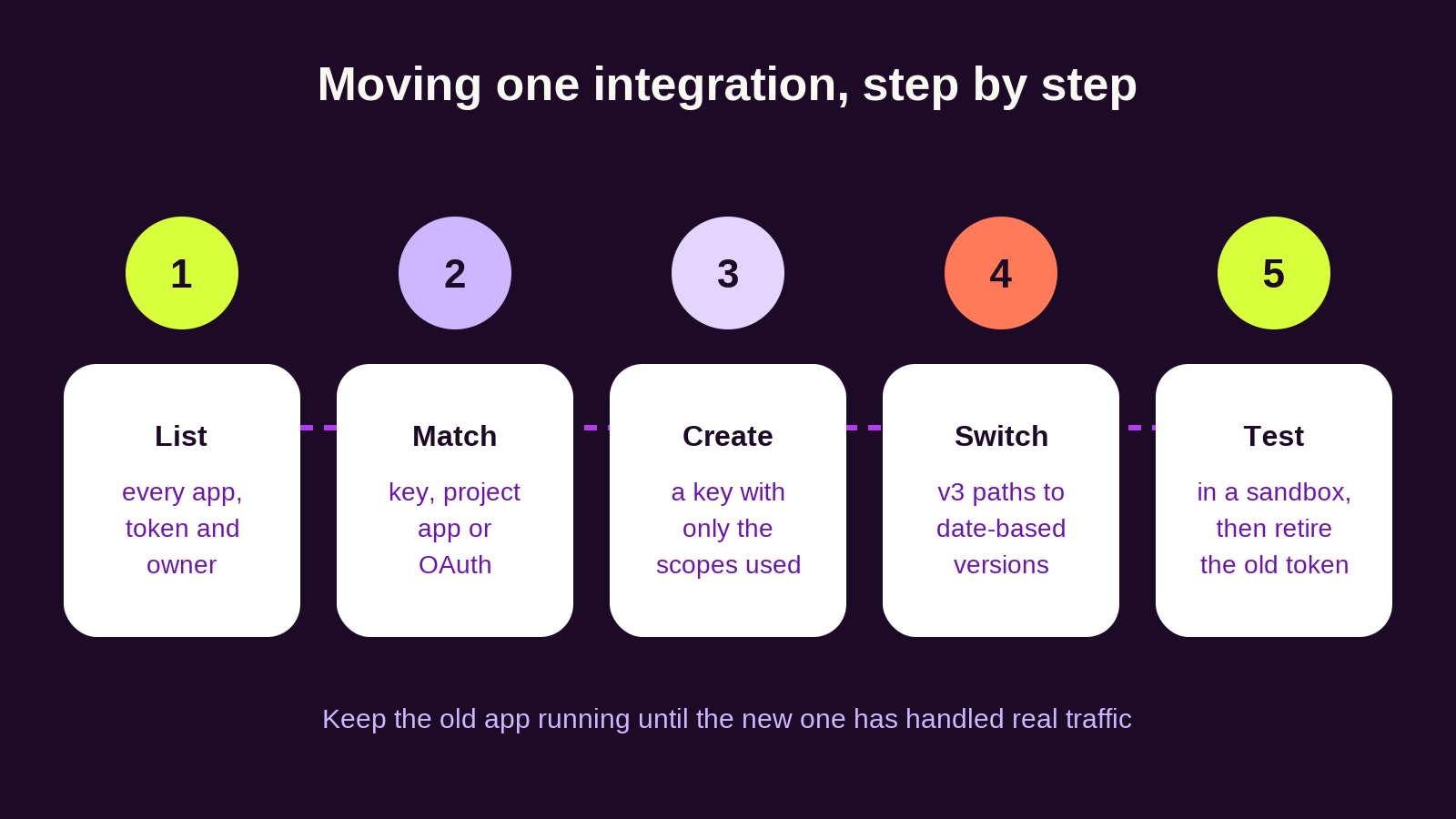
- 1 Inventory. In HubSpot, open the integrations area of settings and list every legacy private app. For each, note its scopes, the system that holds its token, and who in your business owns that system. Check the app's call logs to confirm it's still in use; it's common to find one that nothing calls any more and can simply be deleted.
- 2 Match. Use the table above. If an app subscribes to webhooks, it's not a service key candidate.
- 3 Create the key. HubSpot's docs place service keys under Development > Keys > Service keys; menu labels can shift while the feature matures, so search settings for "service keys" if you don't see it. Name it after the system it serves ("Website forms sync"), and tick only the scopes from your inventory.
- 4 Switch paths. Update each call from the numbered path to the current date-based version, and compare responses field by field.
- 5 Test, cut over, retire. Run the new version against a sandbox, deploy, watch real traffic for a few days, then delete the old private app so its token can't be reused.
Here's a minimal Node.js request using a service key and a date-based path. It runs on any current Node.js LTS (built-in fetch); put the key in an environment variable or secrets manager, never in the code, and change the properties to the ones your integration reads.
// list-contacts.mjs
const res = await fetch(
  "https://api.hubapi.com/crm/objects/2026-09/contacts?properties=email,firstname",
  { headers: { Authorization: `Bearer ${process.env.HUBSPOT_SERVICE_KEY}` } }
);

if (!res.ok) {
  throw new Error(`HubSpot ${res.status}: ${await res.text()}`);
}

const { results } = await res.json();
console.log(results.map((c) => c.properties.email));What we've learned from HubSpot integration migrations
The credential swap is the easy bit. The mistakes we see are about scope and ownership:
- Copying every old scope. Old private apps were often given broad access "just in case". Rebuild scopes from what the code actually calls.
- Moving webhook logic to a key. If the old app received events, a key can't replace it. Either build a project-based app or, for slow-moving data, switch to scheduled polling and accept the delay.
- Changing two things blind. Swapping the token and the API version in one deploy is fine, but only with a test that compares old and new responses first.
When wouldn't we rush? If an integration is stable, low-risk and due for a rebuild anyway, it can wait for the new system, as long as the date is on someone's calendar well before September 2027.
Troubleshooting
-
Symptom: every request returns 401. Likely cause: the old private app token is still in the environment, or the header isn't
Bearer. Fix: confirm the deployed variable holds the new key and redeploy so the process picks it up. - Symptom: 403 on one object type. Likely cause: the scope wasn't granted, or the creator's own user lacked it. Fix: have an admin with the right permissions add the scope, or create the key from that admin's account.
- Symptom: 404 or missing fields after switching paths. Likely cause: the endpoint has no date-based equivalent yet, or its response shape changed. Fix: check HubSpot's legacy API migration guide for that endpoint and adjust the field mapping; keep the old path until a replacement exists.
- Symptom: CRM records stop updating in real time. Likely cause: the old app also handled webhooks. Fix: move that part to a project-based app with webhook subscriptions.
Questions people ask
Will my existing private apps stop working on October 26?
No. HubSpot says existing legacy private apps aren't affected at this time; only creating new ones stopped. The bigger date is September 2027, when legacy apps and numbered APIs lose support.
Are service keys ready for production?
HubSpot launched them as a public beta and lists them as the replacement for legacy private apps. Check the current status in HubSpot's developer changelog before a large rollout, and keep the old app as a fallback until the new key has run cleanly.
Do we need a developer for this?
For a single form sync, a confident admin and the original developer can handle it. Anything with webhooks, custom objects or several systems is worth handing to someone who has done it before.
Why this matters for your business
Your HubSpot integrations are where leads, orders and customer history enter the CRM. If one fails quietly, sales follow-up and reporting fail with it, and nobody notices until a campaign looks oddly quiet. Treating the October 2026 change as a prompt to inventory, re-scope and own your credentials leaves you with a cleaner, safer setup well before the 2027 deadline.
It's the same discipline we cover in moving HubSpot serverless functions off the design manager, and if your integration also receives events, our guide to building reliable webhook receivers in Node.js covers that side. For keeping credentials in your own name, see what you should own when you hire an agency.
Quick checklist: list every private app and its owner; mark which use webhooks; create scoped service keys from an admin account; move calls to date-based paths; test in a sandbox; delete the old apps once traffic is clean.
If you'd like a second pair of hands, our HubSpot CMS development team can map and migrate your integrations, or you can tell us what's connected and we'll suggest a plan.
(over to you)
Planning a build like this?
Tell us what you're building and we'll come back with ideas and next steps.