Node.js security release: patching HTTP/2 and TLS servers
The Node.js security release of 11 November 2026 (26.13.1, 24.22.3, 22.23.5) fixed HTTP/2, HTTPS and TLS issues. Who is most exposed, a repeatable patch routine with a version check script, and fixes for common problems.
Node.js shipped a security release on the eleventh of November 2026, with versions 26.13.1, 24.22.3 and 22.23.5. Most of the fixes cover HTTP/2, HTTPS and TLS handling, so every Node.js service should move to the patched version of the line it runs.
How urgent it is depends on one question: where does TLS end? If a CDN or load balancer sits in front and passes plain HTTP to your app, fewer of these fixes reach your code. If your app runs its own HTTPS, HTTP/2 or mutual TLS server, patch it first.
The routine is simple. Check the version actually running in production. Search your code for servers and TLS settings. Pin the exact patched version in your Docker image, your nvmrc file and your CI. Test TLS, partner certificates, proxies and fetch calls. Then add a small boot check that refuses to start on an old runtime.
Watch for floating image tags, serverless platforms that update on their own timetable, and partner certificates that now meet stricter per-host rules.
Next, ask your developer or agency who owns these updates, and agree the routine before the next release.
This post is for business owners and product teams whose APIs, integrations or web apps run on Node.js, and for whoever looks after those servers. The Node.js security release of 11 November 2026 shipped Node.js 26.13.1, 24.22.3 and 22.23.5, and most of its fixes sit in HTTP/2, HTTPS and TLS handling. You'll learn which setups are most exposed, how to patch without surprises, and what to agree with your developer or agency so the next release is routine rather than a scramble.
The problem: a patch notice that doesn't say whether it's you
Security notes are written for engineers. They list CVE identifiers, internal function names and release lines, and they rarely say "this affects your order sync" or "your booking API is fine." So owners hear "there's a Node.js patch" and can't tell whether it is urgent, routine, or someone else's problem.
This release is a good example. Some fixes stop a remote client from crashing a server. Others close paths where a server could send back memory belonging to another connection, or where a client certificate approved for one hostname could reach another. Whether any of that touches your business depends on one plain question: does your Node.js process handle TLS and HTTP/2 itself, or does something in front of it do that job?
How the November 2026 Node.js security release works
Node.js publishes coordinated security releases for every supported line on the same day. On 11 November 2026 that meant 26.x (Active LTS), 24.x and 22.x. Node.js 20 reached end of life earlier in 2026, so it gets no fix at all; if anything still runs on it, that is now the bigger issue.
The fixes cluster in a few areas:
-
HTTP/2 servers. Several issues let an unauthenticated client abort the process, hold memory and file handles open indefinitely, or cause freed response memory to be sent to a peer. One affects apps that serve files with
respondWithFile(); another meansmaxSessionMemorydidn't count data queued on a stream that the app hadn't read. -
HTTPS servers. A re-entrancy bug could copy unrelated memory into a request body when a handler calls
res.flushHeaders()before the body ends. Plainnode:httpis not affected by that one. -
TLS and mutual TLS. Servers that use
SNICallback, OCSP or session hooks, orserver.addContext(), could be crashed during the handshake. Two separate issues let a client move between hostnames with different client-certificate rules, through TLS 1.2 renegotiation or a per-host context that only set a CA. - Smaller fixes and bundled libraries. Proxy credentials could appear in some error messages, and the release updates bundled libraries such as llhttp, undici and sqlite.
Not every issue affects every line. A few apply only to 24.x and 26.x, and the official release post lists which line each fix covers. In practice you don't pick and choose: you move to the patched version of whatever line you run.
Why your architecture changes the urgency
Many hosted setups put a CDN, load balancer or reverse proxy in front of Node.js. That layer ends TLS and often speaks HTTP/2 to visitors, then passes plain HTTP/1.1 to your app. In that shape, most of the HTTP/2 and TLS code paths fixed here never run inside your process. If your app creates its own https, http2 or tls server, or does mutual TLS for partner integrations, those paths face the internet directly.
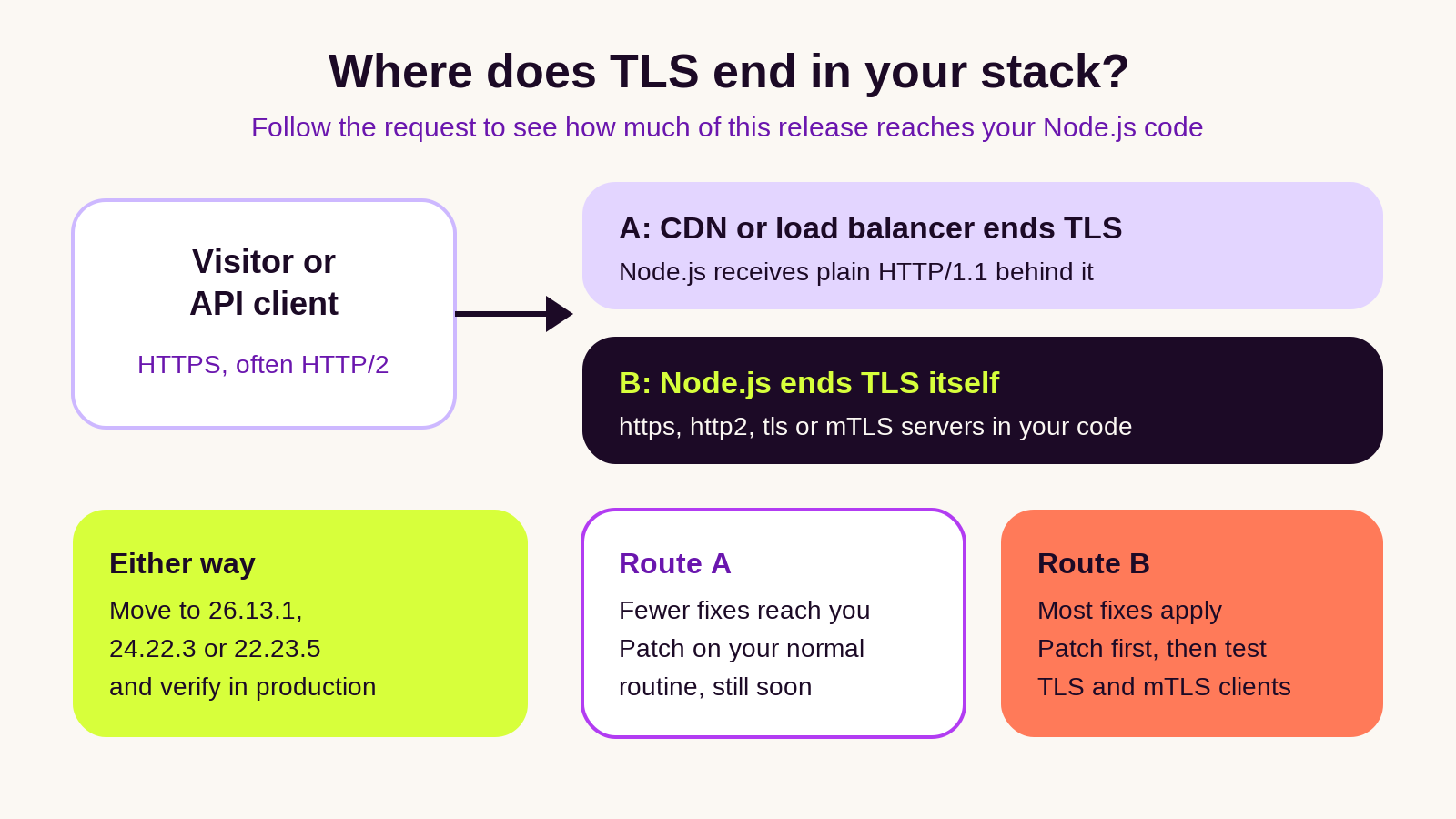
Lower exposure is not "no exposure". Outbound calls, proxies and bundled libraries still change, so every setup should update. The architecture only tells you how fast and how carefully.
How to patch: a routine your team can repeat
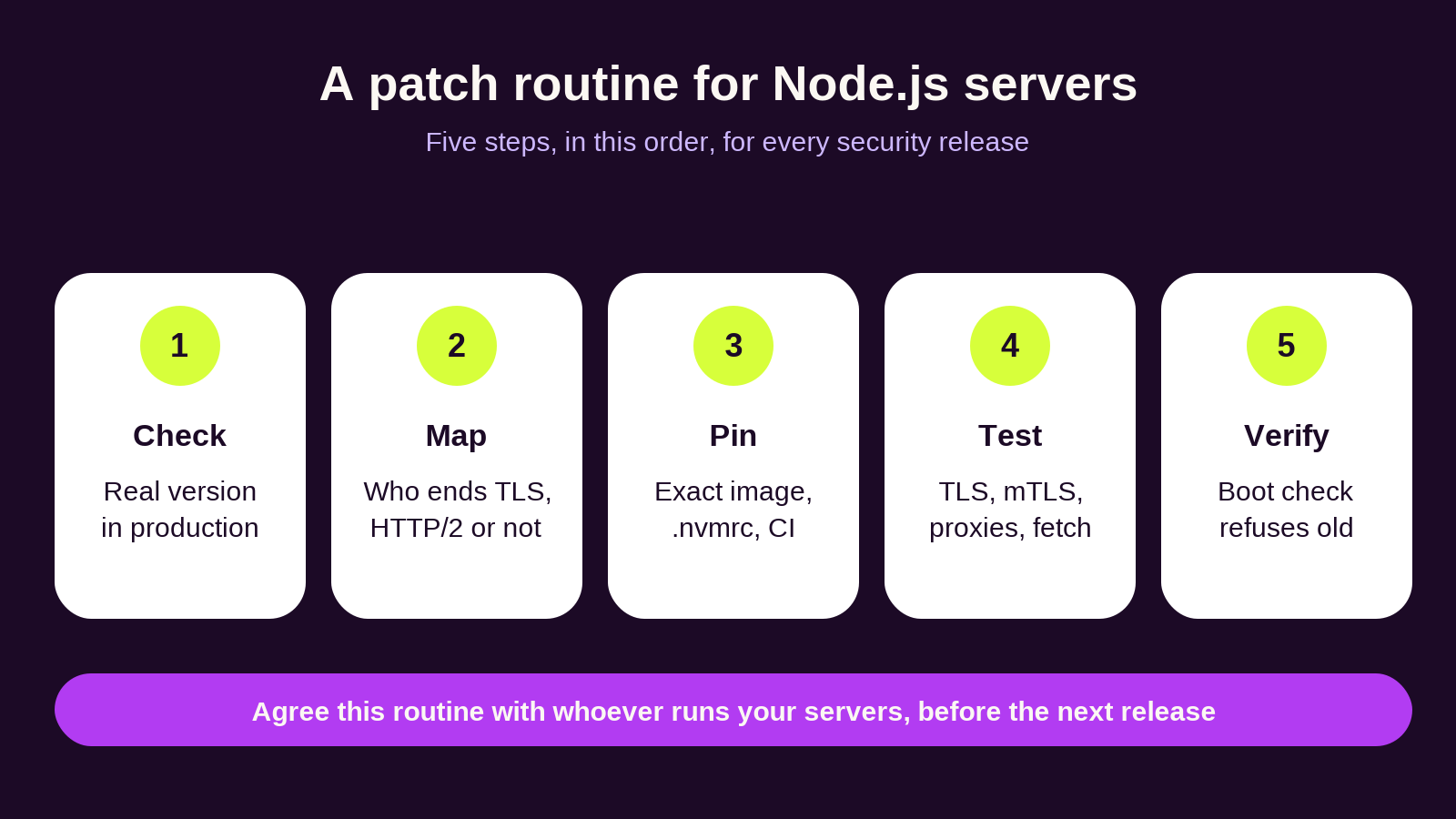
-
1
Check the real version in production. Not the one in the README. Run
node -vinside the running container or server, or logprocess.versions.nodeat startup. -
2
Map your exposure. Find where your code creates servers or sets TLS options. A quick search of the codebase is usually enough:
grep -rnE "http2\.create(Secure)?Server|https\.createServer|tls\.createServer|SNICallback|addContext\(|requestCert|respondWith(File|FD)|flushHeaders\(|altsvc\(" src/Any hit means the TLS and HTTP/2 fixes are relevant to that service. -
3
Pin the exact patched version. Update every place the version lives: the Docker base image (for example
FROM node:24.22.3-bookworm-slim),.nvmrc, thenode-versionin CI, and the runtime setting on your host. -
4
Test the paths that changed. TLS handshakes, any mTLS partner connections, outbound calls through a proxy, and anything that uses
fetch, which runs on the bundled undici. - 5 Verify, and make old versions fail loudly. Add a small check that refuses to boot on an unpatched runtime.
Here is the check we add to Node.js services. Save it as scripts/check-node.mjs, run it in CI and before the server starts (for example "start": "node scripts/check-node.mjs && node server.js"), and update the three versions after each security release.
// scripts/check-node.mjs
// Minimum patched versions from the 11 November 2026 Node.js security release.
const patched = { 22: '22.23.5', 24: '24.22.3', 26: '26.13.1' };

const toNums = (v) => v.split('.').map(Number);
const current = process.versions.node;
const floor = patched[toNums(current)[0]];

const isOlder = (a, b) => {
  const [x, y] = [toNums(a), toNums(b)];
  for (let i = 0; i < 3; i++) {
    if (x[i] !== y[i]) return x[i] < y[i];
  }
  return false;
};

if (!floor || isOlder(current, floor)) {
  console.error(`Node.js ${current} is unsupported or below the latest security release.`);
  process.exit(1);
}
console.log(`Node.js ${current} meets the patched minimum.`);
It uses only built-in features, so it runs on 22.x, 24.x and 26.x without dependencies.
What we've learned from patching Node.js in production
We usually treat a release like this in two passes. Services that end TLS themselves, use HTTP/2 directly or run mTLS with partners get patched first, with focused tests. Everything behind a proxy follows on the normal maintenance cycle, ideally within days rather than weeks.
The common mistakes are rarely technical. Teams patch the API but forget the background worker that runs the same image tag. A serverless function sits on a runtime the platform updates on its own schedule. Or nobody owns the job, because the agency that built the integration assumed the client's IT team would handle it, and the IT team assumed the opposite.
When wouldn't we rush? If a service is internal only, sits behind a proxy and has no server-side TLS code, we'd still patch, but we wouldn't skip testing to do it the same day.
Troubleshooting
| Symptom | Likely cause | Fix |
|---|---|---|
Deployed, but node -v in production still shows the old version |
A floating image tag or a cached Docker layer | Pin the exact tag, rebuild with docker build --pull, and redeploy every service using that image |
| A partner's mTLS connection is now rejected on one hostname | That host used a CA-only context in addContext(), which previously fell back to the default CA |
Issue the partner a certificate from the CA that host expects, or confirm the CA configured for that host is the one you intended |
| A legacy client fails after the update when it renegotiates TLS 1.2 | Changing the server name during renegotiation is now blocked | Have the client open a new connection per hostname; prefer TLS 1.3 where it supports it |
Tests around fetch or proxies behave differently |
The bundled undici was updated in the same release | Read the undici change notes for your line, then fix the test or the call, not the runtime version |
| A serverless function still reports an old runtime | The platform rolls out patch versions on its own timetable | Check the provider's runtime notes; if you can't wait, move to a container runtime where you control the version |
Questions people ask
Do I need to update if my site runs behind a CDN?
Yes. A CDN in front reduces how many of these fixes reach your code, but outbound calls, proxies and bundled libraries still change. Patch on your normal routine rather than treating it as optional.
Is this the same as upgrading to Node.js 26?
No. A security release is a patch inside the line you already run, so 24.x moves to 24.22.3 without a major upgrade. Moving between major versions is a bigger project, covered in our Node.js 26 LTS upgrade plan.
What should I ask my agency or developer?
Ask which Node.js version each service runs today, where TLS ends, who is responsible for applying security releases, and how you'll know it was done. If nobody can answer in one message, that's the gap to close.
Why it matters for your business
Node.js often runs the quiet parts of a business: the API that syncs orders, the webhook receivers that take payment and CRM events, the partner integration that uses client certificates. A crash there means lost orders or stale data; a memory disclosure can mean someone else's information leaving your server. Neither shows up on the homepage until it's already a problem.
A repeatable patch routine turns each release into a small, planned task. It's the same discipline we described for the November Next.js security update, and it belongs in any website security checklist for small businesses.
Quick checklist:
- Confirm the version every service runs in production.
- Find any code that creates HTTPS, HTTP/2 or TLS servers.
- Pin 26.13.1, 24.22.3 or 22.23.5 everywhere the version lives.
-
Test TLS, mTLS, proxies and
fetch, then deploy. - Add a boot check and name who owns the next release.
If you'd like a second pair of eyes on your APIs and integrations, our Node.js development team can audit and patch them, or you can tell us what you run and we'll suggest a routine that fits.
(over to you)
Planning a build like this?
Tell us what you're building and we'll come back with ideas and next steps.