Next.js security update: applying the November 2026 patches
The Next.js security update of 3 November 2026 fixed caching, self-hosting, Edge and image issues in 16.4.5 and 15.5.29. How to check exposure, patch safely and agree a patching routine with your agency.
If your website runs on Next.js, apply the security update released on the third of November 2026. The fixes are in Next.js 16.4.5 and 15.5.29, and nothing changes on your site until someone updates, rebuilds and redeploys it.
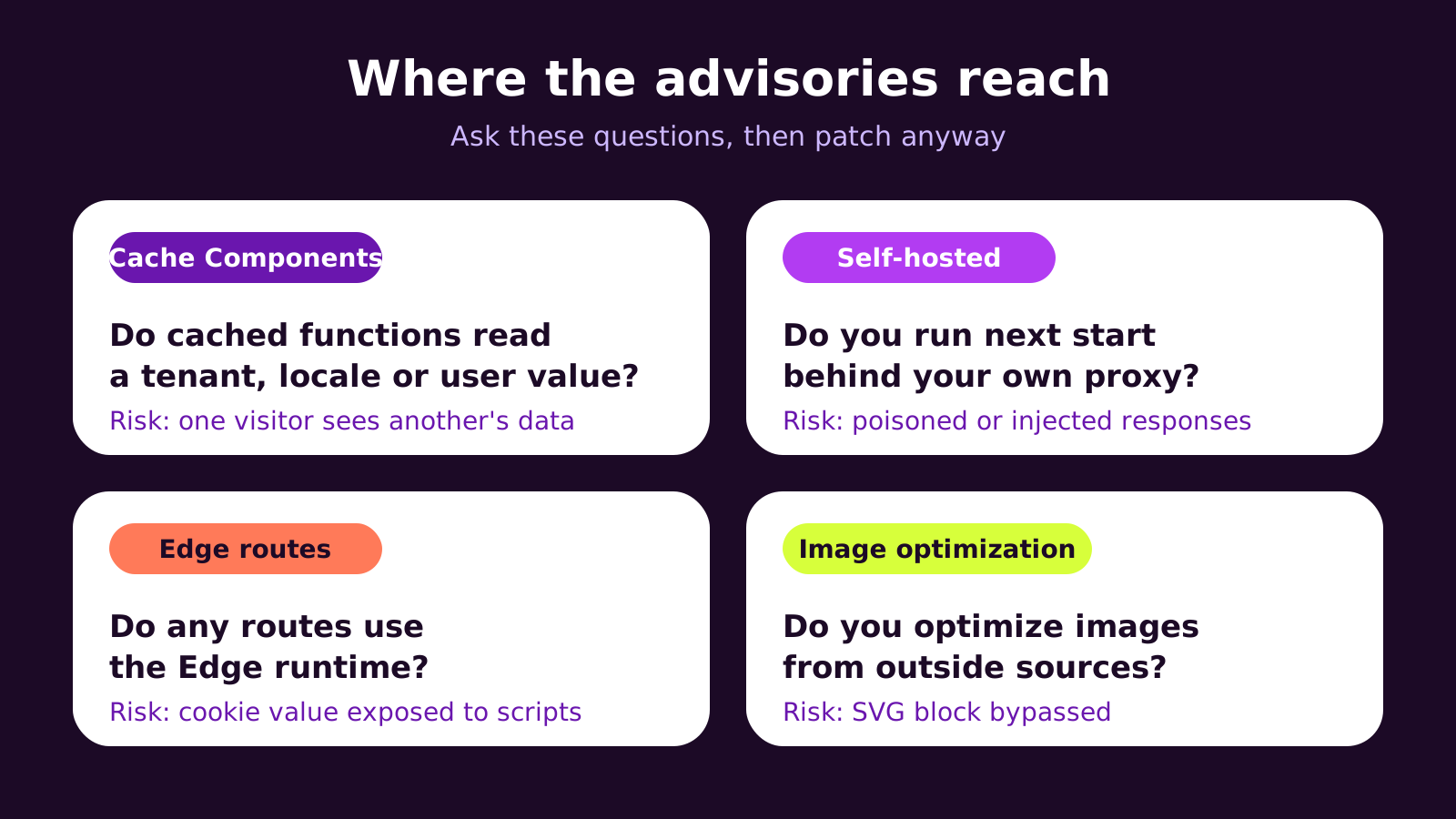
The most serious issue involves Cache Components, where a cached result could be shown to the wrong visitor. Other fixes cover self-hosted servers behind proxies, Edge routes that could expose a cookie value, and image optimization that could let an SVG file through.
The routine is simple. Read the advisory and note which features you use. Check the installed version from the lockfile. Update on the same release line rather than jumping a major version. Test caching, forms, logins and checkout on a preview. Then deploy, confirm the live version, and record who did it.
Turning on automatic security pull requests in GitHub shortens the gap next time, but a person still needs to review and ship them.
Next, ask your developer or agency who tracks these releases, how fast they are applied, and where you can see that the work is done.
If your website or web app runs on Next.js, a Next.js security update landed on 3 November 2026 that you should not leave sitting in a backlog. This post is for owners and marketing leads who rely on a developer or agency to keep a Next.js site running. You'll learn what the November 2026 release fixed, how to tell whether your site was exposed, how to apply the patch safely, and what a sensible patching arrangement with your agency looks like.
The problem: a security release you didn't know you needed
Most business owners only hear about a framework vulnerability when something goes wrong, or when a developer sends a slightly alarming message. Next.js doesn't update itself. The version your site runs is pinned in its code, and it stays there until someone changes it, rebuilds and redeploys.
In late October 2026 the Next.js team announced a scheduled security release, and on 3 November 2026 they published it. The fixes shipped in Next.js 16.4.5 (the Active LTS line) and Next.js 15.5.29 (the Maintenance LTS line). Any site on an earlier 16.4 or 15.5 build is still running the unpatched code until somebody acts.
The hard part isn't the update itself. It's knowing who is responsible, how quickly it should happen, and how to check it was really done.
How the November 2026 advisories actually work
The release bundled several advisories, and most of them only matter if your app uses particular features. That's why the first question is never "are we on Next.js?" but "which parts of Next.js do we use?"
Caching that mixes up visitors
The most serious issue relates to Cache Components and the use cache directive, which Next.js 16.4 made the recommended default. Caching works by storing a result under a key so the next request can reuse it. If a cached function reads a value that differs per tenant, locale or user, but that value doesn't end up in the cache key correctly, one visitor can be served something prepared for another. On a multi-tenant app or a members' area, that's a data exposure, not a cosmetic bug. Related advisories covered nested cached functions and cached functions that take binary arguments.
Self-hosted servers and proxies
Some advisories apply to sites that run next start on their own server rather than on a managed platform. One concerned shared fallback pages being poisoned through route parameters a visitor can supply; another concerned response injection when an App Router site sits behind certain reverse proxies. Managed hosts often add their own protections, but the framework fix is still the real fix.
Edge routes and image optimization
One advisory concerned Edge runtime routes exposing a cookie value through an internal header that page scripts could read. Another let a crafted file slip past the dangerouslyAllowSVG: false setting in image optimization by being treated as a different image format. If you optimize images from outside sources, that one matters.
At the time of the release, the Next.js team reported no known exploitation. That's good news, but it's a reason to patch calmly, not a reason to wait. Once fixes are public, the details are public too.
How to apply a Next.js security update safely
We follow the same five-step routine for every Next.js security release. It's quick when it's habitual and painful when it isn't.
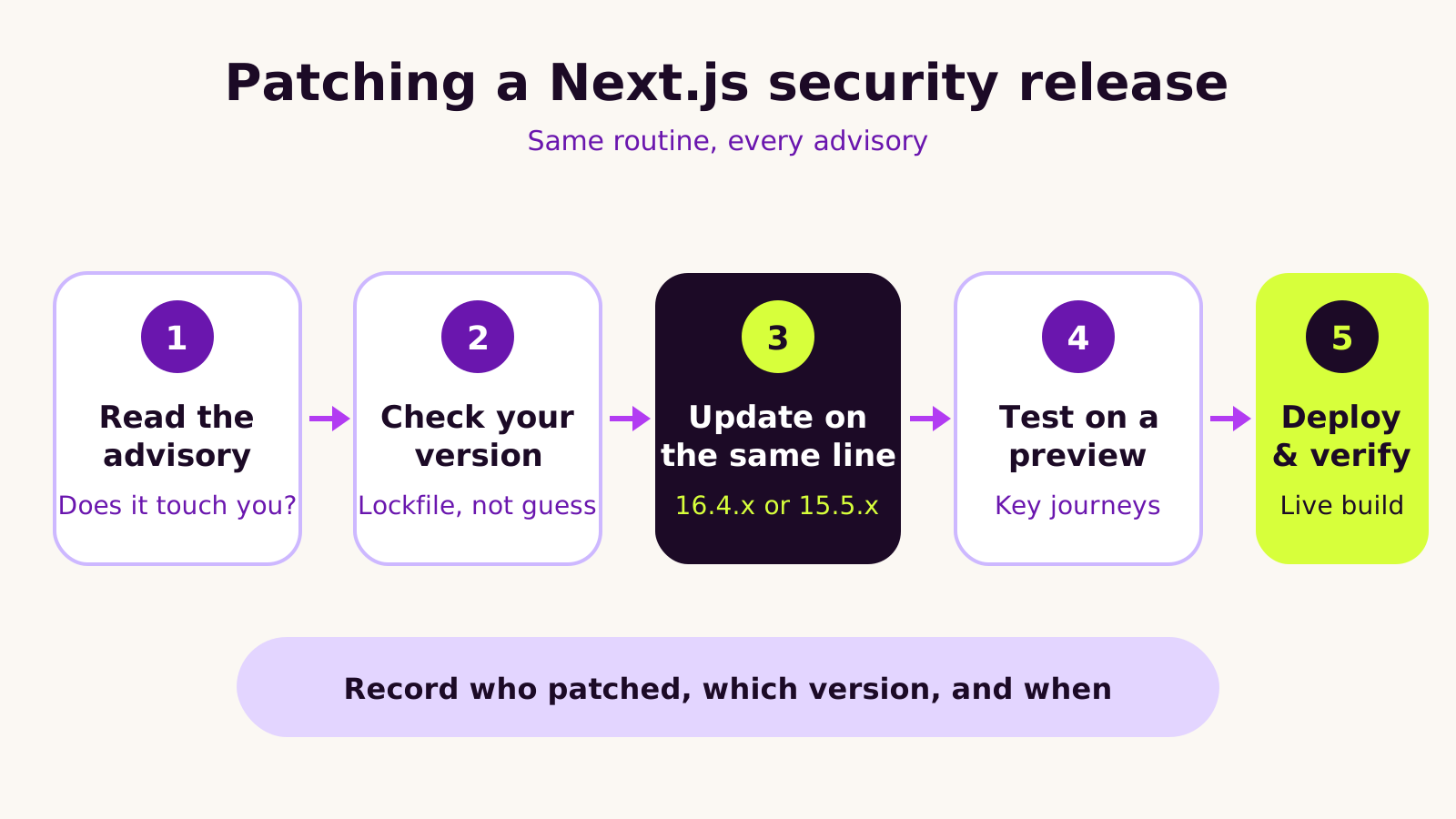
- 1 Read the advisory. Start from the official post on the Next.js blog and the linked GitHub security advisories. Note which features each one affects.
-
2
Check the version you actually run. Don't trust
package.jsonalone; a range such as^16.4.0says what's allowed, not what's installed. The lockfile decides. - 3 Update on the same release line. On 16.4.x, move to 16.4.5 or a later 16.4 patch. On 15.5.x, move to 15.5.29. A security patch is not the moment to jump a major version.
- 4 Test on a preview deployment. Run the build and click through the journeys that earn money: forms, checkout, logins, and any page served from cache.
- 5 Deploy and verify. Confirm the live build runs the patched version, then write down who did it and when.
The commands your developer will run
In the project folder, these show the installed version, update it and confirm the result. Swap 16.4.5 for 15.5.29 if you're on the 15 line, and keep eslint-config-next on the same version as next.
# What is installed right now (including duplicates in a monorepo)
npm ls next

# Update on the same release line
npm install next@16.4.5 eslint-config-next@16.4.5

# Confirm versions, then build before you deploy
npx next info
npm run build
Commit both package.json and the lockfile. With pnpm or Yarn the commands differ slightly, but the idea is the same.
Make the next one automatic
If the code lives on GitHub, Dependabot can open a pull request the moment a security fix appears. This file goes at .github/dependabot.yml; it groups the Next.js packages so they update together instead of in separate pull requests that conflict.
version: 2
updates:
  - package-ecosystem: "npm"
    directory: "/"
    schedule:
      interval: "daily"
    groups:
      nextjs:
        applies-to: security-updates
        patterns:
          - "next"
          - "eslint-config-next"
          - "@next/*"
Dependabot security updates also need to be switched on under Settings > Code security in the repository. A pull request still needs a person to review, test and merge it; automation shortens the gap, it doesn't close it.
What we've learned from patching Next.js sites
We usually treat security patches as routine maintenance rather than emergencies, and that's only possible because the routine already exists. A few habits make the difference.
- Stay on a supported line. Fixes only ship for LTS lines. A site stuck on an older major version has no small patch to apply, so the "quick fix" becomes an upgrade project. Our guide to upgrading to Next.js 16.4 and Cache Components covers that move.
- Know your feature footprint. Keep a short note of which features the app uses: Cache Components, Edge routes, self-hosting, image optimization of remote sources. It turns every advisory into a two-minute read.
- Don't skip testing because it's "only a patch". Patch releases are small, but caching fixes can change what gets cached, which is exactly where surprises appear.
- Patch the runtime too. Next.js runs on Node.js, which has its own security releases. Our Node.js 26 LTS upgrade plan explains how to keep both current.
Troubleshooting the update
| Symptom | Likely cause | Fix |
|---|---|---|
| The live site still reports the old version | The lockfile wasn't committed, or the host reused a cached build | Commit the lockfile, clear the build cache on the host and redeploy |
npm ls next shows two versions |
A monorepo package or a dependency pulls in its own copy | Update every workspace that depends on next, then reinstall |
| Install fails with peer dependency errors | eslint-config-next or React versions don't match |
Update the Next.js packages together and align React with the version the release expects |
| A page shows stale or wrong content after the patch | The caching fix changed cache keys and old entries are still served | Revalidate the affected tags or paths, or clear the data cache on deploy |
Questions people ask
Is my site safe if it's hosted on a managed platform?
Managed hosts can block some attack patterns at their edge, and several advisories mainly affect self-hosted setups. But the vulnerable code still sits inside your app until it's updated. Treat platform protections as a safety net, not a substitute for patching.
How quickly should a Next.js security patch be applied?
That depends on your exposure and your maintenance agreement. In most projects we'd aim to assess an advisory the day it's published and ship a patch within days, faster if the issue touches a feature you use. Agree the timing in writing so nobody has to guess.
Do we need a developer for this, or can our team do it?
If someone on your team can run the commands, test a preview and deploy, the patch itself is straightforward. The value of a developer is in reading the advisory against your app, catching side effects and keeping the routine going month after month.
Why a Next.js security update matters for your business
A framework vulnerability rarely announces itself. The risk is quiet: a cached page showing one customer's details to another, or a route that behaves differently behind a proxy. For a business, that's a trust problem and possibly a compliance one, so check with a qualified adviser if personal data could be involved.
Patching well is also a good test of who you work with. When you're hiring for Next.js work, ask how security releases are tracked and applied, and look for the same clarity you'd expect on code and account ownership. Our website security checklist for small businesses covers the wider picture, and our Next.js development service includes upgrades and ongoing care for exactly this reason.
Quick checklist
- Confirm the installed Next.js version from the lockfile.
- Update to 16.4.5 or later on 16.4, or 15.5.29 on 15.5.
- Test caching, forms, logins and checkout on a preview.
- Deploy, confirm the live version and record the change.
- Turn on Dependabot security updates for next time.
If you'd like someone to check your Next.js site and take patching off your plate, tell us about your project.
(over to you)
Planning a build like this?
Tell us what you're building and we'll come back with ideas and next steps.
Keep reading
All articles React & Next.js
· 6 min read
React 19.3 in practice: View Transitions, Fragment Refs and more
Read article
 React & Next.js
· 7 min read
Figma to code handoff: code layers, GitHub and your agency
Read article
 React & Next.js
· 8 min read
Next.js multi-language website: i18n routing and RTL done right
Read article