Shopify network access declarations: what store owners must check
Shopify network access declarations became required on 19 November 2026, and deploys without one are rejected from 1 December. Which apps are affected, the shopify.app.toml change your developer makes, and fixes for common problems.
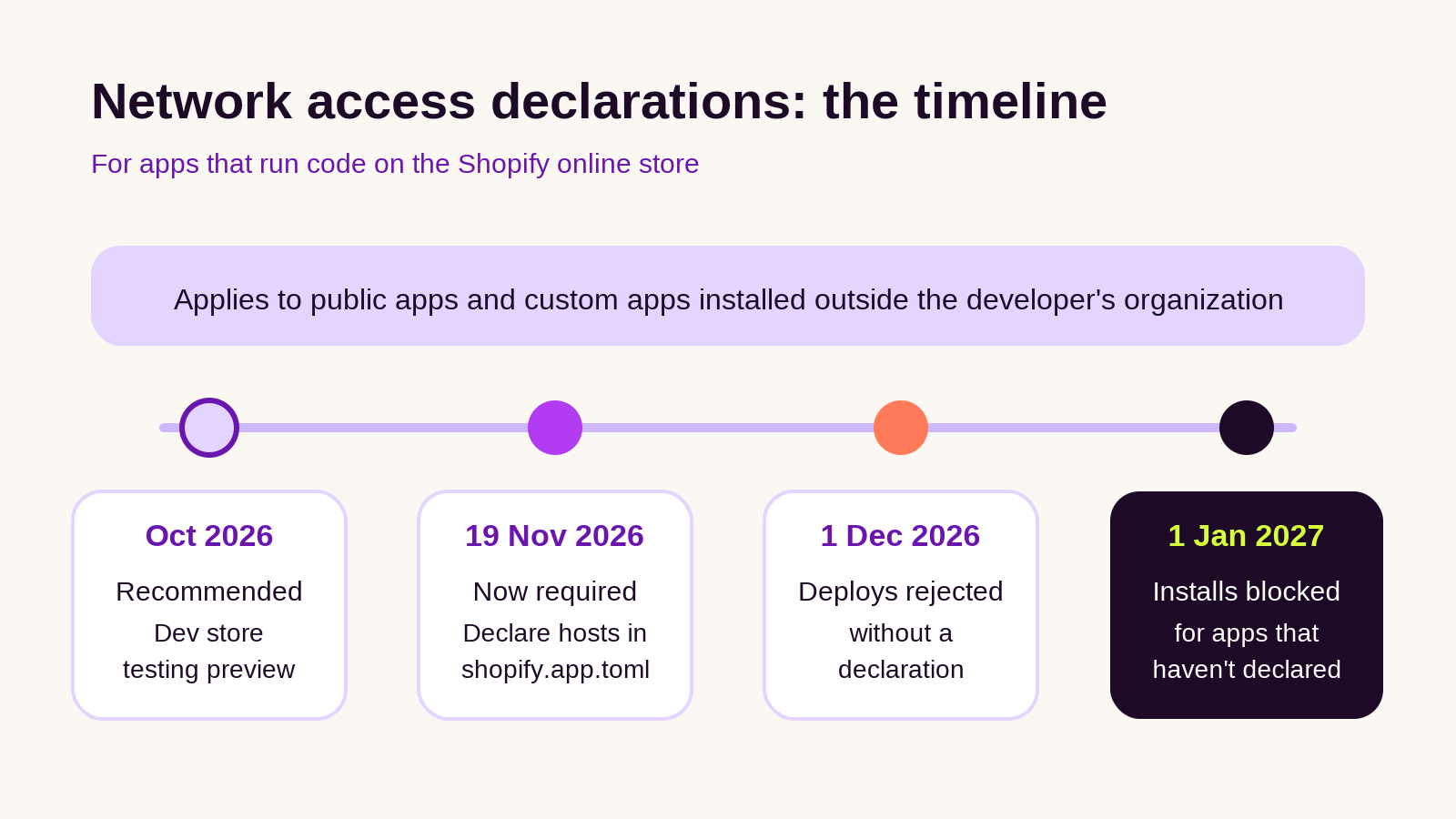
If an app runs code on your Shopify storefront, it now has to declare which servers that code talks to. Shopify made network access declarations a requirement on the nineteenth of November, 2026. From the first of December, deploys without one are rejected, and from the first of January, 2027, public apps that still haven't declared are blocked from new installs.
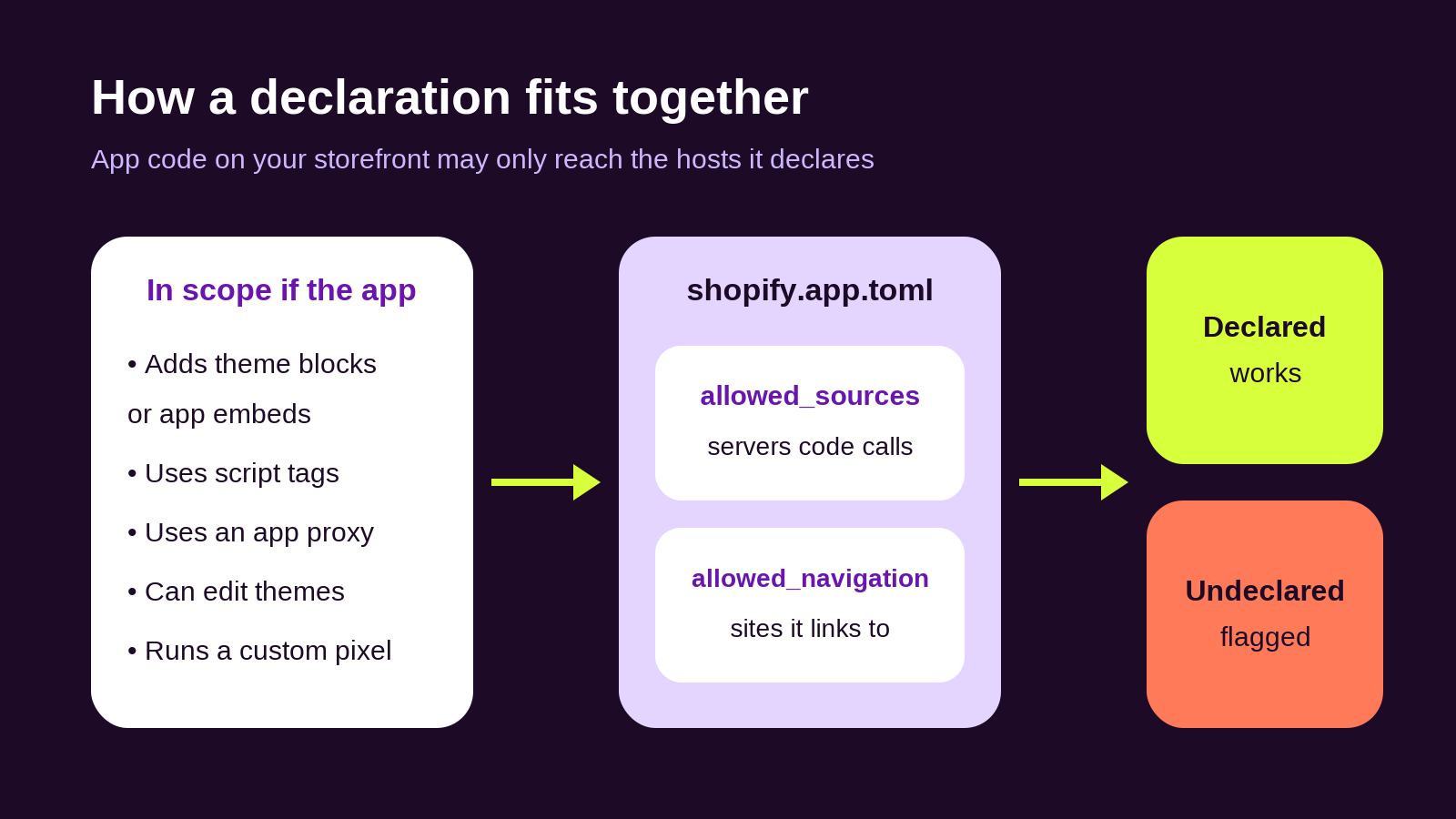
The rule covers apps with theme blocks or app embeds, script tags, an app proxy, theme editing access, or a custom web pixel. That includes most custom apps an agency builds for you.
The fix lives in the app's configuration file. Your developer lists the servers the storefront code calls, and the sites it links shoppers to. They then test on a development store with the network access testing preview, which shows warnings in the browser console, and deploy the change.
Keep the list short, use exact addresses rather than wildcards, and route third-party calls through your own back end where you can.
Next, list the apps on your storefront, confirm who can deploy each custom app, and ask your public app vendors about their plans before December.
This guide is for Shopify merchants who run a custom app built by an agency or freelancer, and for anyone who has paid for a theme block, review widget, upsell tool or tracking pixel that runs on their storefront. Shopify network access declarations became a requirement on 19 November 2026, and from 1 December 2026 Shopify rejects deploys of in-scope apps that haven't declared where their storefront code connects. You'll learn what that means, how to check whether your apps are affected, what your developer needs to change, and how to fix the problems teams hit.
The problem: code on your storefront that talks to servers you can't see
Most stores run more code than the owner realizes. A reviews block loads a script from the app's server. An upsell embed calls an API to fetch offers. A custom pixel sends events to an analytics tool. Each of these runs inside your shop's pages, in front of your customers, and until now an app could reach almost any server it liked from there.
Shopify's stated reason for the change is simple: scripts injected into a storefront can load code from anywhere, and that's a risk for shoppers and merchants. So apps now have to say, up front, which servers their storefront code talks to. If your store depends on an app that hasn't done this, you have two practical risks:
- Your own custom app can't be updated. From 1 December 2026, a deploy without a declaration is refused. That matters the day you need an urgent fix.
- A public app you rely on may be delisted. From 1 January 2027, public apps that still haven't declared are removed from the App Store and blocked from new installs.
Neither of these breaks your store overnight, but both can leave you stuck at a bad moment, such as just before a sale.
How Shopify network access declarations work
A declaration is a short list in the app's configuration file, shopify.app.toml, under a [network_access] section. It holds two settings:
-
allowed_sources: the HTTPS origins your app's storefront code loads files from or sends requests to, such as its API or asset server. -
allowed_navigation_hosts: external sites the app sends customers to with a link, for example a help center. Listing them lets Shopify skip its warning about leaving the store.
Think of it as a guest list. The app tells Shopify in advance which doors its code will knock on, and Shopify can then compare real traffic on the storefront against that list. In the current testing preview, the comparison works like a browser Content Security Policy in report mode: when storefront code contacts a server that isn't on the list, the browser console shows a warning, but nothing is blocked yet. Shopify hasn't published every detail of how live enforcement in the browser will behave, so we treat any undeclared host as something that could stop working later.
Which apps are in scope
Shopify's changelog lists the triggers. An app needs a declaration if it does any of these:
- adds theme app extension blocks or app embeds;
- uses script tags;
- uses an app proxy;
-
has the
write_themesaccess scope; -
runs a web pixel with the
write_open_pixelsscope.
The rule covers public apps and custom apps installed on stores outside the developer's own organization, which describes most agency-built custom apps. Apps that only write content, such as products, menus or metafields, aren't affected.
How to add a declaration, step by step
If you own a custom app, this is a short job for your developer. If you only use public apps, your part is the check in step one.
- 1 List the apps that touch your storefront. In Shopify admin, open Online Store > Themes > Customize and note every app block and every app embed under App embeds. Then check Settings > Customer events for app pixels. Anything there is a candidate.
- 2 Find every host the code contacts. On a dev or staging copy of the theme, open the browser's developer tools, go to the Network tab and use the storefront like a customer: product page, cart, any widget. Note each external domain the app's files load from or call.
-
3
Write the declaration. Add the hosts to
shopify.app.toml, as in the example below. - 4 Test on a dev store with the preview. Create a dev store with the Network access testing feature preview switched on, install the app and browse the storefront. Console warnings tell you which hosts you missed.
-
5
Deploy before 1 December 2026. Run
shopify app deployfrom the app's folder so the new configuration goes live.
Here is a minimal declaration for a hypothetical reviews app. It goes in shopify.app.toml at the root of the app project; replace the example hosts with your own.
# shopify.app.toml
[network_access]
# Origins your storefront code loads from or calls (HTTPS only)
allowed_sources = [
  "https://api.reviews.example.com",
  "https://assets.reviews.example.com"
]
# External sites the app links shoppers to
allowed_navigation_hosts = ["help.reviews.example.com"]
If the app's storefront code never calls an outside server, an empty list still counts as a declaration:
[network_access]
allowed_sources = []What we've learned helping stores prepare
Most declarations are quick. The time goes into finding hosts nobody remembered, and into apps that were built by someone who has since moved on.
- Don't copy a list from an old build. Watch real traffic. Code that was refactored months ago often calls a different host from the one in the documentation.
- Watch for merchant-entered URLs. If a theme block lets a merchant paste in any URL, the host differs from store to store and can't all be declared. Developers are still raising this with Shopify, so for now we'd restrict such settings to known hosts or send the request through the app's back end.
- Don't rely on wildcards. Wildcard entries aren't documented. List exact origins.
- Check the current cap. There's a limit on how many entries each list can hold, and it has been described differently in different places. Read the app configuration reference before you plan around it.
- Get access sorted first. If you can't deploy your custom app because the developer account belongs to a former freelancer, fix ownership now rather than in December.
Troubleshooting
| Symptom | Likely cause | Fix |
|---|---|---|
shopify app deploy is rejected |
The app is in scope and has no [network_access] section, or the section is misnamed |
Add the section with allowed_sources (an empty list if no outside calls) and deploy again |
| Console warnings on the dev store after you added the list | A host was missed, or the entry has the wrong scheme, subdomain or a trailing path | Copy the exact origin (scheme and host) from the Network tab and redeploy |
| A widget works for one merchant but warns for another | The block uses a URL the merchant typed into its settings | Limit the setting to known hosts or proxy the request through your back end |
| No warnings at all, even for a host you know is missing | The dev store wasn't created with the testing preview, or you're testing checkout rather than the online store | Create a new dev store with the preview enabled; the preview covers the online store only |
| A public app you use shows no sign of updating | The vendor may not have deployed its declaration yet | Ask the vendor for its plan before 1 January 2027 and line up an alternative if needed |
Questions people ask
Do I need to do anything if I only use App Store apps?
You don't edit any files; the app developer does. It's still worth asking the vendors behind your storefront apps whether they've declared network access, especially for apps you can't easily replace.
Is this the same as the IP allowlist requirement?
No. The IP allowlist controls which servers can call the Admin API for your store. Network access declarations control which servers the app's code on your storefront can talk to. Many custom apps need both; we covered the other one in our guide to the Shopify custom app IP allowlist.
Does this replace the script tag deadline?
No, it sits alongside it. Script tags still stop loading on the storefront in March 2027, so an app moving to app embeds should declare its hosts as part of that work. Our post on auditing your store before Shopify script tags end walks through that move.
Why it matters for your store
A declaration is a small file change, but it touches three things owners care about: being able to ship fixes when you need them, keeping the apps you depend on available, and knowing what your storefront does with shoppers' browsers. Treat it as a good reason to review your app stack, the way we describe in our Shopify app audit for cost, speed and data access, and to make sure you own the developer accounts behind any custom app.
A quick checklist before 1 December 2026:
- list every app block, app embed and pixel on your storefront;
- confirm who can deploy each custom app;
-
have your developer add and test the
[network_access]section; - ask public app vendors about their plans.
If you'd like a hand with the audit or the change itself, our Shopify development team can help, or you can tell us about your store.
(over to you)
Planning a build like this?
Tell us what you're building and we'll come back with ideas and next steps.