Shopify custom app IP allowlist: what to check with your developer
Shopify now requires an IP allowlist for public apps and agency-built custom apps. What changed in November 2026, who it affects, how to set it up in the Dev Dashboard and how to fix blocked API calls.
If an agency or freelancer built a custom app for your Shopify store, that app now needs an IP allowlist. Shopify made this a requirement in November 2026, and the window for existing installs closes on the first of January 2027.
An IP allowlist tells Shopify which servers are allowed to call the Admin API with your app's credentials. Calls from anywhere else are refused, so a leaked token is far less useful to an attacker.
Here is the plan. First, list every app on your store and find out who built and hosts each one. Second, have the developer find the real outbound address of every server, worker and scheduled job that talks to Shopify. Third, add those addresses, or the hosting provider's network numbers for serverless hosting, in the Dev Dashboard under the app's settings. Fourth, run the built-in test against recent traffic before switching enforcement on.
Apps you created yourself in the admin, and apps used only inside your own organization, are not affected.
If you are not sure who owns your custom app or its hosting, ask your developer this week, and get the allowlist in place well before April 2027, when unprotected calls start failing.
If an agency or freelancer built a private integration for your store, such as an ERP sync, a custom pricing tool or a warehouse connector, the Shopify custom app IP allowlist is now your problem too. This guide is for store owners and the developers they hire. You'll learn what Shopify changed in November 2026, whether your apps are affected, how the allowlist is set up, and what to do when calls start getting blocked.
What changed in November 2026, and who it affects
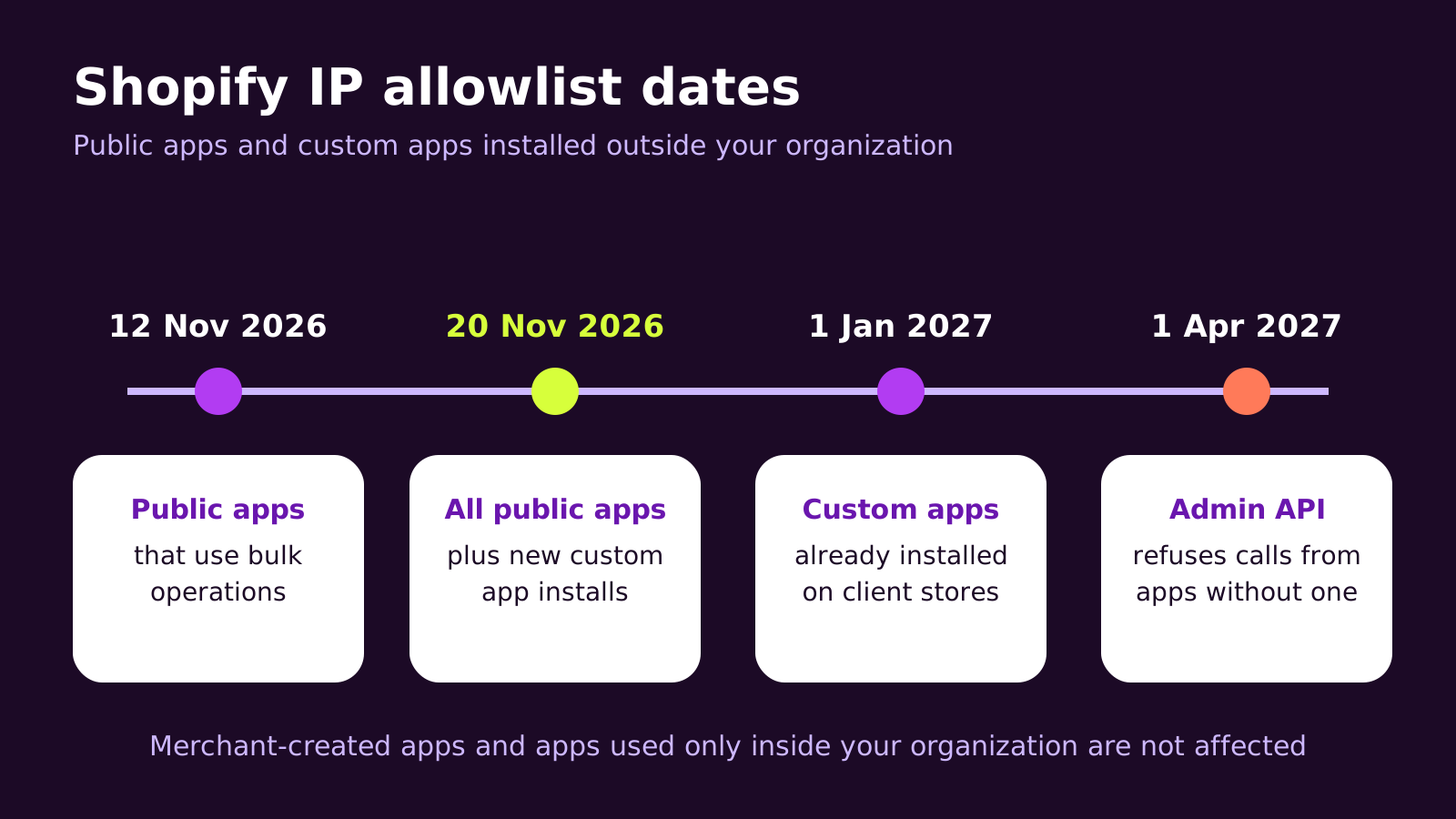
Shopify has turned the Admin API IP allowlist from an optional security setting into a requirement. Public apps that use bulk operations had to configure one by 12 November 2026, and every other public app by 20 November 2026. Public apps without one are removed from the App Store listing, blocked from new installs and flagged to merchants in Settings > Apps. Existing installs keep working for now.
The part most store owners miss is the custom app rule. A custom app built in a developer's or agency's organization and installed on your store counts as "installed outside your organization". For those apps, new installs need an allowlist from 20 November 2026 and existing installs need one by 1 January 2027. From 1 April 2027, Shopify will reject GraphQL Admin API and REST Admin API requests from apps that still don't have one.
Two groups are not affected: apps a merchant creates directly in the Shopify admin, and apps used only inside the organization that built them. Shopify still recommends an allowlist for those, and we agree.
How the allowlist actually works
Every app talks to the Admin API with an access token. Until now, anyone holding that token could use it from any computer on the internet. That's why a token pasted into a chat, committed to a public repository or left on an old staging server was such a serious leak.
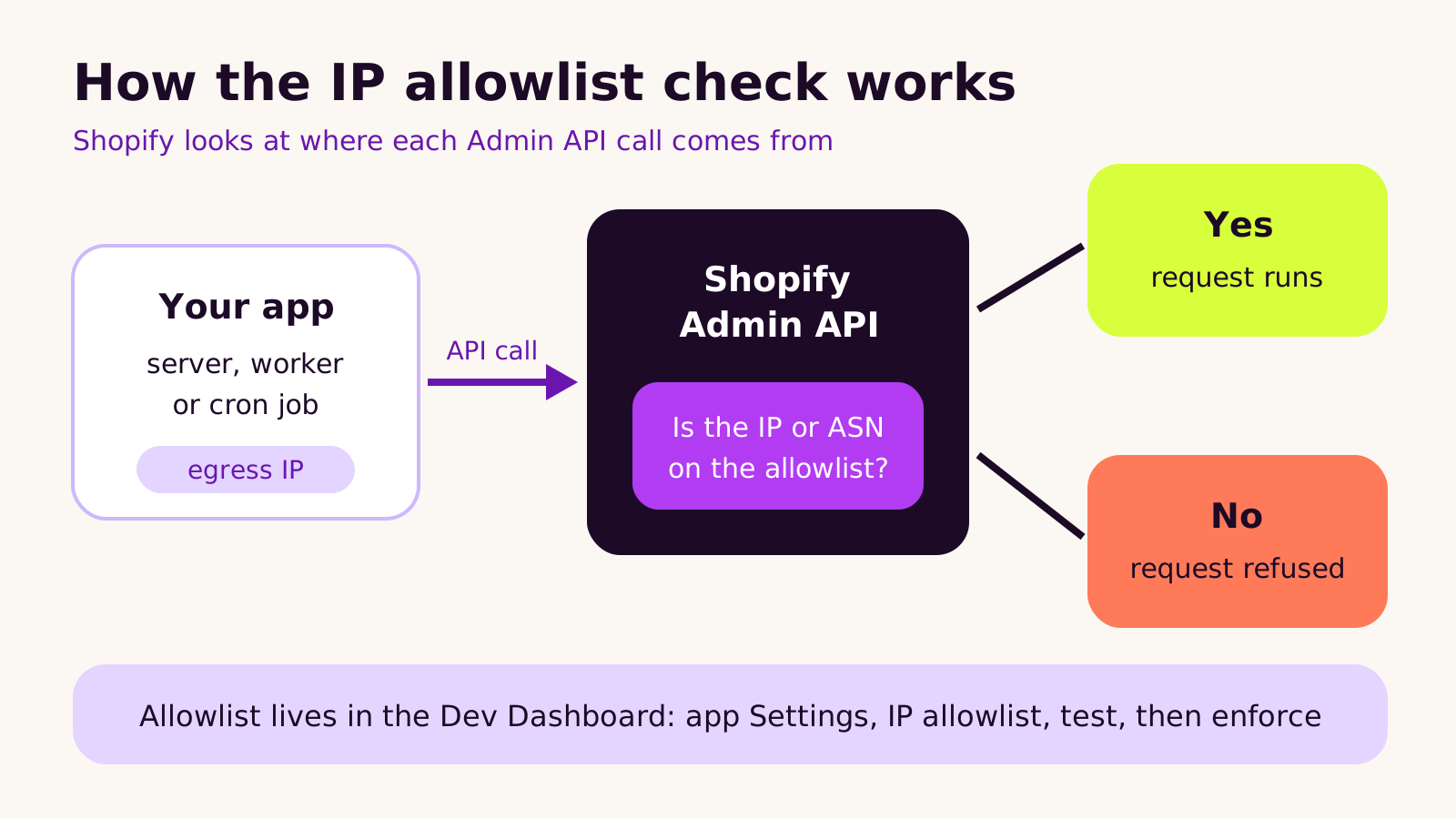
An allowlist adds a second check. When enforcement is on, Shopify looks at the address the request came from and compares it with the list saved for that app. If the address, its range or its network is on the list, the call runs as normal. If not, it's refused, even when the token is valid. A stolen token stops being enough on its own.
You can describe allowed sources in three ways, and mix them:
- Single IP addresses, for a server or NAT gateway with a fixed outbound address.
- CIDR ranges, for a block of addresses your host assigns to you.
- ASNs (autonomous system numbers), which identify a hosting provider's whole network. This is the option for serverless platforms where outbound addresses change.
The important detail: the allowlist is about outbound traffic from the app to Shopify. Webhooks travel the other way, from Shopify to your app, so they don't need allowlisting. They still need signature checks, which we cover in our guide to building reliable webhook receivers in Node.js.
How to set up a Shopify custom app IP allowlist
The setting lives in the Dev Dashboard, not the store admin, so the person who owns the app's developer account has to do it. Here's the order we follow.
1. Make an app inventory
In your Shopify admin, open Settings > Apps and list every installed app. For each custom app, write down who built it, which developer organization owns it and where it's hosted. If nobody knows, that's the first thing to fix. Our Shopify app audit guide walks through this review in more detail.
2. Find every place the app calls Shopify from
Apps rarely have one server. There's the main web process, a background worker, a nightly sync job, maybe a reporting script on someone's laptop. Each one needs its outbound address checked from where it actually runs. A quick way is to run this from the same server, container or function that calls Shopify:
// check-egress-ip.mjs  (Node.js 18 or later)
// Run it where the app runs, not on your own computer.
const res = await fetch("https://api.ipify.org");
const ip = (await res.text()).trim();
console.log(`Outbound IP for this runtime: ${ip}`);
Run it a few times, and after a redeploy. If the address changes, you're on dynamic egress and should either add a static outbound IP through your host or use the provider's ASNs.
3. Add the sources and test before enforcing
- 1 Open the app in the Dev Dashboard and go to Settings, then the IP allowlist section.
- 2 Add the IP addresses, CIDR ranges or ASNs you found. For ASNs, the form also asks where your app runs.
- 3 Run the test. It compares your list against the app's recent traffic and shows calls that would have been refused.
- 4 Fix any gaps, then turn on enforcement. If you turn it off later, Shopify keeps the saved list.
What we've learned rolling this out
The setup screen is simple. The work is in knowing your own infrastructure. A few patterns come up again and again:
- Forgotten scripts. One-off import scripts and cron jobs often run from a different machine to the main app. They pass every test until the one night they run.
- Staging sharing production credentials. If staging calls the live store with the same app, it either needs to be on the list or, better, use its own app and dev store.
- Nobody owns the developer account. When a freelancer built the app in their own organization, only they can change its settings. That's an ownership question as much as a technical one, and it's covered in our piece on what you should own when you hire an agency.
Troubleshooting
| Symptom | Likely cause | Fix |
|---|---|---|
| The app works, but a nightly sync suddenly fails | The job runs on a server that isn't on the allowlist | Run the egress check on that machine and add its address |
| Calls fail at random after a deploy | The host assigns new outbound addresses on each deploy | Add a static outbound IP through the host, or allow the provider's ASNs |
| The test passes but local development breaks | Developers call the live store from their own connections | Point local work at a dev store with its own app, not production |
| The store owner sees a warning in Settings > Apps | The app has no allowlist configured yet | Ask the app's developer to set one up in the Dev Dashboard |
Questions people ask
Will my store stop working on 20 November?
No. Existing installs keep running. Custom apps already on your store have until 1 January 2027 to add an allowlist, and Shopify starts refusing unprotected Admin API calls from 1 April 2027. Waiting until then just puts the fix under time pressure.
I made the app myself in the Shopify admin. Do I need to do anything?
Merchant-created apps aren't covered by the requirement. An allowlist is still a sensible extra layer if the app's token is used on a server you control.
Does this affect the theme or checkout?
No. The rule covers server-to-server calls to the Admin API. Your theme, checkout and storefront aren't part of it.
Why it matters for your store
Custom apps usually do the quiet, important work: stock levels, order exports, pricing rules, customer data. If one of them stops calling Shopify, you might not notice until orders go unfulfilled or stock goes wrong. The allowlist protects that data from a leaked token, and setting it up early means you find hidden servers and unclear ownership on your own schedule.
A short checklist to take to your developer:
- List every custom app and who owns its developer organization.
- Check the outbound address of every server, worker and job that calls Shopify.
- Add them in the Dev Dashboard, run the test, then enforce.
- Write the list down in your handover notes so the next developer can update it.
If you'd like a hand reviewing or rebuilding a custom app, our Shopify development team can help, or you can tell us about your store.
(over to you)
Planning a build like this?
Tell us what you're building and we'll come back with ideas and next steps.