WooCommerce product bundles: keep kits together in block carts
WooCommerce 11.3 (November 2026) lets WooCommerce product bundles declare parent and child cart items. How it works, the code your developer adds, which bundle approach to choose, and fixes for common cart problems.
WooCommerce 11.3, released in November 2026, gives product bundles a shared way to tell the cart which items belong together. If you sell kits or bundles, it helps the cart look right to shoppers.
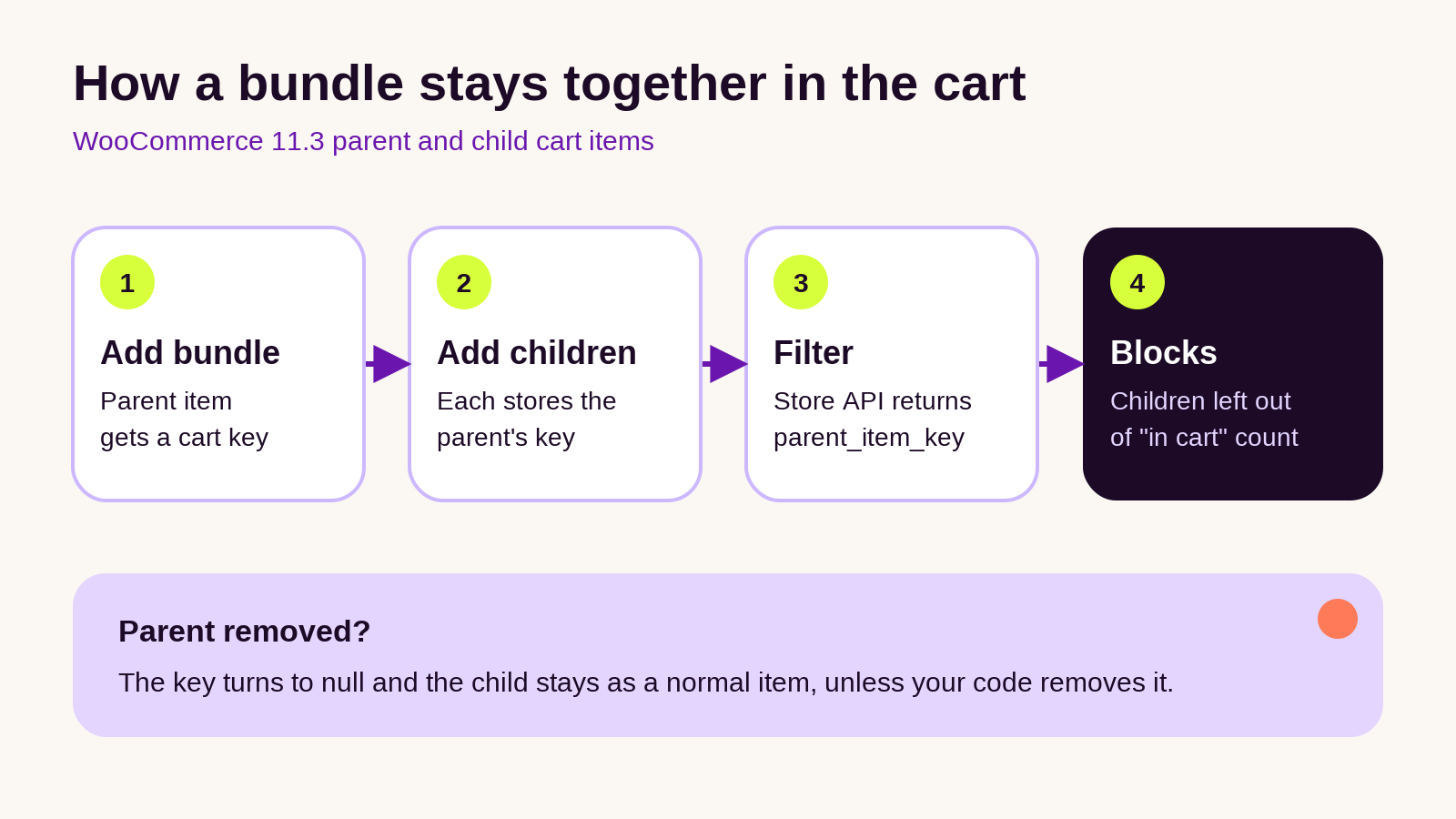
Here's how it works. A new Store API filter lets an extension mark a cart item as the child of another item, using the parent's cart item key rather than its product ID. The blocks can then read that link. For now, the add to cart button's in cart count leaves child items out. If the shopper removes the bundle, its children stay in the cart as normal items unless your code removes them.
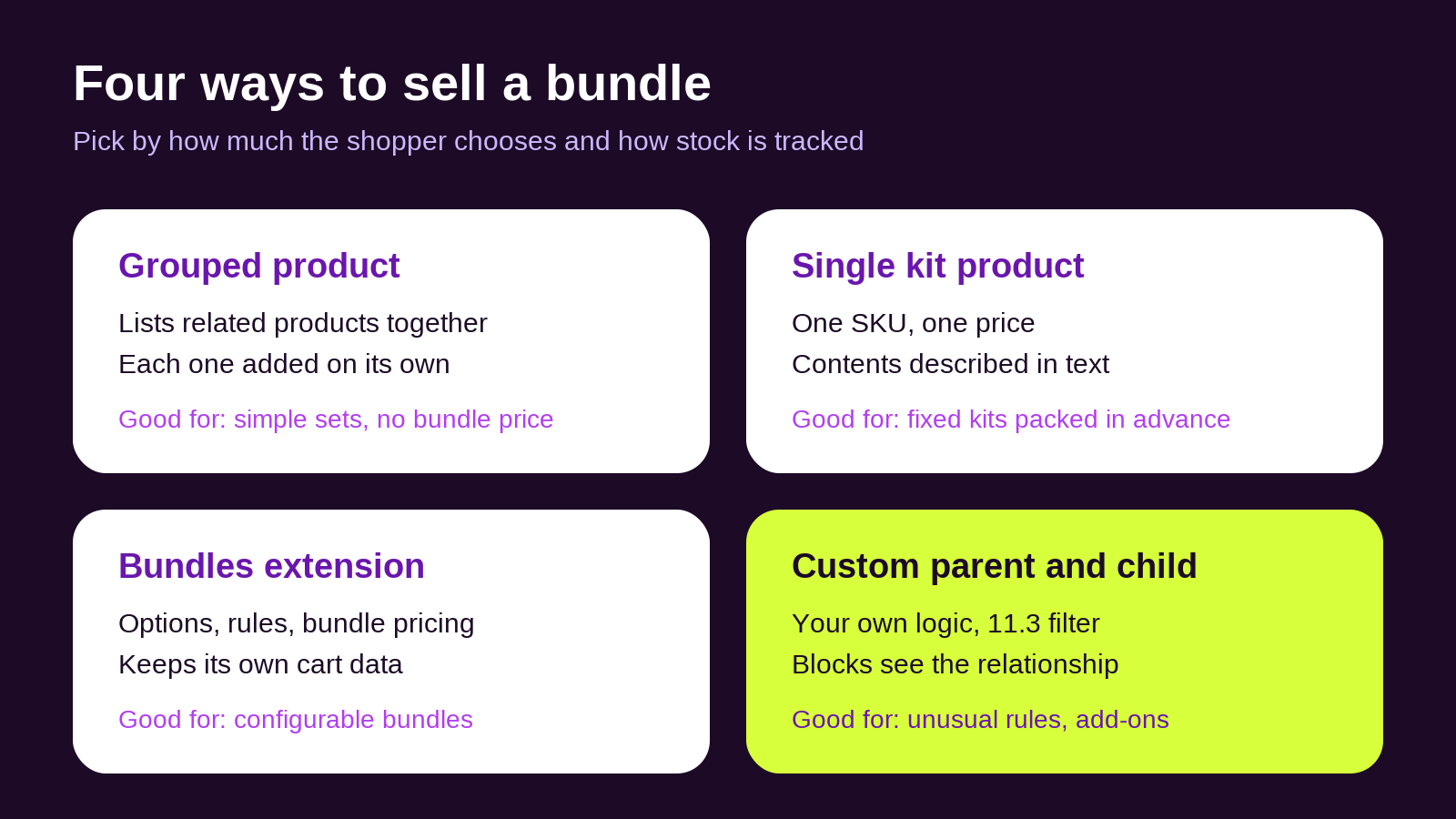
To set it up, pick the right bundle approach first: a grouped product, a single kit product, a bundles extension, or custom code. For custom bundles, give the parent unique cart data, store its key on each child, return that key from the filter, and handle removal and quantity changes.
Test on staging with the block cart before your next promotion, and save the relationship to orders if fulfilment needs it.
If you sell WooCommerce product bundles, kits or "frequently bought together" sets, this post is for you. WooCommerce 11.3, released in November 2026, added a way for a bundle to tell the cart which items belong to it. Below we explain what changed, how it works, what your developer needs to add, and the problems to test for before your next promotion.
The problem: bundles that fall apart in the cart
A bundle looks simple on the product page. A shopper picks a starter kit, clicks add to cart, and expects to see one kit. Under the hood, most bundle setups add several cart items: the bundle itself plus each product inside it. Until now, WooCommerce core had no shared way to know that those items belong together.
That gap shows up in small but confusing ways. The block-based "Add to cart" button shows an "in cart" count, and adding a kit could make the products inside it look as if they had each been added on their own. Every bundle tool solved the relationship privately, so blocks, themes and other extensions couldn't read it. Store owners notice this as "the cart looks wrong" without knowing why.
How parent and child cart items work in WooCommerce 11.3
WooCommerce 11.3 shipped on 11 November 2026. Among the changes is a new filter, woocommerce_store_api_cart_item_parent_item_key, and a matching read-only field, parent_item_key, on each cart item in the Store API. The Store API is what the Cart, Checkout and product blocks read from, so this is how blocks learn about bundles.
A few rules shape how it behaves:
- WooCommerce never decides for you. No item becomes a child unless an extension or your custom code says so through the filter.
-
The parent is identified by its cart item key, the value
WC()->cart->add_to_cart()returns, not by a product ID. Two identical products in the cart can have different keys, so this is the only way to point at the right one. -
Bad keys are ignored. If the key you return doesn't match an item in the cart, or is the item's own key, the field comes back as
null. - Children outlive parents. If the shopper removes the bundle, its children stay in the cart and count as normal items again. Removing them is your job if they shouldn't be sold alone.
Right now the visible effect is narrow: the Product Button's "in cart" count leaves child items out, including inside the Add to Cart with Options block. WooCommerce's developer notes say the Cart and Mini-Cart blocks could later show children indented under their parent. We'd treat that as a direction, not a promise, but it's a good reason to declare relationships properly now.
Existing bundle extensions keep their own parent and child data. The new field is a shared signal on top, not a replacement, so check with your extension's changelog whether it now declares parents through the filter.
How to set up WooCommerce product bundles that blocks understand
Start by deciding which kind of bundle you actually sell. Many stores don't need custom code at all.
| Approach | When it fits | Watch out for |
|---|---|---|
| Grouped product (core) | Related products shown together, bought separately | No bundle price, and nothing ties the items together in the cart |
| Single kit product | Fixed kits you pack in advance with their own SKU | Stock of the individual parts isn't tracked automatically |
| A bundles extension | Shoppers choose options, with bundle pricing and rules | Check it supports block cart and checkout and how it handles 11.3 |
| Custom parent and child items | Unusual rules, add-ons, gift sets or a booking-style flow | You own the code, the edge cases and the testing |
Step by step for a custom bundle
- 1 Update a staging copy to WooCommerce 11.3 or later and confirm your store uses the block Cart and Checkout (WooCommerce > Settings > Advanced > Page setup shows which pages are used).
- 2 Give the parent item its own cart item data, so it doesn't merge with the same product added on its own.
- 3 Save the parent's cart item key in each child's cart item data when you add the children.
- 4 Return that key from the filter, and return the incoming value untouched for every other item.
- 5 Decide what happens when the parent leaves the cart, and code it.
Here's a minimal version for a small custom plugin or a site-specific plugin (not a theme's functions.php, which you lose when you switch themes). Rename the crest_ prefix and the constants to match your project. It goes below the plugin header and follows WooCommerce's own Store API documentation for 11.3.
const CREST_PARENT_KEY = '_crest_parent_item_key';
const CREST_IS_PARENT  = '_crest_is_bundle_parent';

function crest_add_bundle( int $bundle_id, array $child_ids ): void {
    $parent_key = WC()->cart->add_to_cart(
        $bundle_id, 1, 0, array(), array( CREST_IS_PARENT => true )
    );
    if ( ! $parent_key ) {
        return;
    }
    foreach ( $child_ids as $child_id ) {
        WC()->cart->add_to_cart(
            $child_id, 1, 0, array(), array( CREST_PARENT_KEY => $parent_key )
        );
    }
}

// Tell the Store API (and blocks) which items are children.
add_filter(
    'woocommerce_store_api_cart_item_parent_item_key',
    function ( $parent_item_key, $cart_item ) {
        return $cart_item[ CREST_PARENT_KEY ] ?? $parent_item_key;
    },
    10,
    2
);

// Remove children when their bundle is removed.
add_action(
    'woocommerce_cart_item_removed',
    function ( $removed_key, $cart ) {
        foreach ( $cart->get_cart() as $key => $item ) {
            if ( ( $item[ CREST_PARENT_KEY ] ?? '' ) === $removed_key ) {
                $cart->remove_cart_item( $key );
            }
        }
    },
    10,
    2
);
If the parent and children are added in separate requests, store the parent key somewhere you can read later, such as the customer session, then attach it when you add each child. Pricing is a separate decision: this code links items, it doesn't change what each one costs.
What we've learned building bundles
In most projects we'd start with an established bundles extension and only go custom when the rules are genuinely unusual. Bundles touch stock, pricing, tax, coupons, emails and refunds, and each one needs a decision. A custom build is fine, but scope those decisions up front.
We'd also be honest about when not to build bundles at all. If your kits never change and you pack them before they're sold, a single product with its own SKU is easier to run, easier to report on and has nothing to break in the cart. The parent and child approach earns its keep when shoppers choose what goes in the bundle, when parts are also sold individually, or when stock has to come off each part.
Before you brief a developer, write down the answers to a short set of questions. Can shoppers change what's in the bundle? Is the bundle priced as a whole, or as the sum of its parts with a discount? Should a coupon apply to the bundle, its parts or both? What does a refund of one part look like? Clear answers here save more time than any code does.
A few things we see often:
- Quantity drift. A shopper changes the bundle from one to two, and the children stay at one. Decide whether children follow the parent's quantity, and test it in the block cart.
- Classic templates. The new field lives in the Store API. If your theme still uses the shortcode cart or heavily customised templates, you won't see any change there.
- Orders forget the link. Cart item data isn't saved to the order on its own. If fulfilment or reporting needs the relationship, copy it into order item meta at checkout.
Troubleshooting
Symptom: the "in cart" count still includes the bundle's contents. Likely cause: the store is below 11.3, the page uses a classic button, or the filter returns a product ID. Fix: update, use the block, and return the cart item key from add_to_cart().
Symptom: the bundle merges with the same product added separately. Likely cause: the parent has no unique cart item data. Fix: pass a marker such as CREST_IS_PARENT when adding the parent.
Symptom: items from another plugin lose their parent after you add your code. Likely cause: your callback returns null or an empty string for items it doesn't own. Fix: return $parent_item_key unchanged.
Symptom: removing a kit leaves loose products that can be bought cheaply on their own. Likely cause: children outlive their parent by design. Fix: remove them on woocommerce_cart_item_removed, as in the example.
Questions people ask
Do I need WooCommerce 11.3 to sell bundles?
No. Bundles worked before, through extensions or custom code. 11.3 adds a shared way for blocks to understand them, so the cart looks right and future block features can build on it.
Will my bundles extension use the new field?
That depends on the extension. Check its changelog or ask its support team. Your store keeps working either way, since extensions still keep their own bundle data.
Is this worth changing on a store that already works?
If you use block Cart and Checkout and sell bundles through custom code, yes, it's a small change worth adding during your next update cycle. On classic templates, plan it alongside a move to blocks.
Why it matters for your store
Bundles are often how a store encourages larger orders, so a cart that confuses shoppers at that moment works against you. The 11.3 change gives developers a clean, shared way to keep kits together, and it's a good prompt to review how your bundles handle stock, quantity and removal. If you're planning updates, our WooCommerce 11 update guide covers what else changed in recent releases, and if you sell in several currencies, read our WooCommerce multi-currency setup guide before pricing bundles. Hiring someone for the work? Our checklist for hiring a WordPress developer lists what to check first.
Quick checklist:
- Test bundles on WooCommerce 11.3 or later in staging.
- Confirm which bundle approach you use and whether it declares parents.
- Check quantity changes, removal, coupons and refunds in the block cart.
- Save the relationship to orders if fulfilment needs it.
If you'd like a hand building or fixing bundles, our WordPress and WooCommerce development service can help, or tell us about your store.
(over to you)
Planning a build like this?
Tell us what you're building and we'll come back with ideas and next steps.