Hire a WordPress developer: what to check before you sign
How to hire a WordPress developer with confidence: match skills to the job, review real code, run a paid trial task, agree ownership and access, and fix the problems that derail new hires.
If you plan to hire a WordPress developer, judge them on their code and their process, not on a gallery of finished sites. WordPress makes it easy to build something that looks right while hiding problems underneath.
Start with a clear brief, then match the developer's skills to the job. Theme and block work, custom plugins, WooCommerce and performance are different specialties.
Next, ask to see real code. Look for permission checks, nonces, cleaned input and escaped output, and ask whether they use Git and the WordPress Coding Standards.
Then run a small paid trial on a staging copy of your site. Watch how they ask questions, report progress and hand back the work.
Before you sign, agree who owns the code and accounts, give everyone named logins instead of shared ones, and plan the handover and ongoing care.
Do these things and you will usually spot a good fit early, and avoid an expensive rebuild later.
If you need to hire a WordPress developer for a new site, a WooCommerce store or a rescue job on an existing build, this guide is for you. It explains what separates careful WordPress work from work that only looks finished, and gives you a practical way to check a developer's skills, run a fair trial and sign an agreement that protects your site.
Why hiring for WordPress goes wrong so often
The usual story goes like this. You find a developer with a strong portfolio, agree a price, and the site launches on time. A few months later a plugin update breaks the checkout, the site is slow on phones, and nobody can explain how the custom features were built. The next developer quotes for a rebuild.
The problem isn't that WordPress is hard to hire for. It's that WordPress is easy to assemble. A page builder, a premium theme and a stack of plugins can produce a polished front end without much engineering underneath. A portfolio shows you that front end. It doesn't show you the code, the plugin choices, or how the developer works when something breaks.
So the job of a buyer is to look past the screenshots and check three things: the right specialty, the quality of the code, and the way the person works with you.
How WordPress development actually works
"WordPress developer" covers several different jobs. Knowing which one you need is the fastest way to narrow a shortlist.
- Theme and block development. Building block themes, custom blocks and patterns so your team can edit pages in the Site Editor without breaking the design. Since WordPress 7.1 added responsive controls and hover and focus styling in the editor, a good theme developer can hand over far more control to editors safely.
- Plugin development. Custom features: booking logic, member areas, integrations with a CRM or ERP. This is PHP and JavaScript engineering, and it's where security mistakes live.
- WooCommerce. Products, checkout, payment gateways, shipping and the hooks that change them. Store work needs someone who has dealt with order data and payment testing before.
- Performance and hosting. Caching, image handling, database clean-up and Core Web Vitals. This overlaps with server work and often needs access to hosting, not just the WordPress admin.
Most real projects need two or three of these. A small agency can usually cover them as a team; a single freelancer may be strong in one and adequate in the rest. Neither is wrong, but you should know which you're getting.
Underneath every specialty sits the same foundation. WordPress gives developers hooks (actions and filters) to change behavior without editing core files, and a set of functions for checking who the user is, confirming a request is genuine, cleaning input and escaping output. Developers who use these consistently produce sites that survive updates. Developers who skip them produce sites that work until they don't.
How to hire a WordPress developer, step by step
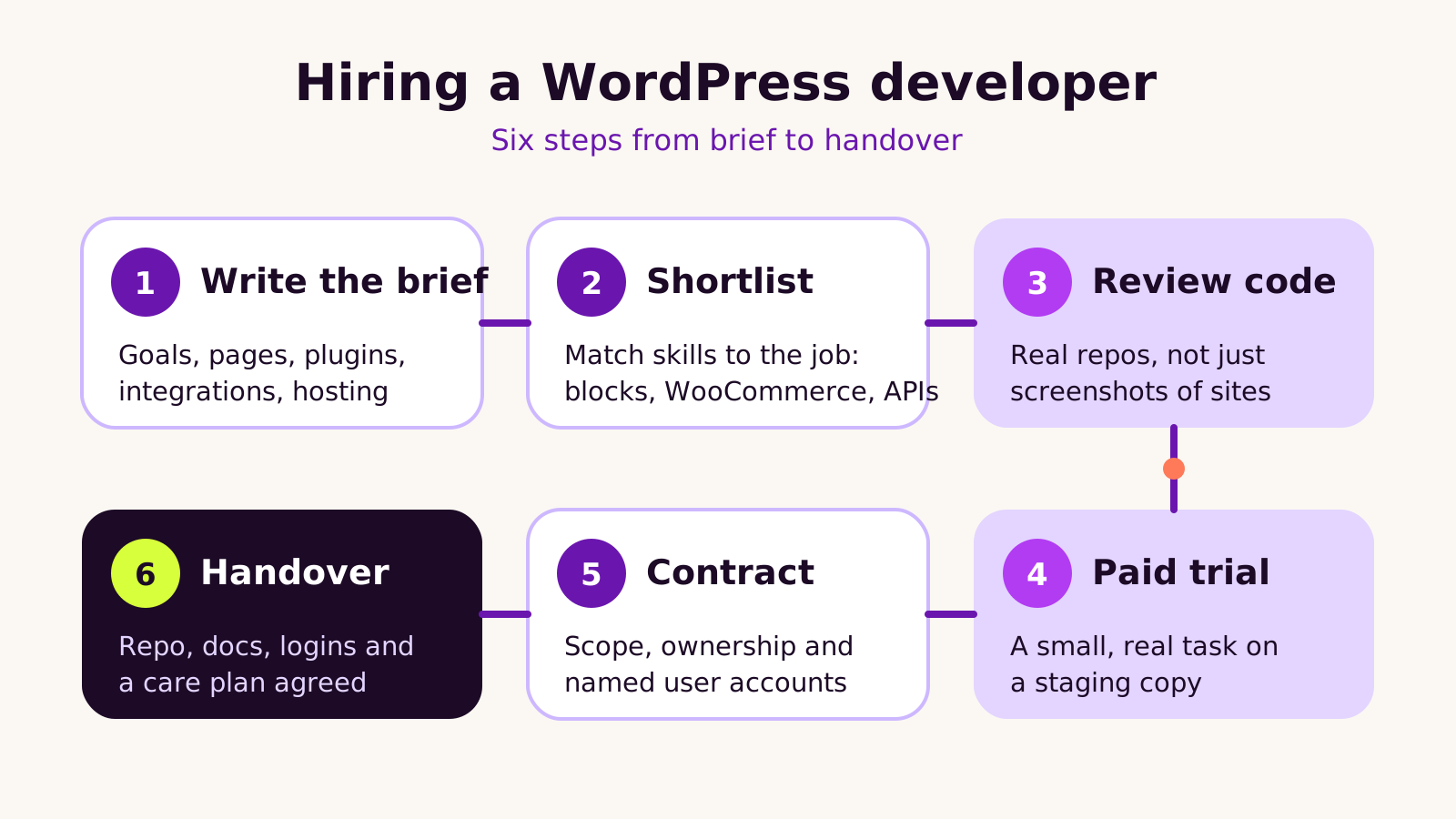
1. Write a short, specific brief
List the pages and templates, the features, the plugins you already rely on, the integrations, who will edit the site and where it's hosted. Our guide to writing a website brief for an agency has a template you can copy. A clear brief also makes quotes comparable.
2. Shortlist on fit, not volume
Ask each candidate which of the specialties above they'd own, and which they'd bring someone in for. Ask them to name the plugins they'd use for your forms, SEO and caching, and why. Vague answers ("whatever works") are a signal.
3. Review real code
Ask for a link to a repository, a plugin they've published, or a sanitized sample from a past project. You don't need to read PHP fluently to spot the patterns below. If they can't share any code at all, ask them to talk you through a feature they built and how they tested it.
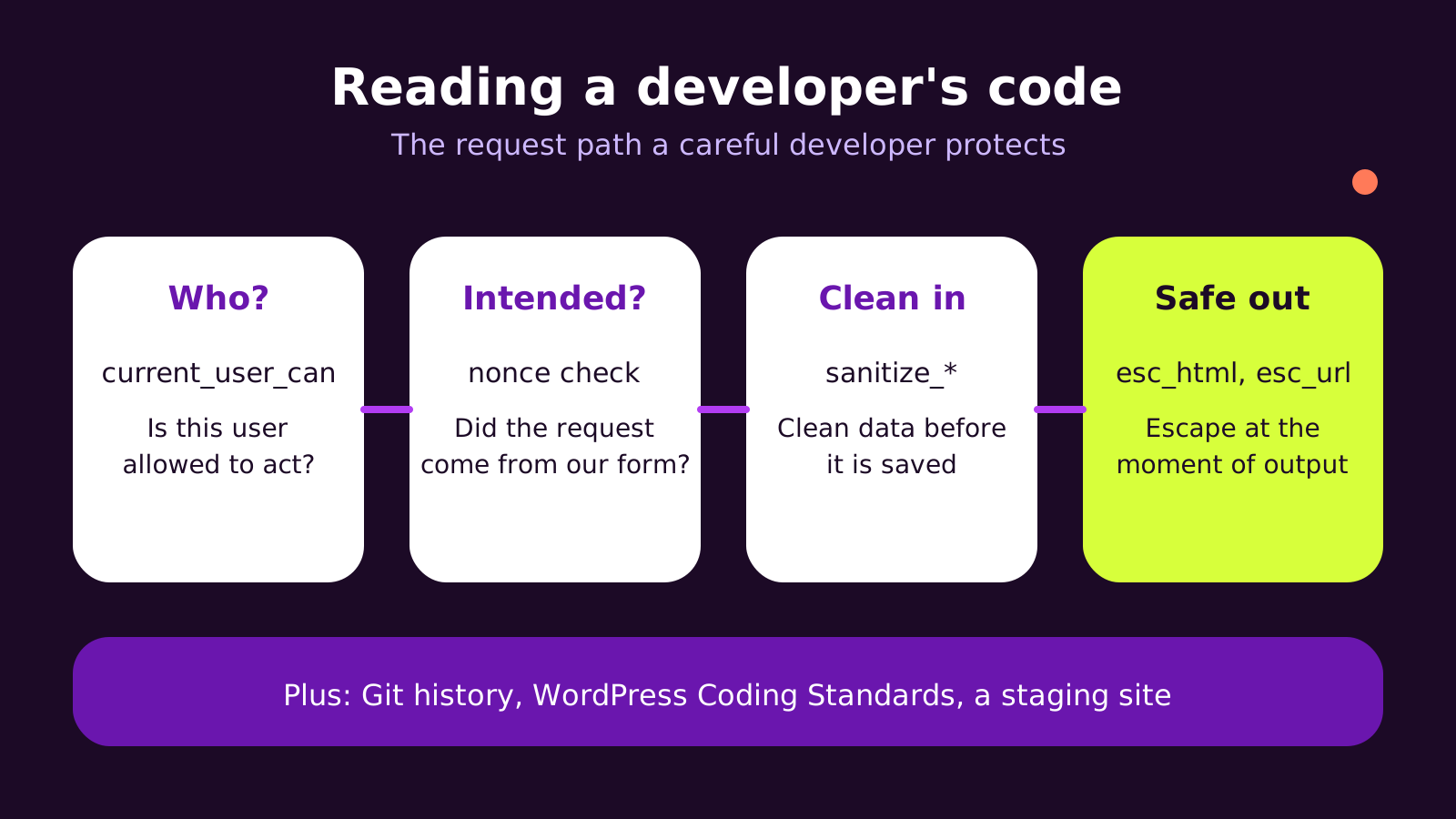
Here's a small form handler of the kind we'd expect in a custom plugin. It checks the user's permission, verifies the nonce, cleans the input before saving and escapes it on output. If a candidate's code never contains functions like these, ask why.
// In a custom plugin file. Change 'acme' to your plugin prefix.
add_action( 'admin_post_acme_save_note', function () {
    if ( ! current_user_can( 'manage_options' ) ) {
        wp_die( esc_html__( 'You are not allowed to do this.', 'acme' ), 403 );
    }
    check_admin_referer( 'acme_save_note' );

    $note = isset( $_POST['note'] )
        ? sanitize_textarea_field( wp_unslash( $_POST['note'] ) )
        : '';
    update_option( 'acme_note', $note );

    wp_safe_redirect( admin_url( 'options-general.php?page=acme-note&saved=1' ) );
    exit;
} );

// Wherever the note is displayed: escape at the point of output.
echo esc_html( get_option( 'acme_note', '' ) );
The form that posts to it would include wp_nonce_field( 'acme_save_note' ) and a hidden action field set to acme_save_note. You can also ask a developer to run the WordPress Coding Standards against their own work. With Composer, that's:
composer config allow-plugins.dealerdirect/phpcodesniffer-composer-installer true
composer require --dev wp-coding-standards/wpcs:"^3.0"
vendor/bin/phpcs --standard=WordPress wp-content/plugins/your-plugin
A handful of warnings is normal. A developer who has never heard of the tool, or a wall of security errors, tells you more.
4. Run a small paid trial
Pick a real task from your backlog: a new block, a template change, a plugin conflict. Give access to a staging copy, never production, and pay for the time. You're watching how they ask questions, how they report progress, whether the work arrives in Git with a clear note, and whether it still works after you update plugins.
5. Agree the contract and access
Put scope, change requests, payment milestones and code ownership in writing. Give the developer their own named WordPress, hosting and Git accounts rather than sharing yours, so access can be removed cleanly later. Our post on what you should own when you hire an agency lists the accounts to keep in your name. Have a qualified adviser review any contract terms you're unsure about.
6. Plan the handover before day one
Agree now what you'll receive at the end: the repository, a list of plugins and licenses in your name, admin notes for editors, and who handles updates afterwards.
What we've learned from rescuing WordPress builds
When we take over a WordPress site that someone else built, the same patterns tend to come up.
- Too many plugins doing small jobs. Each one is another update and another possible conflict. We'd rather see a few well-maintained plugins and a little custom code than dozens of single-purpose add-ons.
- Edits to a parent theme or plugin files. These vanish on the next update. Changes belong in a child theme, a custom plugin or hooks.
- No staging site. Without one, every change is tested on customers.
- Old PHP. Sites left on unsupported PHP versions miss security fixes. Ask what PHP version the developer targets; our note on which PHP version WordPress should run explains the current position.
Our recommendation: for a brochure site with light editing needs, a solid freelancer who builds with blocks is often enough. For WooCommerce, custom integrations or a site the business depends on daily, we'd lean toward a small team, because you need cover for holidays, emergencies and the skills one person rarely has all of. The trade-off is cost and a little more process.
Troubleshooting a new developer relationship
| Symptom | Likely cause | Fix |
|---|---|---|
| The site breaks after every plugin update | Custom changes were made inside theme or plugin files | Move changes into a child theme or custom plugin, and test updates on staging first |
| Pages look right on desktop but slow and jumpy on phones | Heavy page builder output, unoptimized images, no caching | Ask for a performance pass; see our guide to fixing a slow WordPress site |
| Nobody can explain how a feature works | No version control or documentation | Make a Git repository and a short README part of every milestone |
| You can't remove a former developer's access | Shared admin and hosting logins | Create named accounts, rotate passwords and turn on two-factor sign-in |
| Quotes vary wildly for the same job | The brief is too loose, so each developer guessed a different scope | Tighten the brief and ask everyone to quote the same feature list |
Questions people ask
Should I hire a freelancer or an agency for WordPress?
It depends on what the site does for the business. A freelancer suits a focused, well-defined build. An agency suits sites with several specialties, ongoing changes or a need for cover when someone is away.
Do I need a developer if I use a page builder?
For small content changes, often not. You'll want one for custom features, integrations, performance work and anything that touches checkout or user data.
How do I check a developer's work if I'm not technical?
Use the trial task and ask a second developer to review it. Look for Git history, a staging site and clear written notes. How they explain their choices to you matters as much as the code.
Why it matters for your business
Your WordPress site is where leads arrive and orders are placed. Hiring the right developer decides whether it stays fast, secure and easy to edit for years, or needs rebuilding the next time something changes. Checking code, running a trial and agreeing ownership up front costs a little time and helps you avoid the most common and painful outcomes.
A quick checklist before you sign:
- Brief written and shared with every candidate
- Specialty matched to the job
- Real code reviewed, with permission checks, nonces and escaping in place
- Paid trial completed on staging
- Ownership, named accounts and handover agreed in writing
If you'd like a team that works this way, our WordPress development service covers builds, rescues and ongoing care, and you can tell us about your project whenever you're ready.
(over to you)
Planning a build like this?
Tell us what you're building and we'll come back with ideas and next steps.
Keep reading
All articles WordPress
· 5 min read
WooCommerce multi-currency: how to set it up without surprises
Read article
 WordPress
· 5 min read
Best PHP version for WordPress in 2026: upgrade before 8.2 ends
Read article
 WordPress
· 5 min read
WooCommerce payment gateways in India: how to set up checkout properly
Read article