Adobe Commerce Cloud security enforcement: what to do now
Adobe Commerce Cloud security enforcement began with the October 30, 2026 service deadline. How to check MariaDB, OpenSearch and RabbitMQ versions, upgrade them safely and plan for the 2027 dates.
If your store runs on Adobe Commerce on Cloud, the first deadline in Adobe's security enforcement policy passed on October 30, 2026. Environments still on older MariaDB, Elasticsearch or RabbitMQ services are now outside the policy, and Adobe says it can restrict access to environments that stay that way.
Start by checking the service versions in every environment, not just Production. Then confirm which service versions your Commerce release supports, because an older release may need its own upgrade first.
Make the change in an Integration environment by editing the services file, reindex search, and test search, checkout and anything that uses message queues. On Pro plans, Staging and Production service changes go through an Adobe support ticket, so raise it early and keep a record of the result.
The next dates arrive in 2027, covering older PHP, older MariaDB and older Commerce versions. Use this round to plan the next one, and to decide whether to upgrade, move to the Cloud Service, or replatform.
If your store runs on Adobe Commerce on Cloud and nobody has touched its database, search or queue services in a while, this post is for you. Adobe Commerce Cloud security enforcement started with a dependency deadline on October 30, 2026, and environments still on older services are now out of line with Adobe's policy. Below we explain what the policy covers, how to check where you stand, how to upgrade the services safely, and what to plan for the 2027 dates.
The problem: the store works, but its services are out of date
Most Commerce Cloud stores we look at were set up years ago and have had code upgrades since, but the services underneath them were left alone. The storefront runs fine, so nobody notices that the database is still on an old MariaDB release, catalog search still points at Elasticsearch, or the message queue runs an old RabbitMQ version.
Adobe's page Required actions and deadlines to secure Commerce environments changes that. It sets dates by which Cloud environments must move off unsupported services and versions. The first date, October 30, 2026, covered older MariaDB, Elasticsearch and older RabbitMQ. The policy says Adobe can act on environments that stay non-compliant, which can include limiting access or suspending traffic. For a store owner, that turns a quiet technical debt into a trading risk.
How the enforcement policy actually works
On Commerce Cloud, Adobe runs the infrastructure but you choose the service versions in your project files. Each service is declared in .magento/services.yaml and connected to the application through relationships in .magento.app.yaml. That split is why the policy exists: Adobe can't patch a service you have pinned to an old version, so it sets deadlines and asks you to move.
The policy groups requirements by date:
- October 30, 2026: MariaDB 10.5 and older move to a newer supported release, Elasticsearch is replaced by OpenSearch, and older RabbitMQ releases move to a supported one.
- May 31, 2027: older PHP versions and the next band of older MariaDB releases.
- June 2027 and June 2028: the oldest 2.4.x Commerce versions have to be upgraded or migrated, starting with 2.4.4 and 2.4.5.
Check the exact version for each row in Adobe's table for your release, because the target OpenSearch version, for example, depends on which Commerce version you run. The important point is the dependency chain. A service can only move to a version your Commerce release supports, so an old Commerce version may block a service upgrade until the code is upgraded first. That's why some stores that missed October 30 can't fix it with a single config change.
How to upgrade your Commerce Cloud services
This is the order we follow. It keeps every change testable before it reaches customers.
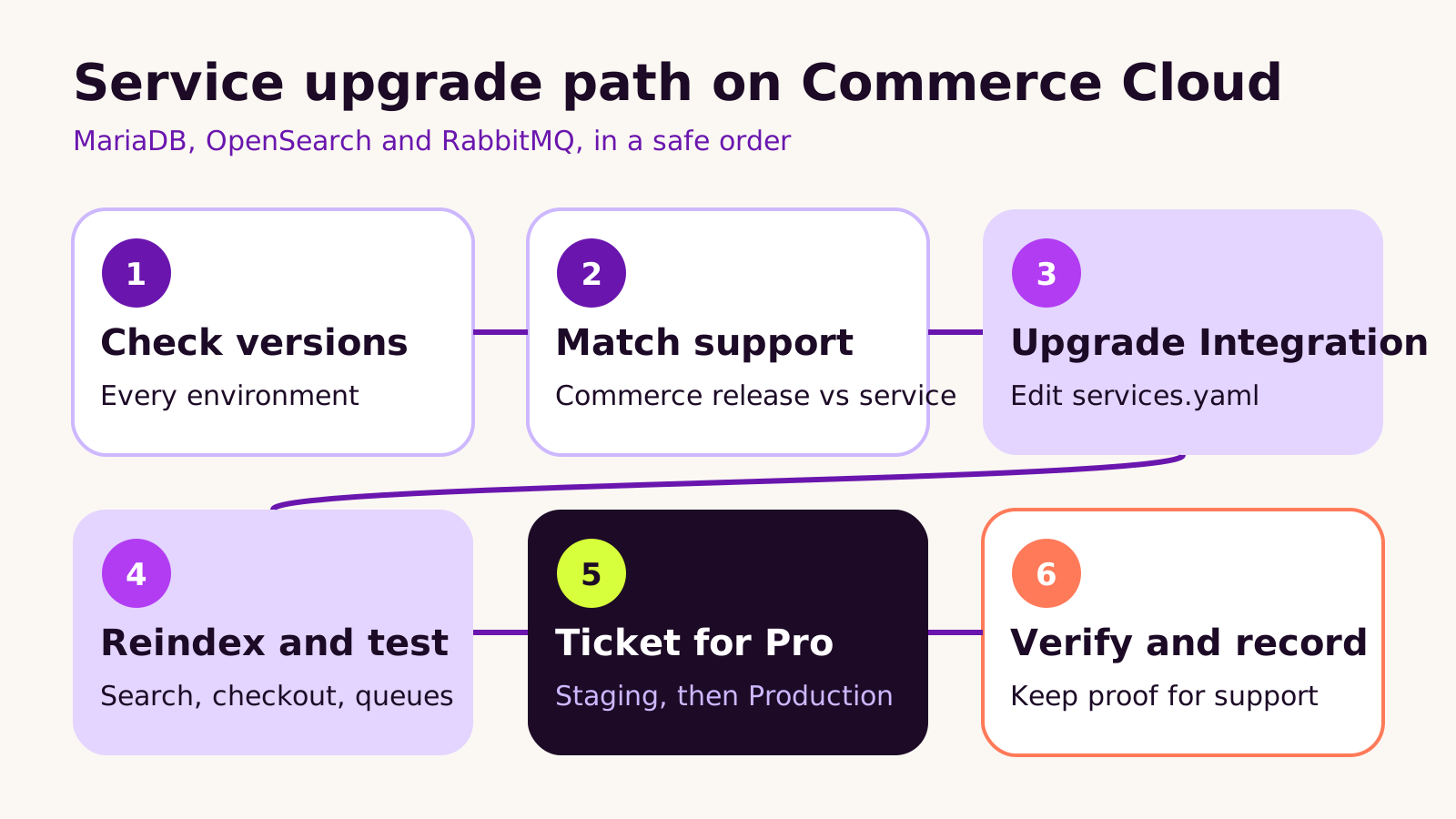
1. Check versions in every environment
Run magento-cloud environment:relationships against each environment (or open .magento/services.yaml on each branch) and write down the MariaDB, search and RabbitMQ versions. Do Integration, Staging and Production separately. They drift apart more often than people expect, and the policy applies to all of them.
2. Confirm what your Commerce release supports
Compare your installed version (bin/magento --version) with Adobe's system requirements for that release. If the required service version isn't supported on your release, plan the Commerce upgrade first and treat the service move as part of it.
3. Upgrade in an Integration environment
Edit .magento/services.yaml on a branch and push it. A typical result looks like this; the version numbers are examples, so use the ones Adobe lists for your release:
# .magento/services.yaml
mysql:
    type: mysql:10.6
    disk: 5120

opensearch:
    type: opensearch:2.19
    disk: 1024

rabbitmq:
    type: rabbitmq:3.13
    disk: 1024

# .magento.app.yaml (relationships section)
relationships:
    database: "mysql:mysql"
    opensearch: "opensearch:opensearch"
    rabbitmq: "rabbitmq:rabbitmq"
When you move from Elasticsearch, remove the old elasticsearch service and relationship rather than leaving both. The cloud deploy tools read the relationships and set the search engine for you; if you have hard-coded search settings in .magento.env.yaml, update or remove them. Service versions can only go up, never down, so back up the database before you push.
4. Reindex and test the parts that touch each service
A new search engine starts with an empty index, so run bin/magento indexer:reindex catalogsearch_fulltext and check category pages, layered navigation and the search results page. Then place test orders, run a product import, and confirm queue consumers start and process messages.
5. Raise the ticket for Staging and Production on Pro
On Pro plans, service changes on Staging and Production are applied by Adobe through a support ticket, not by your push. List the environments, the current and target versions, and a preferred window. Ask for Staging first, test it, then Production. On Starter, the same services.yaml change merged to your production branch does the job.
6. Verify and keep a record
Run the relationships command again after each change and save the output with the ticket. If Adobe or your own team later asks whether an environment is compliant, you have the proof in one place.
What we've learned from Commerce Cloud service upgrades
The service change itself is rarely the hard part. The surprises come from things built around it:
- Extensions that talk to search directly. Some search and merchandising modules call the Elasticsearch client or expect its index names. Check every search-related module for OpenSearch support before the move.
- Forgotten environments. Old Integration branches still declare old services. Delete branches you don't use rather than upgrading them.
- Treating it as a one-off. The 2027 dates cover PHP and Commerce versions, which are bigger jobs. We'd plan both rounds together rather than paying for discovery twice.
We'd also use this moment to ask the bigger question. If your store is on 2.4.4 or 2.4.5, the choice is between upgrading on Cloud, moving to Adobe Commerce as a Cloud Service, or replatforming. Each is reasonable for different catalogues and budgets; what isn't reasonable is waiting for the next deadline to decide. Our guide to Magento websites, stores and store views is a useful check on how much configuration any move would need to carry across.
Troubleshooting
| Symptom | Likely cause | Fix |
|---|---|---|
| Deploy fails after changing the search service | Old elasticsearch relationship or hard-coded search settings still present |
Remove the old relationship and any search engine settings in .magento.env.yaml, then redeploy |
| Category pages or search show no products | The new OpenSearch index is empty | Run a full catalogsearch_fulltext reindex and check cron is running |
| Orders place but emails, exports or imports stall | Queue consumers not reconnecting to the upgraded RabbitMQ | Check CRON_CONSUMERS_RUNNER settings and restart consumers with a redeploy |
| The push is refused with a version error | The target service version isn't supported on your Commerce release, or it is a downgrade | Confirm the system requirements for your release; upgrade Commerce first if needed |
Questions people ask
We missed October 30. Is it too late?
No. Start now, upgrade Integration first, and open the support ticket for Staging and Production as soon as testing passes. Tell Adobe support what you're doing and when.
Does this apply to self-hosted Magento Open Source?
The enforcement policy doesn't, but the same services reach end of life everywhere. Upgrading them on your own hosting is still part of good security practice.
Can our in-house team do this?
If they know Commerce Cloud's project files and deploy process, yes. If not, it's a well-scoped job for an agency, and you should keep access in your own accounts as described in our post on website ownership when you hire an agency.
Why it matters for your store
A store on unsupported services carries two risks: known security issues that won't be fixed, and a platform owner that can now restrict access to it. Both are avoidable with a planned, tested upgrade, and both fit into the wider routine in our website security checklist.
A short checklist to finish:
- Record service versions for every environment.
- Check them against your Commerce release's requirements.
- Upgrade, reindex and test in Integration.
- Ticket Staging, then Production, and save the proof.
- Put the May 31, 2027 and June 2027 dates in your roadmap now.
If you'd like a hand planning this round and the next, our Magento and Adobe Commerce development team is happy to talk it through.
(over to you)
Planning a build like this?
Tell us what you're building and we'll come back with ideas and next steps.