Magento multi-store setup: websites, stores and views explained
A practical Magento multi-store setup guide: how websites, stores and store views differ, which one each language, price or brand needs, and how to configure, route and troubleshoot them.
Magento can run several shops from one installation, but only if you pick the right building block for each difference. That is the main lesson of this guide.
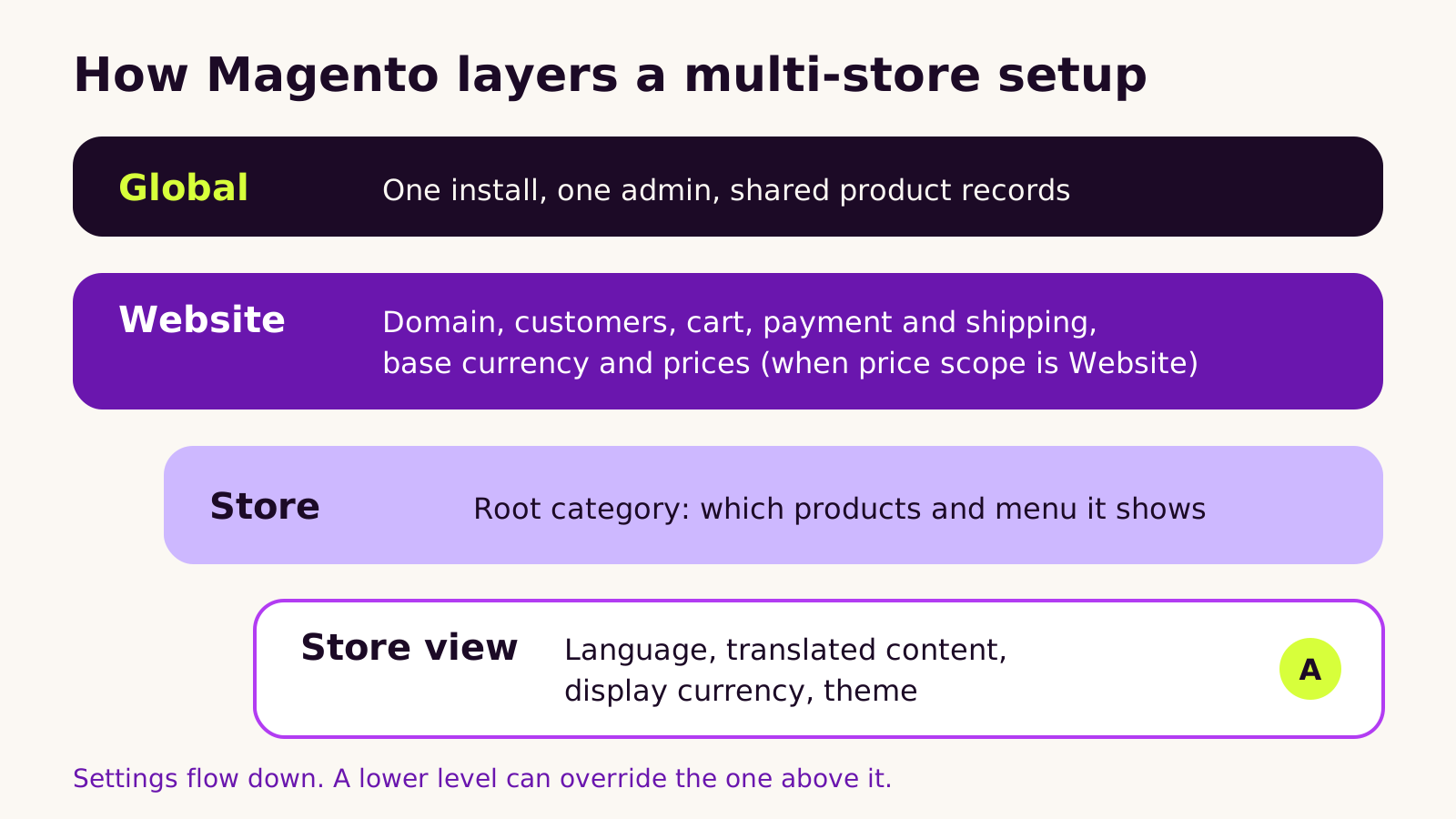
Magento has four levels. Global covers the whole install. A website is the commercial boundary, with its own checkout, payment methods, base currency and, if you allow it, its own prices and customers. A store decides which products are sold, through its root category. A store view decides presentation: language, translations, display currency and theme.
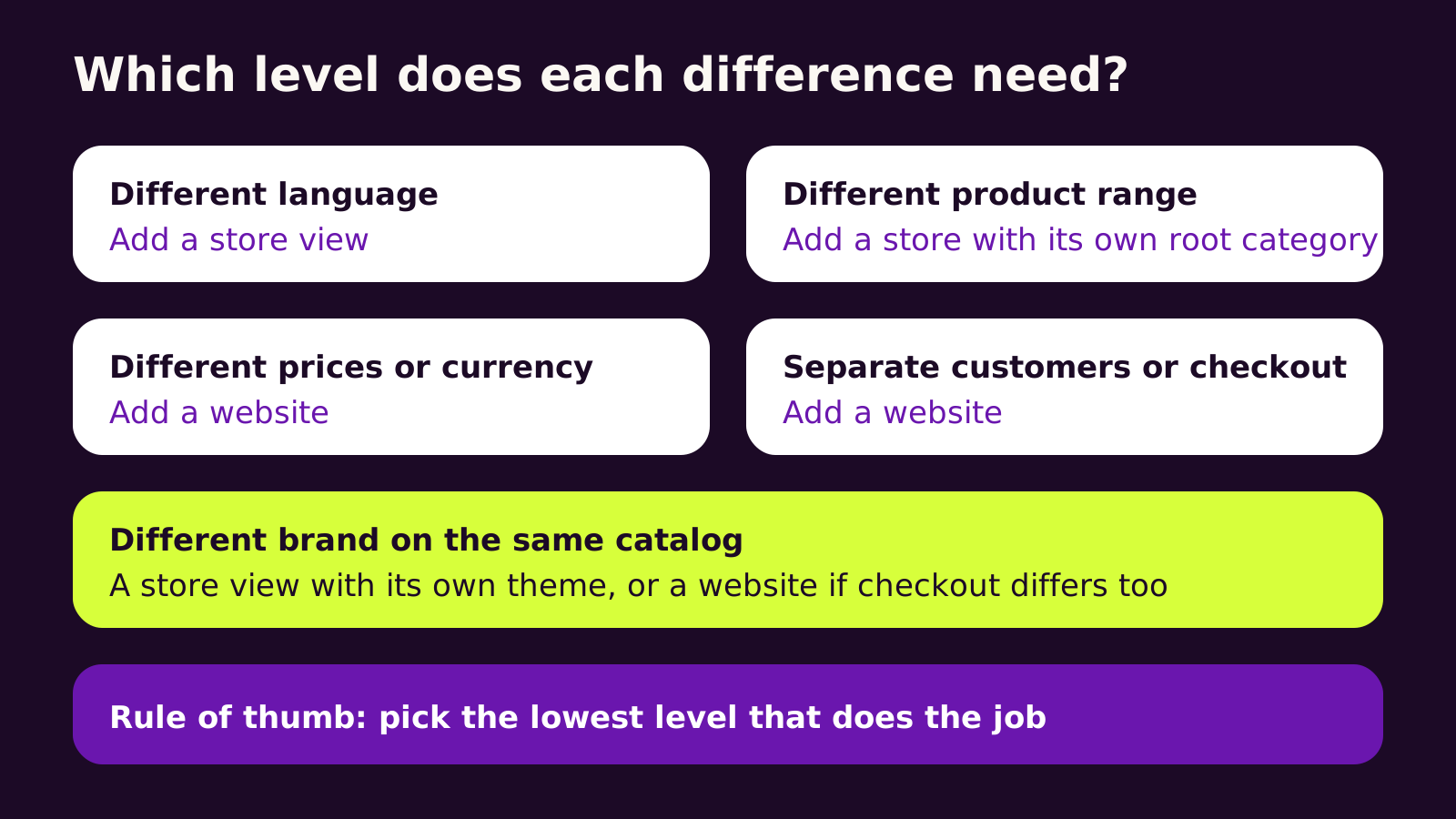
Use the lowest level that does the job. A new language is a store view. A different range is a store. Different prices, customers or checkout need a website.
To build it, set price scope and customer account sharing first. Create the structure under Stores, All Stores, using permanent codes. Set base URLs per website, point your web server at each website's code, assign products, translate, reindex and test every checkout.
Watch for settings overridden at a lower scope, products not assigned to a website, and right to left layouts that need theme work.
Sketch your structure before importing any data, and ask for help if you want it checked.
This guide is for store owners and e-commerce managers planning a Magento multi-store setup: a second brand, a wholesale site, or the same shop in another language or currency. You'll learn how websites, stores and store views relate, which one each kind of difference needs, how to build it in the Admin and on the server, and how to fix the problems teams usually hit.
The problem: one catalog, several shops, and settings that leak
Most merchants come to us with a version of the same request. "We want a second storefront, but we don't want to run two Magentos." Maybe it's a trade site with different prices, a sister brand that sells half the range, or an English and Arabic version of the main shop.
Magento (and Adobe Commerce) can do all of this from one installation. The trouble is that it gives you three building blocks with similar names, and choosing the wrong one is painful to undo. Build a language as a separate website and customers suddenly need two accounts. Build a trade site as a store view and you discover prices can't differ. The structure touches configuration, indexing, URLs and reporting, so it pays to get it right before anyone imports a product.
How Magento websites, stores and store views actually work
Every Magento install has the same four levels of scope. Think of them as layers of a settings cake, where each layer can override the one above it.
- Global is the whole installation. Product records, attributes and the admin itself live here.
- Website is the commercial boundary. It owns its own customers (if you choose), cart and checkout, payment and shipping methods, tax setup, base currency and, when price scope is set to Website, its own prices. Usually one domain per website.
- Store (sometimes called a store group) decides what is sold. Each store points at a root category, which becomes its menu and catalog.
- Store view decides how it's presented: language, translated product names and descriptions, display currency and theme. Shoppers switch between store views with the language switcher.
Why does it behave this way? Because the database stores a value per scope only when you override it. If a store view has no value for a product name, Magento falls back to the default (global) value. That's what makes translation cheap, and it's also why a setting changed at the wrong scope seems to "do nothing".
Two settings shape everything else, so decide them first:
- Catalog Price Scope at Stores > Configuration > Catalog > Catalog > Price. Global means one price everywhere; Website lets each website have its own prices and base currency.
- Share Customer Accounts at Stores > Configuration > Customers > Customer Configuration > Account Sharing Options. Global lets one login work on every website; Per Website keeps customer bases apart.
Choosing the right level for each difference
Our rule of thumb: use the lowest level that does the job. Store views are light, websites are heavy. Every extra website multiplies configuration, payment setup and testing.
| What should differ | Use | Why |
|---|---|---|
| Language, translated content | Store view | Same cart and customers, content overrides per view |
| Display currency only | Store view | Converted from the base currency using your rates |
| Product range or menu | Store | Each store has its own root category |
| Prices, base currency, payment methods | Website | These are set at website scope |
| Separate customers, separate checkout | Website | Carts and (optionally) accounts belong to a website |
How to build a Magento multi-store setup, step by step
1. Create the structure in the Admin
- 1 Create root categories first under Catalog > Categories if stores will sell different ranges.
- 2 Go to Stores > Settings > All Stores. Create the website, then the store (choosing its root category), then each store view.
-
3
Give every level a short, permanent code, such as
tradeormain_ar. The server and deployment scripts refer to these codes, so don't rename them later.
2. Set base URLs and scope settings
Switch the Scope dropdown at the top of Stores > Configuration to the new website and set its base URLs under General > Web. Then work down: language under General > Locale Options per store view, allowed and display currencies under General > Currency Setup, and payment and shipping methods per website. Settings you keep in code can be applied from the command line:
# Base URL for the "trade" website
bin/magento config:set --scope=websites --scope-code=trade \
  web/secure/base_url https://trade.example.com/

# Unsecure base URL for the same website
bin/magento config:set --scope=websites --scope-code=trade \
  web/unsecure/base_url https://trade.example.com/

bin/magento cache:flush
Swap in your own codes and domain. The same command takes --scope=stores for a store view, which catches people out: in config:set, "stores" means store views, not stores.
3. Tell the web server which website to load
Magento picks the website or store view from two variables, MAGE_RUN_TYPE and MAGE_RUN_CODE. On nginx, map each host name to a code in the server config (this follows the approach in Adobe's multi-site guide for 2.4.x, including 2.4.8):
map $http_host $MAGE_RUN_CODE {
    default            base;
    trade.example.com  trade;
}

server {
    listen 443 ssl;
    server_name www.example.com trade.example.com;
    set $MAGE_ROOT /var/www/magento;
    set $MAGE_RUN_TYPE website;
    include /var/www/magento/nginx.conf;
}
In your copy of nginx.conf.sample, pass both values to PHP inside the PHP entry point block with fastcgi_param MAGE_RUN_TYPE $MAGE_RUN_TYPE; and fastcgi_param MAGE_RUN_CODE $MAGE_RUN_CODE;. On Adobe Commerce on cloud infrastructure the same job is done in magento-vars.php and routes.yaml. Store views on one domain don't need any of this: Magento handles them with the store switcher, or with store codes in URLs if you turn on Add Store Code to Urls under General > Web > Url Options.
4. Assign products, translate, reindex
Products must be assigned to each website in the product's Product in Websites section, or they simply won't appear. Translate names, descriptions and URL keys per store view, run bin/magento indexer:reindex, and test checkout end to end on every website.
What we've learned from Magento multi-store projects
- Plan the tree before the data. Moving a store view to another website later means reworking orders, customers and URLs. We sketch the structure with the client before anything is built.
- Don't add a website just for a language. It splits carts and, with Per Website sharing, customer accounts too.
- Every website is a checkout to maintain. Payment credentials, tax rules, emails and shipping all need setting and testing per website.
- Right-to-left needs theme work. Setting an Arabic language doesn't flip a layout by itself. The theme needs RTL styles, and extensions need checking for hard-coded left and right spacing.
- Hreflang isn't built in. Core Magento doesn't output hreflang tags between store views, so plan an extension or a small custom module.
Troubleshooting
-
Symptom: the new domain shows the main store. Cause: the run code doesn't reach PHP, or the code doesn't match the Admin. Fix: check the
fastcgi_paramlines and compare codes withbin/magento store:website:list. - Symptom: products missing on the new site. Cause: not assigned to the website, or outside the store's root category. Fix: update Product in Websites and category assignments, then reindex.
- Symptom: a setting change has no effect. Cause: a lower scope overrides it. Fix: switch the scope dropdown to the website or store view and tick Use Default or Use Website.
- Symptom: prices can't be edited per site. Cause: Catalog Price Scope is Global. Fix: set it to Website and reindex prices.
- Symptom: shoppers are logged out when moving between sites. Cause: accounts are shared Per Website, or the domains don't share cookies. Fix: decide whether shared accounts are wanted and adjust Account Sharing Options.
Questions people ask
Does Magento Open Source support multiple websites?
Yes. Websites, stores and store views are part of the core in both Magento Open Source and Adobe Commerce. Adobe Commerce adds B2B features such as shared catalogs on top, which help when trade buyers need their own catalogs and prices.
Can each website use a different theme?
Yes. The theme is set under Content > Design > Configuration, per website or store view. Two brands can share one catalog and still look completely different.
Is one install with many websites better than separate installs?
Usually, if the sites share products and a team. One install means one place to update, patch and report. Separate installs make sense when the businesses share almost nothing.
Why the structure matters for your business
A sound multi-store structure lets you open a new brand, trade channel or language without a second platform, a second set of patches or duplicated product data. A poor one shows up later as double accounts, wrong prices and slow launches. If you already run Magento, read our Magento to Shopify migration plan to weigh staying against moving, and see how we handle languages on other platforms in our Next.js multi-language and RTL guide and our WooCommerce multi-currency setup guide.
Quick checklist before you build:
- 1 List what must differ: language, range, prices, customers, checkout.
- 2 Map each difference to the lowest level that handles it.
- 3 Set Catalog Price Scope and customer account sharing first.
- 4 Agree permanent codes, then build in the Admin and on the server.
- 5 Assign products, translate, reindex and test every checkout.
If you'd like a second pair of eyes on your structure, our Magento and Adobe Commerce development team is happy to talk it through with you.
(over to you)
Planning a build like this?
Tell us what you're building and we'll come back with ideas and next steps.