Brand guidelines AI tools can read: what to ask your agency
Adobe Firefly can now build a brand kit from your brand guidelines PDF and check designs against it (November 2026). What a machine-readable guide contains, what to ask your agency to deliver, and fixes for common problems.
If your brand guidelines only work as a nice-looking PDF, AI design tools will misread them. Ask your agency for guidelines that software can read.
In November 2026, at Adobe MAX, Adobe put Firefly Design into public beta, and Firefly's assistant can now build a brand kit from a brand guidelines PDF and check a design against it. Those checks can only test what is written as exact values, like color codes and font names.
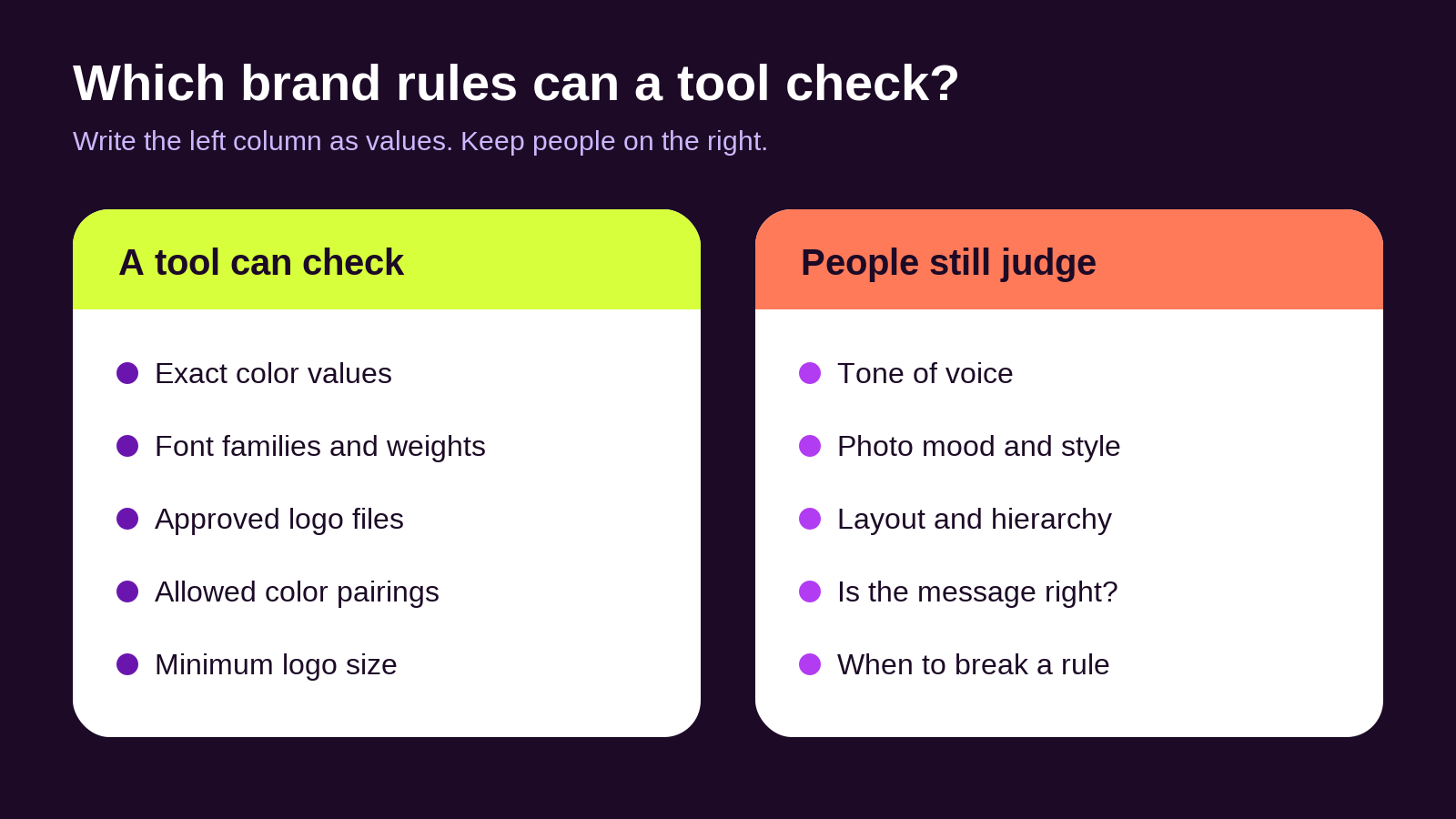
So the guide needs a plain text summary page, every color written as a code with its role, exact font family names, proper logo files, and measurable logo rules. Tone of voice and photo style stay with people, so give examples of what to do and what to avoid.
Put the same values in your website code as design tokens, so the site, the store and the ads all match. Then test it: upload the guide, compare the kit the tool produces with the source, and fix the guide, not the kit.
If you are hiring a brand or web agency, add these items to your brief and ask to see the token file and the logo files before you sign off.
If you're hiring a brand or web design agency right now, ask for brand guidelines that software can read, not just a well-designed PDF. This post is for founders and marketing leads who own a brand and want it to stay consistent as more of their ads, social posts and web pages are made with AI design tools. You'll learn what changed, how these tools read your guide, and exactly what to ask your agency to deliver.
Why a beautiful brand guidelines PDF isn't enough any more
On 10 November 2026, at Adobe MAX, Adobe opened Firefly Design as a public beta. In the same release, Adobe's help pages describe Firefly's AI Assistant extracting a brand kit from a brand guidelines PDF, using it to generate on-brand images, and running a brand check on a design. Adobe also announced that brand-standards features are coming to Photoshop, Illustrator and InDesign. Other design and marketing tools are heading the same way: you hand over a document, the tool turns it into rules, and it starts judging your team's work against them.
That's a problem for most brands, because their guidelines were written for people. Colors appear as swatches inside images. Fonts are named loosely ("our sans"). Logo rules are a page of pictures with red crosses. A designer reads all that and fills the gaps from experience. A tool reading the same file has to guess, and a guessed brand kit produces checks that pass work they shouldn't, or flag work that's fine.
It affects anyone whose brand book was last touched at launch: marketing teams producing campaign assets, store owners refreshing banners, and businesses whose agency handed over a file called "brand-book-final-v3".
How AI tools turn brand guidelines into a brand kit
It helps to think of it as two separate jobs.
Extraction is a reading job. The tool reads the text and images in your document and tries to fill a structured record: color values, font families, logo files, and a description of voice and imagery. Anything written as plain text with exact values is read exactly. Anything shown only as a picture has to be interpreted. Two slightly different purples in two sections? The tool has to pick one, and it may pick the wrong one. Adobe's own documentation for its brand features asks you to review what was extracted before relying on it, and that's sound advice for any tool.
Checking is a comparison job. Once the kit exists, a brand check compares a design against it. At the time of writing, Adobe's help page for Firefly's brand check says it looks at the colors and fonts in a design against the saved brand kit, while composition is reviewed separately. That tells you something useful: only the rules you've written as exact values can be checked reliably. Everything else becomes a hint for the generator and a job for a human reviewer.
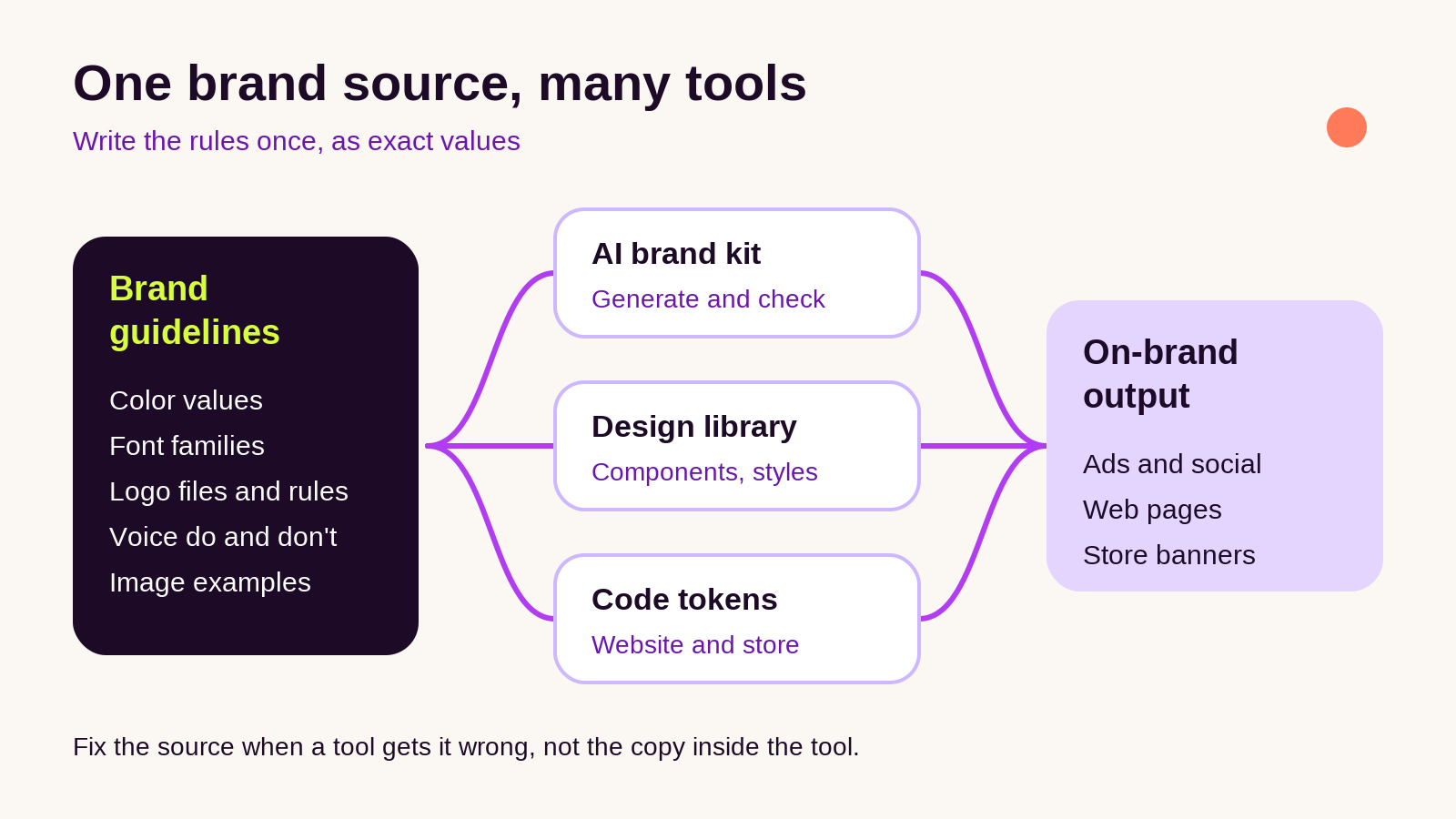
The same logic applies to your website. A theme, a Figma library and an AI brand kit are all copies of your guidelines. If each one was typed in by hand, they drift. If they all come from one set of written values, they stay in step.
How to write brand guidelines a tool can read
None of this means a dull document. Keep the design. Just make sure the facts are also there as text.
- 1 Add a plain text summary page at the front. One page, real text (not an exported image), listing every color, font and logo file by name. Extraction tools and new team members both start here.
- 2 Write every color as a value with a role. Give the hex code for screens, plus CMYK or a spot color reference if you print. Name the role: primary, accent, text, background. List which pairings are allowed, such as "accent text on dark background only".
- 3 Name fonts exactly. Use the family name as it appears in the licensed font files, the weights you use, and what each is for (headings, body, buttons). Add the web fallback stack, and say who holds the font licence for web and app use.
- 4 Make logo rules measurable. "Leave clear space equal to the height of the symbol" can be checked; "give it room to breathe" can't. State a minimum size, and supply SVG and PNG files with clear names.
- 5 Describe voice and imagery with examples. Short pairs of "write this, not this" and a few approved photos beat a list of adjectives. These rules stay human-judged, but examples give generators and reviewers something concrete.
- 6 Say where flexibility is allowed. If campaigns may use an extended palette, write that down, so a check doesn't flag every seasonal banner.
- 7 Mirror the values in code as design tokens. Your website and store should read colors and fonts from one file, not from values scattered through stylesheets.
A copy-ready token file for your website
Here's a minimal set of CSS custom properties that carries brand values into a site. It goes in your theme's main stylesheet (or a file it imports). Swap the example values for your own, then use the variables everywhere instead of hard-coded colors.
/* brand-tokens.css: brand values for the website, taken from the guidelines */
:root {
  /* Color roles */
  --brand-primary: #6A16AE;
  --brand-accent: #D7FF3B;
  --brand-text: #1C0A26;
  --brand-surface: #FBF8F3;
  --brand-on-primary: #FFFFFF;

  /* Type roles, with web fallbacks */
  --font-heading: "Bricolage Grotesque", Arial, sans-serif;
  --font-body: "Inter", Arial, sans-serif;
}

body {
  font-family: var(--font-body);
  color: var(--brand-text);
  background: var(--brand-surface);
}

h1, h2, h3 {
  font-family: var(--font-heading);
}

.button-primary {
  background: var(--brand-primary);
  color: var(--brand-on-primary);
}
On specific platforms the same values usually live in the platform's own settings: the color palette and typography sections of theme.json in a WordPress block theme, color and font settings in a Shopify theme's settings_schema.json, or Variables in Webflow. The point is the same everywhere: one named value per brand decision.
What to ask your agency to deliver
| Deliverable | Format | Why it matters |
|---|---|---|
| Brand guidelines | PDF with a real-text summary page | People and AI tools read the same facts |
| Logo files | SVG and PNG, plus print formats | The right file is used everywhere |
| Color and type values | Listed in the guide and in a token file | Exact matches across tools |
| Design library | Figma (or similar) file in your account | Your team can keep using it |
| Website tokens | CSS or theme settings in your repository | The site matches the guide |
| Font licences | Held in your business's name | No surprises when you change agency |
What we've learned building brand kits
The mistakes we see most often are small and fixable:
- Colors only as swatches. The guide shows a color but never writes its value, so every tool samples it slightly differently.
- Print and screen drift. The print color was converted by eye for the website years ago, and now there are two "primary" purples.
- Marketing names for fonts. The guide says one name, the font files say another, and the check flags a correct design.
- Treating a passed check as approval. A check on colors and fonts says nothing about whether the layout works or the message is right.
We'd recommend this level of precision for any business that has more than one person making content, or that plans to use AI tools for ads and social. For a very small business with one designer, a single summary page and a token file are usually enough. The trade-off is rigidity: the more exact the rules, the more a tool will push back on creative work. That's why the "where flexibility is allowed" section matters.
Troubleshooting common brand kit problems
- Symptom: the extracted brand kit has the wrong colors. Likely cause: colors appear only as images, or old values are still in the document. Fix: write each value as text on the summary page and delete superseded colors.
- Symptom: the brand check flags fonts you know are correct. Likely cause: the kit stored a different family name, or the design fell back to a substitute font. Fix: list the exact family names and weights, and make sure the font is available in the tool.
- Symptom: the website looks slightly off-brand next to the ads. Likely cause: the site has hard-coded colors that were never updated. Fix: move colors and fonts into tokens or theme settings and replace the hard-coded values.
- Symptom: generated images pass the check but feel wrong. Likely cause: imagery rules aren't checkable values. Fix: add approved and rejected example images, and keep a human sign-off for anything public.
Questions people ask
Do we need new brand guidelines because of AI tools?
Usually not. Most brands need a revision rather than a rebrand: a text summary page, exact values, tidy logo files and a token file. Your visual identity stays the same.
Can a brand check replace our designer's review?
No. A check compares a design with stored values such as colors and fonts. It can't tell whether the layout, image or message is right for the moment, so keep a person in the loop for anything public.
Who should own the brand files?
Your business should. Ask for the source files, logo masters, design library and font licences in your own accounts, as we explain in our guide to website ownership when you hire an agency.
Why it matters for your business
Your brand now gets applied by more hands than ever: designers, marketers, store apps and AI tools. Guidelines written as clear values keep all of them in step, cut the rework when an asset comes back off-brand, and outlast whichever tool is popular next year. They also make the website build smoother, because developers can turn your values straight into tokens, much like the design-to-code workflow in our post on Figma to code handoff with your agency.
A quick checklist to finish:
- Real-text summary page at the front of the guide
- Every color as a value with a role and allowed pairings
- Exact font names, weights and licence owner
- Measurable logo rules and properly named files
- Voice and imagery examples, plus where flexibility is allowed
- Website tokens that match the guide
- A test upload to your AI tool, checked against the source
If you're briefing an agency, add these items to your website brief for an agency so they're priced in from the start.
If you'd like a brand system that works for your team, your website and your AI tools alike, our brand identity and UI design service can help, or simply tell us about your project.
(over to you)
Planning a build like this?
Tell us what you're building and we'll come back with ideas and next steps.
Keep reading
All articles Platform guides
· 5 min read
European Accessibility Act: a website checklist for 2026
Read article
 Platform guides
· 5 min read
Website redesign without losing SEO: a step-by-step plan
Read article
 Platform guides
· 8 min read
Website brief for an agency: what to include, with a template
Read article