Figma to code handoff: code layers, GitHub and your agency
Figma code layers can now clone your GitHub repo and open pull requests. How the Figma to code handoff works in November 2026, who should own what, and how to set up review rules with your agency.
Figma code layers let designers work on real, running code from your repository, right on the Figma canvas. In early November 2026, Figma made GitHub cloning the default for new connections, and code layers started using AI credits on paid plans. That changes the Figma to code handoff, so it needs clear rules.
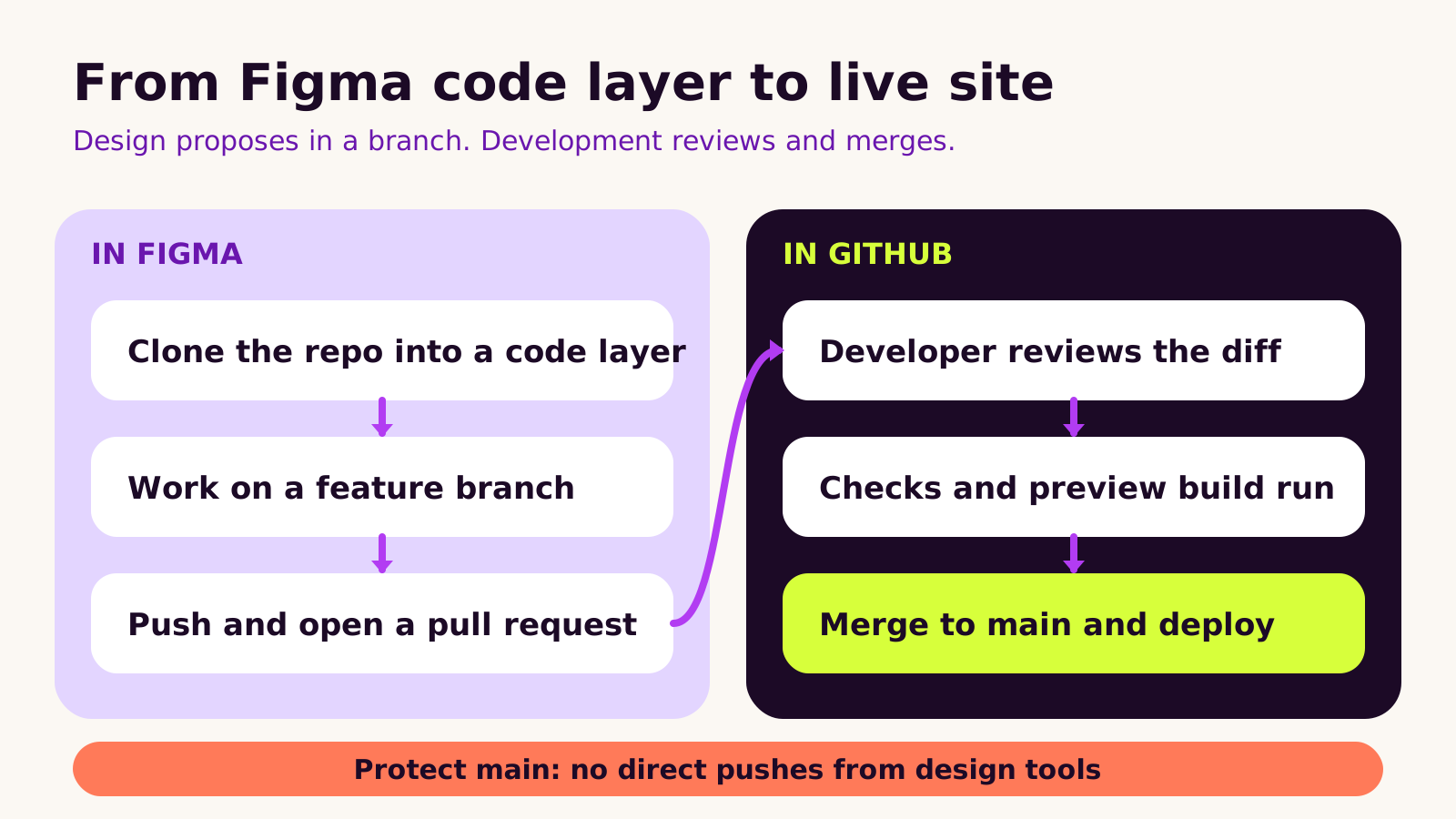
Here is how it works. An admin connects the Figma GitHub app to your organization. Each person authorizes their own GitHub account. A designer clones a repository into a code layer, works on a branch, and can push changes or open a pull request.
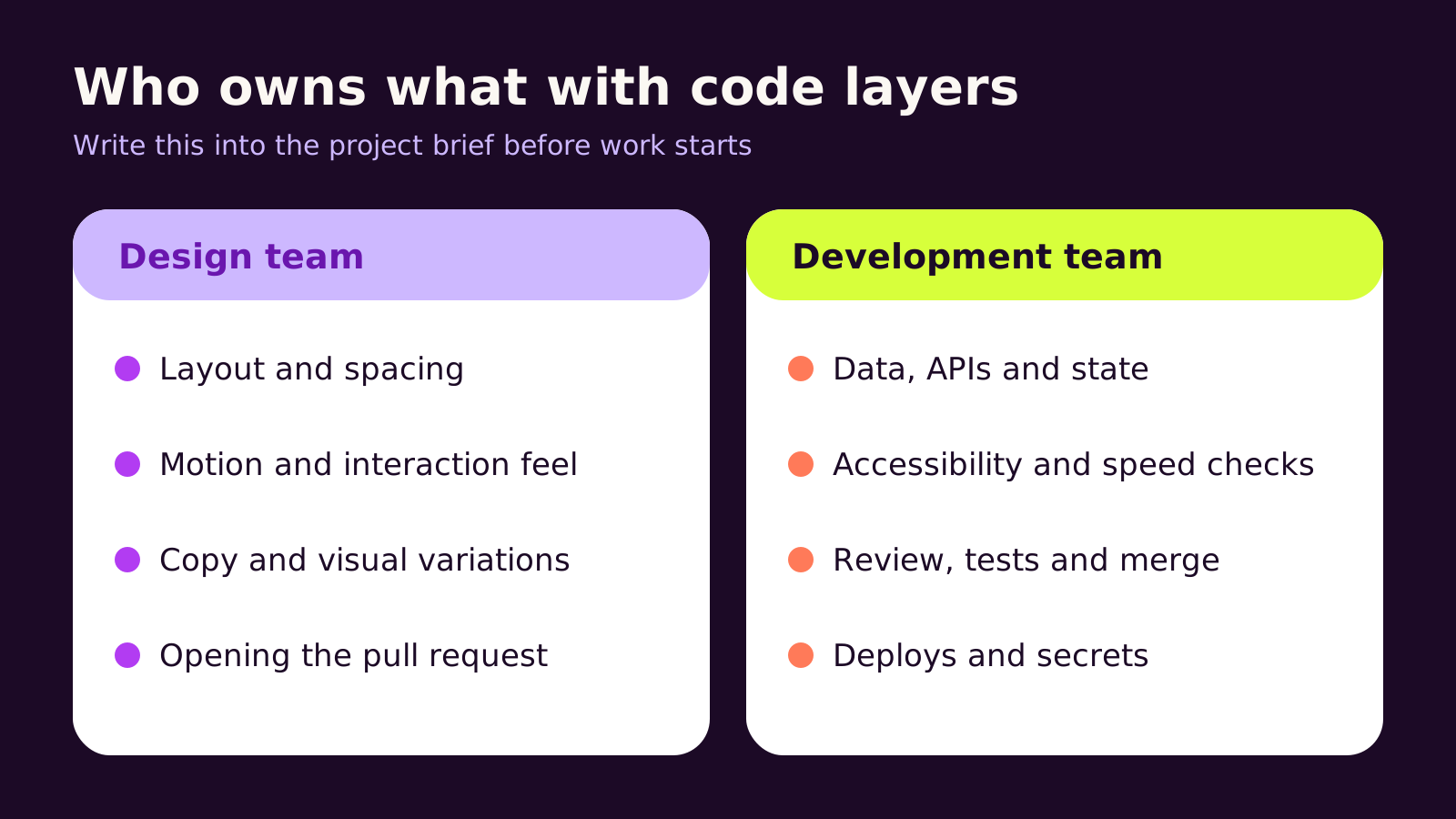
Our advice is simple. Let designers propose changes on feature branches, never on main. Protect the main branch in GitHub and require a developer review, using a code owners file. Agree who owns layout, motion and copy, and who owns data, accessibility, speed and deploys. Watch AI credit use, and check permissions when a push fails.
Next step: write these rules into your project brief before anyone connects GitHub to Figma, and ask your agency how they will review design pull requests.
If your designers work in Figma and your developers work in a React or Next.js codebase, the Figma to code handoff just changed. In November 2026 Figma made cloning GitHub repositories the default for new connections in code layers (November 3), taught its agent to read prototype connections when it builds a code layer, and ended the free period for code layers on paid plans (November 4), after which they use AI credits. This post is for founders, marketing leads and product owners who work with a design team or agency. You'll learn what code layers actually do, how to connect them to GitHub without putting your live site at risk, and which rules to agree with your agency first.
The problem: design and code drift apart
Most teams know the pattern. A designer polishes a pricing page in Figma. A developer rebuilds it by hand. Spacing shifts, an animation gets simplified, the hover state is forgotten, and two weeks later someone files a ticket that says "doesn't match the design".
Code layers promise to close that gap, because the designer is now editing the real component. That's genuinely useful. It also means a design tool can push code to the same repository that deploys your website. If nobody has agreed how that works, you swap one problem (drift) for a worse one (unreviewed changes reaching production).
How Figma code layers and GitHub actually work
A code layer is an interactive prototype backed by running code that sits on the Figma canvas next to ordinary design layers. It's still in open beta. You can put several running variations side by side, and Figma's Extract designs feature can turn parts of a code layer back into editable Figma layers.
The GitHub link needs two separate connections, and this trips people up:
- Organization level: a Figma org admin installs the Figma GitHub app on your GitHub organization and chooses which repositories it can see.
- Personal level: each designer then authorizes their own GitHub account. Their access in GitHub still decides what they can push.
Once both are in place, a designer picks a repository to clone into a code layer. Figma keeps its own clone and selects the main branch by default, though another branch can be chosen. From the code editor's branch controls they can create branches, push, and, when working on a branch other than the one they cloned, open a pull request for review in GitHub. If the remote branch has moved on since the clone, the push fails and the Figma agent can pull the new changes in and help resolve conflicts.
The important detail is that last point about branches. If a designer works directly on the branch they cloned, a push lands on that same branch in your real repository. If that branch is main and nothing protects it, the change can go straight to your deploy pipeline.
Two smaller points matter for budgets. Since November 4, 2026, creating and editing in code layers uses AI credits like Figma's other agent features, and the cost depends on how complex the task is. Uploaded folders, by contrast, have no live GitHub connection at all, so you can't push or open a pull request from them.
How to set up a safe Figma to code handoff
Here's the setup we'd use on most projects. It takes an afternoon and saves a lot of awkward conversations.
1. Limit what the Figma GitHub app can see
When your admin installs the app, choose Only select repositories rather than all of them. Give it the front-end repository or a dedicated component library, not the repository that holds your back end, infrastructure scripts or anything with sensitive configuration.
2. Protect the main branch
In GitHub, open the repository and go to Settings > Rules > Rulesets (or Settings > Branches on older setups). Target the default branch and switch on:
- Require a pull request before merging
- Require review from Code Owners
- Require status checks to pass (your build, lint and tests)
- Block force pushes
With these in place, a designer's push to main is refused and they're nudged to work on a branch and open a pull request instead.
3. Add a code owners file
A CODEOWNERS file tells GitHub who must approve changes to which folders. Put it at .github/CODEOWNERS on the default branch and replace the team names with your own:
# .github/CODEOWNERS
# Every pull request, including ones opened from Figma,
# needs approval from a developer.
*                    @your-org/web-developers

# Shared UI components: a developer and the design system lead.
/src/components/     @your-org/web-developers @your-org/design-system

# Data fetching, config and deploy files: developers only.
/src/lib/            @your-org/web-developers
/next.config.ts      @your-org/web-developers
/.github/            @your-org/web-developers
Later lines win when patterns overlap, so keep the catch-all * rule at the top. Teams listed here need write access to the repository, or GitHub will ignore them.
4. Agree a branch naming habit
Something like design/pricing-hover-states makes Figma-originated work easy to spot in the pull request list and easy to filter in your preview deploys.
5. Turn on preview builds
If your hosting creates a preview URL for each pull request, reviewers can check the change in a real browser before anyone reads the diff. For marketing sites this is the step that makes design pull requests pleasant to review.
What we've learned about code layers so far
We like code layers most for interaction details that are hard to describe in a static frame: hover and focus states, motion timing, responsive behaviour on a real component. We're more cautious about using them for whole new pages, where data, routing and SEO decisions belong in development.
A few things we'd recommend:
- Clone a branch, not main. Ask designers to clone a feature branch or create one straight away, so pushes never target production.
- Keep secrets out of the repository. Anything cloned into Figma should be safe for a designer to read. Environment variables belong in your hosting, not in committed files.
- Review design pull requests like any other. Generated code can add dependencies, inline styles or markup that misses accessibility basics. A developer should check labels, focus order and contrast, not just the look.
- Budget for AI credits. Agent edits now draw on your plan's credits. Large, vague prompts tend to use more than small, specific ones.
Troubleshooting
- Symptom: the repository doesn't appear when cloning. Likely cause: the Figma GitHub app wasn't given access to that repository, or the designer hasn't authorized their own account. Fix: an org admin adds the repository in the app's settings on GitHub, then the designer reconnects.
- Symptom: push fails with a permission error. Likely cause: the designer's GitHub account can't write to the repository, or branch rules block direct pushes. Fix: give them write access and have them push to a feature branch, then open a pull request.
- Symptom: push fails after a few days of work. Likely cause: the remote branch changed since the clone. Fix: ask the Figma agent to pull in the latest changes and resolve conflicts, then push again.
- Symptom: no Create PR option. Likely cause: they're working on the branch they cloned. Fix: create a new branch in the code editor's branch controls and push that.
- Symptom: the code layer works in Figma but the preview build fails. Likely cause: a missing dependency or an environment variable the code layer didn't need. Fix: the developer reviewing the pull request adds it properly and documents it.
Questions people ask
Do code layers replace front-end developers?
No. They let designers adjust real components and propose changes, but someone still needs to own data, performance, accessibility and deploys. In practice they make the handoff shorter, not optional.
Can our agency use code layers on our repository?
Yes, if your GitHub organization grants access to their accounts. Keep the repository and the Figma organization in your name and give the agency access, as we explain in our guide to website ownership when you hire an agency.
Does this work with Next.js sites?
Code layers clone ordinary repositories, and React component projects fit the model well. Keep framework config and data fetching under developer ownership; our notes on upgrading to Next.js 16.4 and Cache Components show why those files need careful review.
Why this matters for your business
A tighter Figma to code handoff means fewer "doesn't match the design" rounds and quicker small changes to the pages that bring in leads and sales. The risk is that it also puts your codebase within reach of a design tool. With limited repository access, a protected main branch, a code owners file and a clear split of responsibilities, you get the speed without giving up control.
When you're choosing a design or development partner, ask how they'll handle pull requests from Figma, who reviews them and how AI credit use is tracked. Good answers are a strong sign they've thought about the whole workflow, not just the visuals. That's how we work across UI and web design and React development.
Quick checklist
- Figma GitHub app limited to selected repositories
- Main branch protected with pull requests, code owner review and status checks
-
.github/CODEOWNERSin place - Designers clone or create feature branches
- Preview builds on every pull request
- AI credit owner agreed
If you'd like a hand setting up a design-to-code workflow your team can trust, tell us about your project.
(over to you)
Planning a build like this?
Tell us what you're building and we'll come back with ideas and next steps.
Keep reading
All articles React & Next.js
· 8 min read
Next.js multi-language website: i18n routing and RTL done right
Read article
 React & Next.js
· 6 min read
Next.js SEO for marketing sites: metadata, sitemaps and schema
Read article
 React & Next.js
· 6 min read
Next.js 16.4: Cache Components by default and how to upgrade
Read article