Shopify bot traffic in reports: read sessions and conversion right
Shopify bot traffic detection for carts and checkouts improved in November 2026. What changed in your sessions and conversion rate, how the human or bot filter works, and how to explain the shift to your team.
If your Shopify sessions dipped in late November 2026 while orders held steady, the likely reason is better bot detection, not lost customers.
On November 16, 2026, Shopify improved how its analytics spots bots in cart and checkout activity. Reports built on human sessions now leave out more automated traffic. Orders, sales and customer records don't change.
Because conversion rate is orders divided by sessions, fewer counted sessions can make conversion look higher, even though nothing changed on the store. Funnel steps such as added to cart and reached checkout can shift in the same way.
To read your reports well, add a note for the change date, compare periods after it with each other, and use the human or bot session filter when you want to see the full picture. Expect other analytics tools to disagree, because each uses its own bot rules.
Next, agree one source of truth for each metric with your team or agency, and check that targets and dashboards still make sense after the change.
If you run a Shopify store and your session count dipped in the second half of November 2026 while orders looked normal, this post is for you. Shopify bot traffic detection for cart and checkout activity got stricter on November 16, 2026, and that changes how your traffic, conversion rate and funnel reports read. You'll learn what actually changed, how Shopify decides a session is a bot, how to compare periods fairly, and what to tell the people who watch your numbers.
The problem: fewer sessions, same orders
The question we hear from store owners goes something like this: "Traffic is down, but sales are fine. And somehow our conversion rate went up. Is the store broken, or are the reports?"
Neither. Shopify posted a changelog entry on November 16, 2026 saying its analytics now detects bot activity in carts and checkouts more accurately. Session counts under the human-based filter may dip slightly as a result. Shopify states that orders, sales and customer data are not affected.
That matters because a lot of decisions sit on top of session numbers: ad budgets, landing page tests, agency reports, monthly targets. If nobody explains the change, a team can spend a week chasing a traffic "drop" that is really just cleaner counting.
How Shopify bot traffic filtering actually works
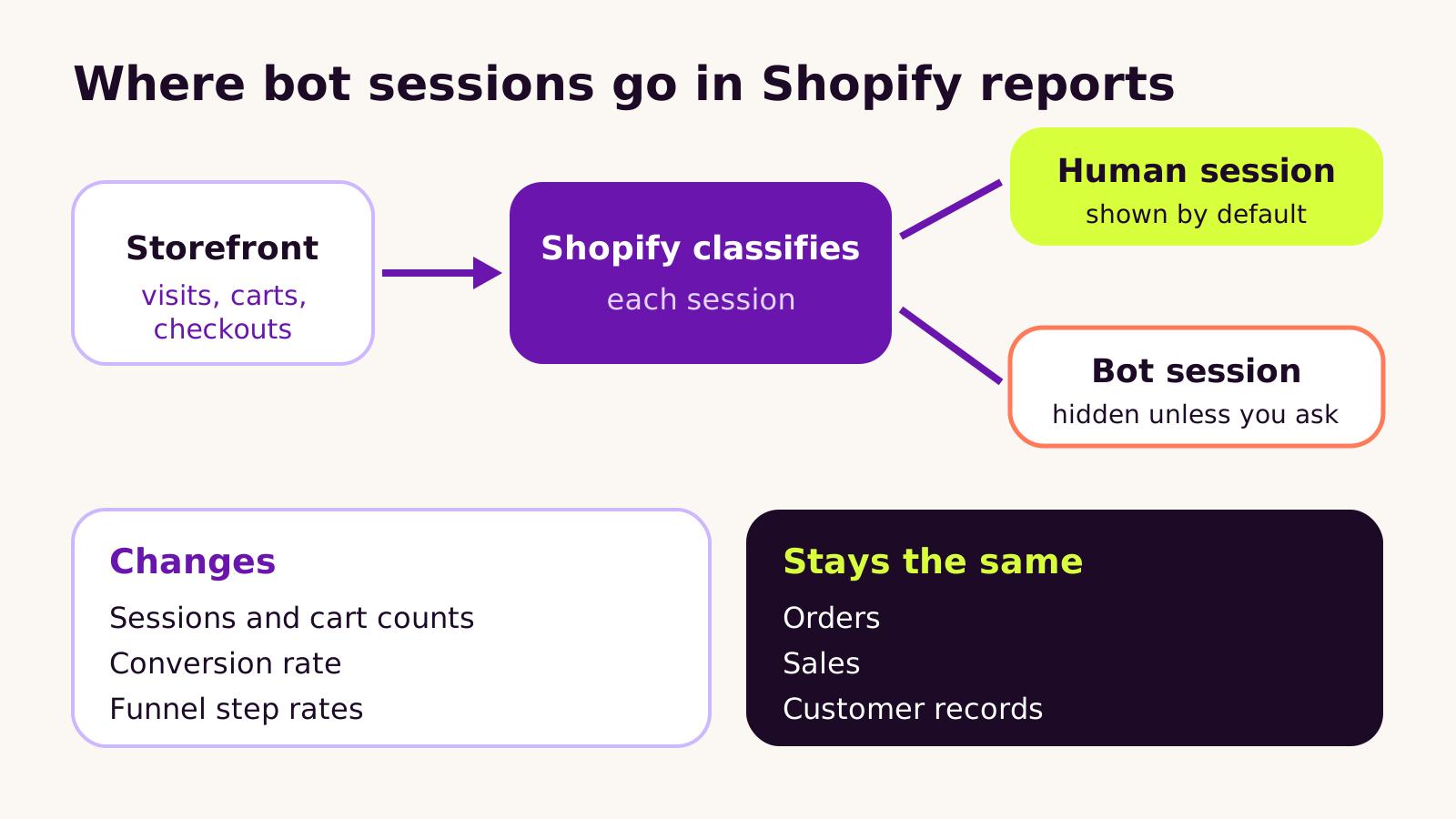
Every visit to your storefront becomes a session. Shopify looks at signals from that session (how it behaves, how it requests pages, how it moves through cart and checkout) and labels it either a human session or a bot session. Scrapers, price checkers, uptime monitors and scripted add-to-cart tools tend to land in the bot group.
Three details explain most of the confusion:
- Bots are hidden by default. Session-related reports count only human sessions until you change the Human or bot session filter. The bot sessions are still recorded; you just don't see them.
- The November change sharpened cart and checkout detection. Bots that used to reach the cart or start a checkout were sometimes counted as people. More of them are now caught, so cart and checkout counts can move more than top-of-funnel visits.
- Classification isn't applied backwards forever. Shopify's Help Center says bot classification only applies to sessions from October 7, 2025 onward. Comparing a recent month with a much older one mixes filtered and unfiltered data.
Search and product recommendation reports filter identified bots automatically and don't offer the filter at all, so you can't switch bots back on there.
Why your conversion rate can go up
Conversion rate in Shopify is orders divided by sessions. Bots rarely place real orders, so removing them shrinks the bottom of that sum and leaves the top alone. The result is a higher conversion rate with no change in customer behavior. The same applies to "added to cart" and "reached checkout" rates in the funnel.
Nothing about the store improved. The measurement did.
How to read your reports after the change
Here's the routine we follow on the stores we look after. It takes an afternoon, and it saves a lot of awkward conversations later.
- 1 Mark the date. Wherever your team reads numbers (a shared dashboard, a monthly report, a spreadsheet), add a note on November 16, 2026: "Shopify improved bot detection for carts and checkouts." Future you will thank present you.
- 2 Open a sessions report and find the filter. In Shopify admin, go to Analytics > Reports and open a report built on sessions, such as sessions over time or the conversion breakdown. In the filter bar, look for Human or bot session. Leave it on human for day-to-day work.
- 3 Run the same period both ways. For a week before and a week after the change, look at human sessions only, then include bots. This tells you how much automated traffic your store attracts and whether the gap widened after November 16.
- 4 Compare like with like. For trend lines, compare periods after the change with each other. If you must compare across it, compare orders and sales, which Shopify says are unaffected, rather than sessions or conversion rate.
- 5 Re-check targets. If your agency, marketing team or bonus plan uses a conversion rate target, revisit it. A target set on older counting may now be easier to hit for reasons nobody earned.
- 6 Tell the ad and analytics people. Your other tools use their own bot rules, so they won't match Shopify. Agree which tool owns which metric.
| Metric | Affected by the change? | How to compare across November 16 |
|---|---|---|
| Sessions | Yes, can dip | Compare post-change periods only, or include bot sessions in both |
| Added to cart and reached checkout | Yes, often the most | Same as sessions |
| Conversion rate | Yes, can rise | Treat as a new baseline |
| Orders and sales | No | Compare as usual |
| Customer records | No | Compare as usual |
What we've learned from reading bot-filtered data
Cleaner data is a good thing, but it does catch teams out. A few patterns come up again and again.
- Don't "fix" a drop that isn't real. The worst reaction is raising ad spend to win back sessions that were never people. Check orders first.
- Don't celebrate the conversion bump either. If a redesign or new app launched the same week, the bot change can make it look better than it is. Give any test a clean post-change period before calling it.
- Bot traffic is a signal in its own right. A big bot share on cart and checkout can point to scripted add-to-cart tools, inventory checkers or card testing. That's worth a look from a security angle, not only an analytics one.
- Apps can add their own noise. Some apps send their own requests or ping your store. If you haven't done it recently, run through our guide to auditing your Shopify apps for cost, speed and data access.
We wouldn't switch bots back on for everyday reporting. It's useful for diagnosis and for a one-off before-and-after view, but human sessions are what you want for decisions.
Troubleshooting
- Symptom: sessions fell after November 16 but orders didn't. Likely cause: more bots are now excluded from human sessions. Fix: run the same dates with bot sessions included; if the totals line up, nothing is wrong with the store.
- Symptom: conversion rate jumped with no change to the site. Likely cause: fewer sessions in the bottom of the sum. Fix: reset the baseline from November 16 and judge experiments only on post-change data.
- Symptom: Shopify and your other analytics tool disagree more than before. Likely cause: each tool applies its own bot rules, and Shopify's just changed. Fix: stop trying to reconcile sessions exactly; agree which tool owns which metric and track trends inside each tool.
- Symptom: you can't find the bot filter on a report. Likely cause: search and recommendation reports filter bots automatically and don't display it. Fix: use a sessions or conversion report when you need to compare human and bot traffic.
- Symptom: year-on-year comparisons look odd. Likely cause: sessions before October 7, 2025 were never classified. Fix: use orders and sales for long-range comparisons.
Questions people ask
Did I lose real customers?
Not because of this change. Shopify says orders, sales and customer data aren't affected. If orders are steady, the drop in sessions is counting, not customers.
Can I see the bot traffic Shopify removed?
Yes, in reports that support the Human or bot session filter. Change it to include bots. Search and recommendation reports don't offer this.
Should I change my analytics setup?
Usually not. Add a note for the date, reset conversion baselines and agree one source of truth per metric. If your tracking is already messy, this is a good moment to tidy it.
Why it matters for your store
Most decisions on a Shopify store come back to a few numbers: how many people visited, how many bought, and what it cost to bring them in. When the way those numbers are counted changes, the decisions built on them need a quick review too. Getting that right keeps your ad budget, your design tests and your agency's reports honest.
It also pairs well with other recent clean-up work: automations in Shopify Flow that alert you to unusual order patterns, and product data that's ready for AI shopping agents, which visit stores in ways that can look like bots.
Quick checklist:
- Note November 16, 2026 on every dashboard and report.
- Compare one week either side with bots excluded and included.
- Reset conversion and funnel baselines from that date.
- Use orders and sales for long-range comparisons.
- Agree which tool owns which metric.
If you'd like a second pair of eyes on your store's reporting, our Shopify development team is happy to talk it through with you.
(over to you)
Planning a build like this?
Tell us what you're building and we'll come back with ideas and next steps.