Webflow vs WordPress for a B2B website: how to choose
Webflow vs WordPress for a B2B website: how each handles editing, content structure, CRM integrations, hosting and ownership, plus a decision checklist and fixes for common problems.
Choosing between Webflow and WordPress for a B2B website comes down to your team, not the feature list. Webflow suits marketing teams who want to edit a design-led site visually, with hosting and security handled by the platform. WordPress suits sites with a large, layered content library, custom fields, gated areas or deep integrations, and teams who want full control of the code.
The article explains how each platform really works. Webflow is a hosted, visual builder with structured CMS collections and site roles for editors. WordPress is open source software you host yourself, extended with themes, plugins and custom code.
It then walks through four deciding questions: who edits the site, how much structure the content needs, what the site must connect to, and who will run hosting and updates. You'll also find a short WordPress code example for a case study post type, common mistakes, and fixes for problems like broken form tracking and editors breaking layouts.
Next step: write down your answers to those four questions, then build one real page, such as a case study, before you commit.
If you run marketing at a B2B company and you're about to brief an agency on a new site, the platform question usually lands early: Webflow vs WordPress for a B2B website. Both can produce a fast, good-looking site that generates leads. The real difference is who does the work after launch, how your content is structured, and what the site has to connect to. This guide explains how each platform actually behaves, gives you four questions that settle the choice, and covers the problems we see teams run into on both.
The real problem: the site has to keep working after the agency leaves
Most B2B sites aren't hard to build. What goes wrong is month six. The marketing team wants a new landing page for an event and the only person who can make one is a developer. Or the blog has grown into hundreds of articles, case studies and resources, and nobody can filter them by industry because the content model was never planned. Or an update to a plugin quietly breaks the demo request form, and leads stop arriving in the CRM for a week before anyone notices.
Those are platform problems as much as build problems. Picking the platform that matches your team and content is what keeps the site useful after the launch announcement.
How Webflow and WordPress actually work
Webflow: a hosted visual builder with a structured CMS
Webflow is a hosted platform. You design in the Designer, which writes real HTML and CSS as you work, and Webflow hosts, secures and serves the site for you. There are no plugins to update and no server to patch. Dynamic content lives in CMS Collections: you define fields (text, rich text, images, references to other collections) and build one template page per collection. A "Case studies" collection with a reference to an "Industries" collection is a typical B2B setup.
Editing is controlled by site roles in Site settings, such as Designer, Marketer and Content editor, so you can let a marketer publish a blog post without letting them move the navigation. On some Enterprise plans you can scope access further to particular collections, pages or locales. Because the whole stack is Webflow's, what you can do is set by the platform and your plan: custom server-side logic, user accounts and complex filtering need outside services or custom code embeds.
WordPress: open source software you host and extend
WordPress is open source software you install on hosting you choose. Its strength is the data model and the ecosystem. You can register your own content types (case studies, webinars, team members), add custom fields, build taxonomies several levels deep and query them any way you like. Themes control the design; on current versions, block themes let editors work in the Site Editor, and WordPress 7.1 added responsive styling controls in the editor. Plugins add almost anything: membership areas, multi-language, CRM forms, search.
The trade-off is responsibility. Someone has to choose good hosting, keep core, the theme and plugins updated, watch security and test after changes. That someone is you or a partner on a care plan, which we cover in our guide to what you should own when you hire an agency.
| Question | Webflow | WordPress |
|---|---|---|
| Hosting and security | Included and managed by Webflow | Your choice of host; you or a partner maintain it |
| Daily editing | Visual, with role-based limits | Block editor; flexibility depends on the theme build |
| Content structure | Collections and references, within plan limits | Custom post types, fields and taxonomies |
| Extending it | Apps, integrations and code embeds | Plugins and custom PHP |
| Code ownership | Site lives on Webflow; code export has limits | Full codebase and database are yours |
How to choose: four questions for your B2B website
We ask these in the first scoping call. Answer them honestly and the choice is usually obvious.
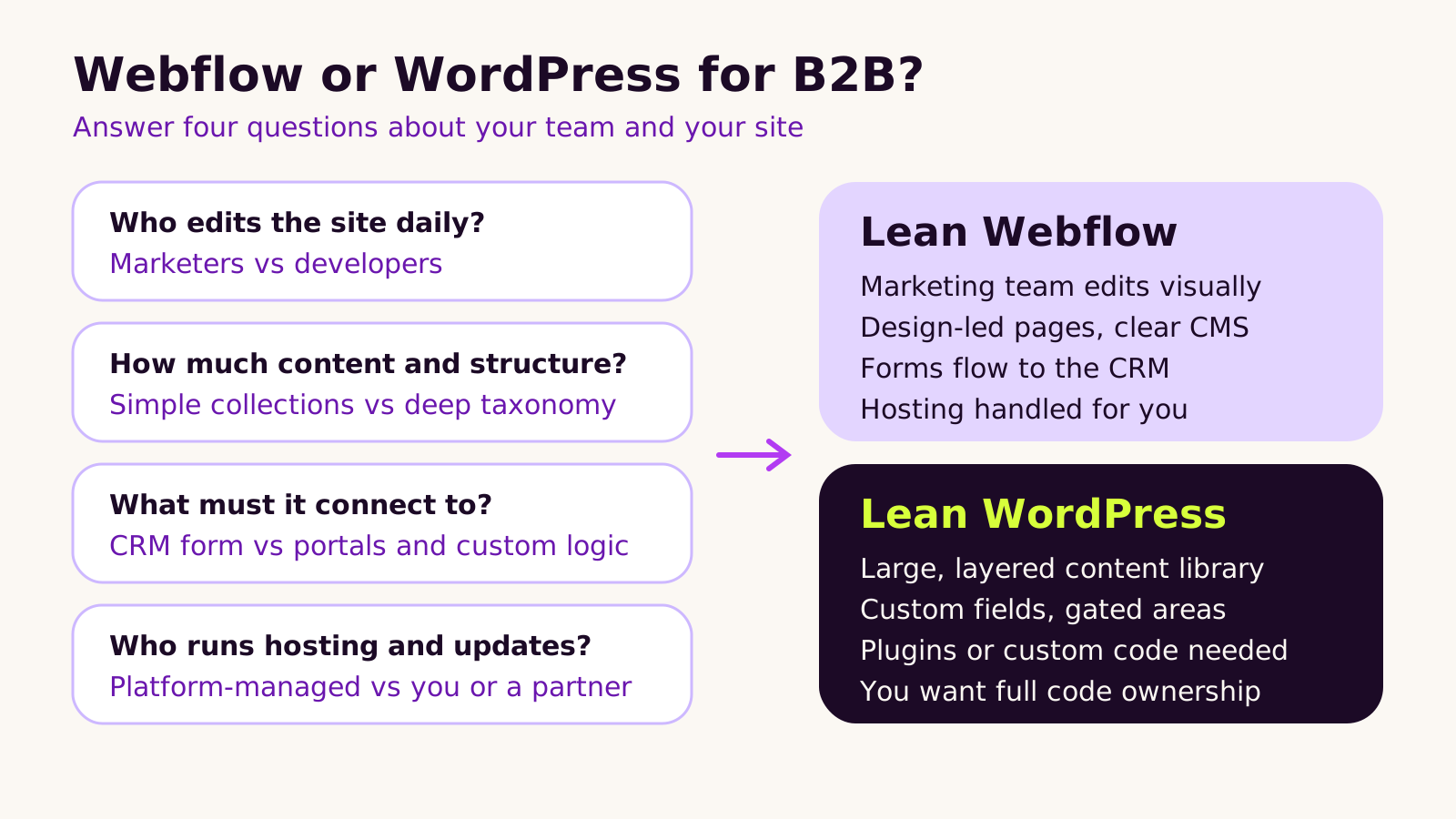
- 1 Who edits the site every week? If it's marketers and designers who want to build pages without a ticket, Webflow fits them well. If you have developers on hand, or edits are mostly blog posts, WordPress works fine.
- 2 How much structure does your content need? A blog, case studies and a few landing pages map neatly onto Webflow collections. A resource library filtered by industry, product, format and funnel stage, with gated downloads, is where WordPress custom post types and taxonomies are more comfortable.
- 3 What must the site connect to? If the main job is sending form fills to HubSpot or Salesforce, both platforms handle it. Customer portals, logged-in areas, pricing calculators tied to your own data or a partner directory point to WordPress or a custom build.
- 4 Who will run hosting and updates? If nobody wants that job, Webflow's managed hosting is a real advantage. If you're happy to fund a care plan, WordPress gives you more control in return.
Model the content before you pick
Whichever way you lean, write out your content types and their fields first. For a WordPress build, a case study type usually starts as a small plugin like the one below. Put it in wp-content/plugins/crest-case-studies/crest-case-studies.php, activate it, and rename the slugs to suit your site. Keeping content types in a plugin rather than the theme means they survive a redesign.
<?php
/**
 * Plugin Name: Case Studies
 */
add_action( 'init', function () {
    register_taxonomy( 'industry', 'case_study', array(
        'label'        => 'Industries',
        'hierarchical' => true,
        'show_in_rest' => true,
        'rewrite'      => array( 'slug' => 'industry' ),
    ) );

    register_post_type( 'case_study', array(
        'label'        => 'Case studies',
        'public'       => true,
        'has_archive'  => true,
        'show_in_rest' => true, // needed for the block editor
        'menu_icon'    => 'dashicons-portfolio',
        'supports'     => array( 'title', 'editor', 'excerpt', 'thumbnail' ),
        'rewrite'      => array( 'slug' => 'case-studies' ),
    ) );
} );
After activating it, visit Settings > Permalinks and click Save so the new URLs work. In Webflow, the equivalent is two collections in the CMS panel, "Case studies" and "Industries", joined by a Reference field, with a Collection template for each.
What we've learned building both
- Don't choose on the design. Both platforms can match any design. Choose on editing, content and integrations.
- Webflow rewards planning. Class naming, components and collection structure set up well at the start make it pleasant to edit for years. Set up loosely, editors end up duplicating pages and styles drift.
- WordPress rewards restraint. A lean theme and a short list of well-maintained plugins stays fast and stable. A page builder plus a long plugin list is where updates start to hurt.
- Check plan limits early on Webflow. CMS item counts, locales and editor seats depend on the plan, and plans changed recently; see our note on Webflow's new site plans.
- Going multi-language? Webflow Localization handles it natively on supported plans, as covered in our Webflow Localization guide. On WordPress you'll pick a translation plugin and plan right-to-left styles in the theme.
Troubleshooting common problems
- Symptom: form fills stop appearing in the CRM. Likely cause: on WordPress, a form or caching plugin update changed the submission; on Webflow, the native form was swapped for an embed without the integration being reconnected. Fix: send a test submission after every release and set an alert in the CRM when no new leads arrive in a normal working day.
-
Symptom: editors keep breaking layouts. Likely cause: on Webflow, too many people have Designer access; on WordPress, the theme exposes every style control. Fix: give content people the Content editor role in Webflow, or lock block patterns and limit design settings in
theme.jsonon WordPress. - Symptom: the resource library can't be filtered the way sales wants. Likely cause: content was stored as plain pages rather than structured items. Fix: model resources as a collection or custom post type with reference fields or taxonomies, then migrate the existing items.
- Symptom: rankings drop after moving platforms. Likely cause: missing redirects. Fix: map every old URL to its new one before launch, as set out in our Webflow migration plan.
Questions people ask
Is Webflow or WordPress better for SEO on a B2B site?
Neither platform ranks a site by itself. Both let you set titles, meta descriptions, canonicals, redirects and clean URLs. What matters is the content and how well the site is built and maintained.
Can I move from Webflow to WordPress later, or the other way?
Yes, though it's a rebuild rather than an export. CMS content can be moved through CSV export and import or the platforms' APIs, but templates and design are recreated. Plan redirects either way.
Which costs less to run?
It depends on your plan, hosting and how much maintenance you need. Webflow bundles hosting into the site plan; WordPress separates hosting, premium plugins and care. Compare both over a few years, including who does the updates.
Why the choice matters for your business
A B2B website exists to turn interest into conversations with sales. The right platform lets your team publish quickly, keeps leads flowing into the CRM, and doesn't need a rescue project every time something changes. Before you decide, check:
- who will edit, and how often;
- your content types and the filters sales actually needs;
- every system the site must talk to;
- who owns hosting, updates and the accounts.
For a wider view across four platforms, see our HubSpot, Shopify, Webflow and WordPress comparison, or read when Webflow is the right platform.
If you'd like a second opinion on your shortlist, our Webflow development and WordPress development teams are happy to talk it through, or you can start a conversation here.
(over to you)
Planning a build like this?
Tell us what you're building and we'll come back with ideas and next steps.
Keep reading
All articles Platform guides
· 7 min read
Website ownership when you hire an agency: what you should own
Read article
 Platform guides
· 6 min read
Google November 2026 core update: what to check and what to do
Read article
 Platform guides
· 5 min read
Website security checklist for small businesses: late 2026
Read article