CDN migration: keep Googlebot crawling when you switch
A CDN migration can block Googlebot or overload your origin. What Google's November 2026 guidance means, the bot, cache and DNS settings to check, a crawler verification snippet and fixes for common problems.
Moving your website behind a CDN usually makes it faster, but two things can quietly hurt your search traffic: bot protection that blocks Googlebot, and an origin server that struggles while the new cache is still empty. Google's Search Central blog covered this in November 2026.
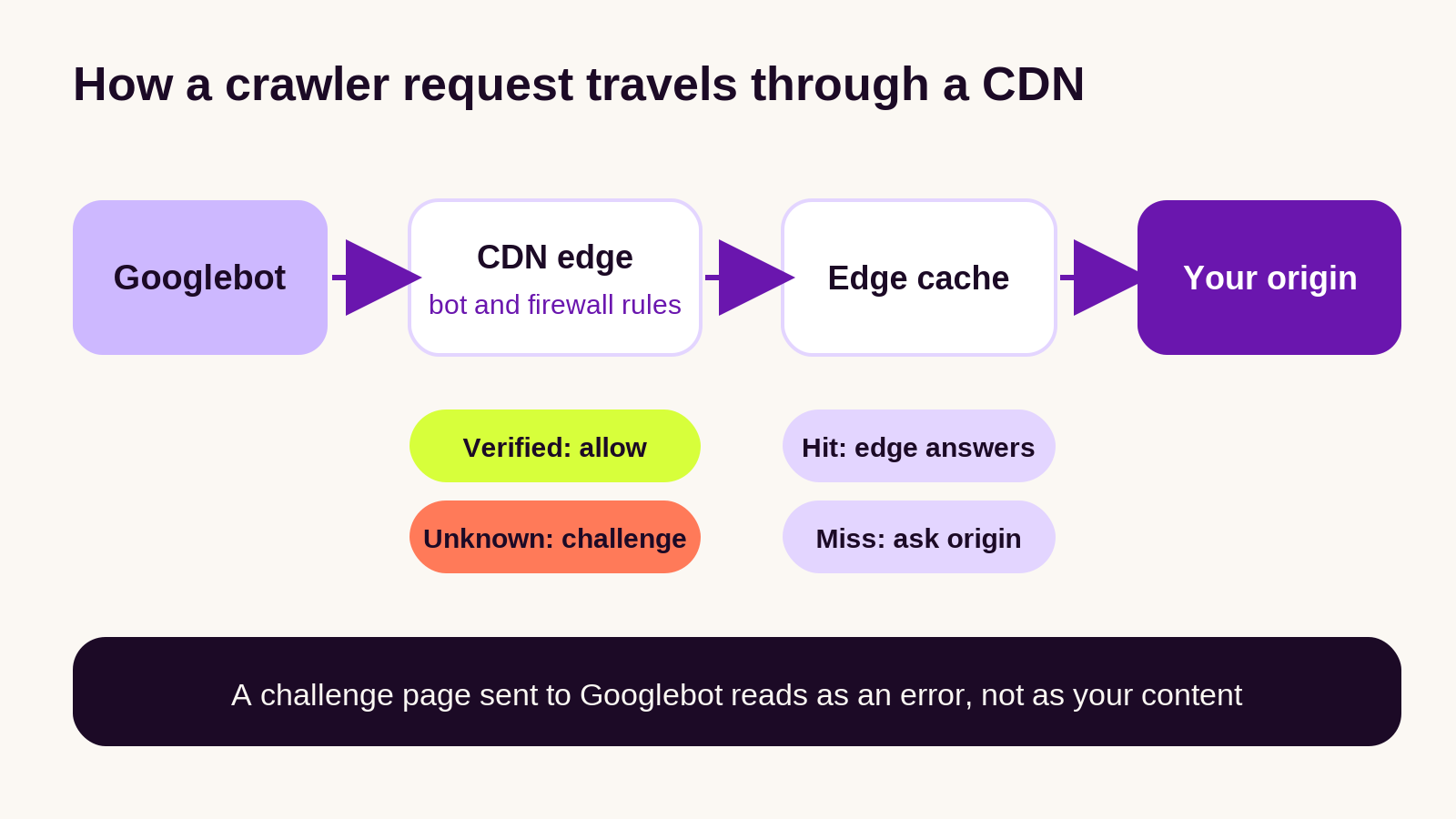
Here is why it happens. Google crawls faster when your site responds quickly, so a new CDN can lead to more crawling. At first, many of those requests miss the cache and land on your origin. And broad bot rules can send Googlebot a challenge page instead of your content.
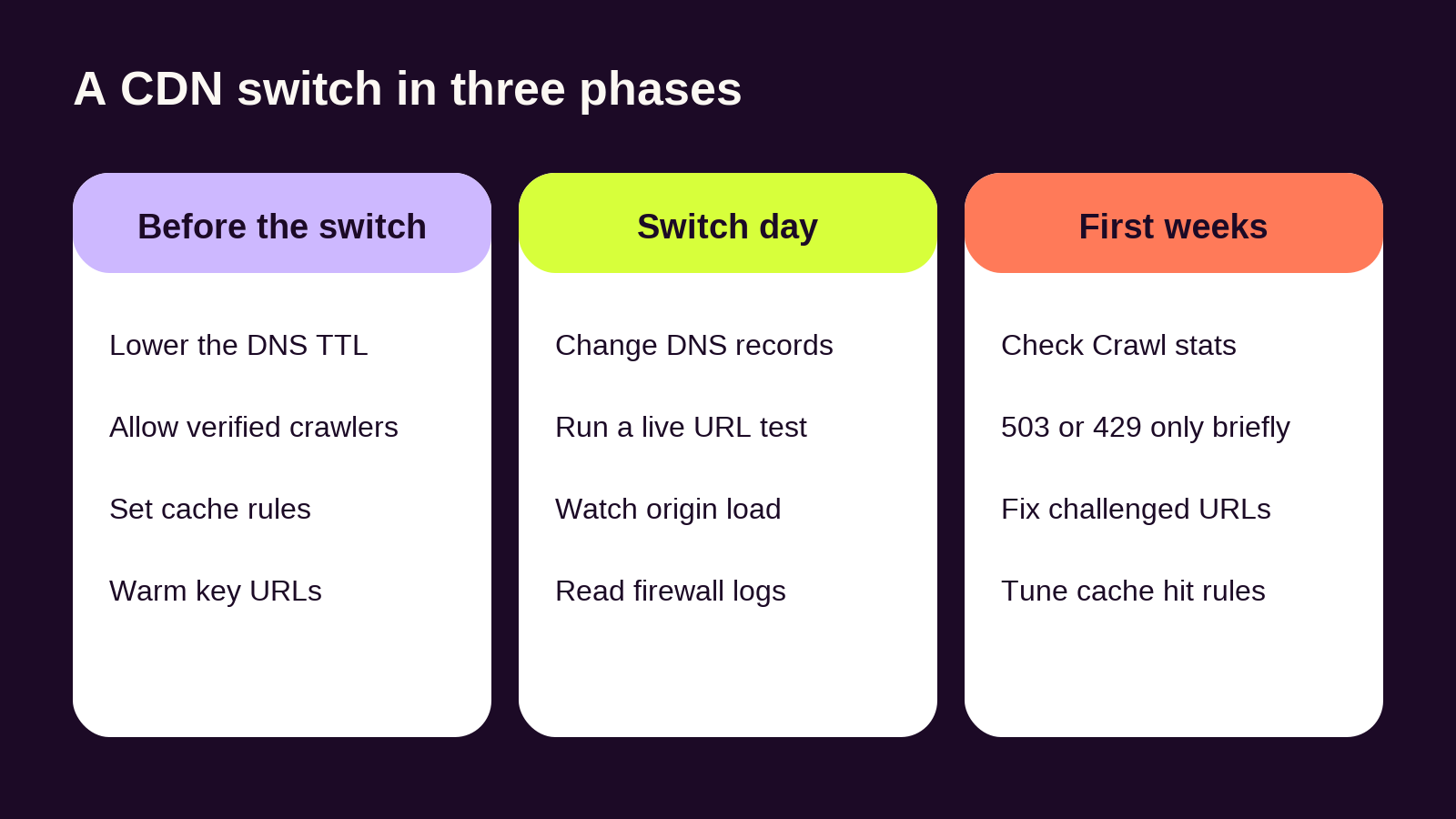
The plan has three phases. Before the switch, lower your DNS time to live, allow verified crawlers before any challenge rule, set cache rules, and warm the cache from your sitemap. On switch day, change DNS, run a live URL test in Search Console, and watch origin load and firewall logs. In the first weeks, check the Crawl stats report, and only use temporary 503 or 429 responses for a short time if the origin needs relief.
Next, agree with your developer or agency who owns the CDN account and who checks crawler access after launch.
This guide is for business owners and marketing leads who are about to put their website behind a content delivery network, or switch from one CDN to another, and want to know what can go wrong in search. A CDN migration usually makes pages faster for visitors, but two things can quietly hurt you: bot protection that blocks Googlebot, and an origin server that buckles under a sudden rush of crawling. In November 2026 (on November 11) Google's Search Central blog published guidance on exactly this, and below we explain what it means in practice, the settings to check, and how to brief your developer or agency.
The problem: a faster site that search engines suddenly can't read
The usual story goes like this. A site gets slow or attacked, someone moves it behind a CDN with a firewall, and everything looks better in the browser. A week or two later, pages start slipping out of search results, or the hosting provider reports CPU spikes on the origin server that nobody can explain.
Both come from the same switch. The CDN sits between every visitor and your server, and that includes crawlers. If the CDN treats Googlebot like a suspicious bot, Google sees challenge pages instead of your content. If it lets Googlebot through but the cache is empty, your origin does all the work at the moment crawling picks up.
This mostly applies to self-hosted sites: WordPress, WooCommerce, Magento, and custom Next.js or Node.js builds. Hosted platforms such as Shopify, Webflow and HubSpot CMS already serve pages through their own delivery network, so the CDN decisions there are largely made for you.
How a CDN migration changes the way Google crawls you
Google adjusts how fast it crawls a site based on how the site responds. When responses come back quickly and without errors, it treats that as a sign the server can handle more requests. Point your DNS at a fast edge network and, from Google's side, your server looks as if it just got far more capable. Crawling can rise as a result.
That would be fine if every request were answered at the edge. It isn't, at first. A new CDN starts with a cold cache. The first request for each URL is a cache miss, so the edge fetches it from your origin. Crawlers are very good at requesting many different URLs, including old product pages, filtered listings and archives that real visitors rarely touch. So in the first days, crawler traffic can mean more origin load, not less.
The second piece is bot protection. Most CDNs offer some mix of bot scoring, JavaScript challenges, CAPTCHAs and rate limits. Those tools can't always tell a real search crawler from a scraper pretending to be one. If a broad rule challenges every automated client, Googlebot gets the challenge too. Google's guidance is direct about the result: if crawlers keep getting blocked, they back off and pages can begin to drop out of search.
Why the user agent alone isn't enough
Anyone can send a request that says "Googlebot" in its user agent. That's why good CDN rules allow verified crawlers rather than anything with the right name. Google publishes its crawler IP ranges as JSON files in its Search Central documentation, and also supports verification by reverse DNS: the IP should resolve to a host under googlebot.com or google.com, and that host should resolve back to the same IP.
How to plan a CDN migration step by step
We split the work into three phases. None of it is exotic, but skipping any one of them is where most of the trouble comes from.
Before the switch
- 1 Lower the DNS TTL on the records you'll change, a day or so ahead, so you can roll back quickly if something breaks.
- 2 Turn on the verified-bots allowance in your CDN's bot or firewall settings, and make sure no custom rule (country blocks, "challenge all bots", aggressive rate limits) runs before it.
- 3 Write cache rules on purpose. Cache static assets and public HTML; bypass the cache for cart, checkout, account and admin paths, and anything that sets a session cookie.
- 4 Warm the cache for your important URLs before moving real traffic. A simple script that requests every URL in your XML sitemap through the new CDN hostname does the job.
Switch day
- 1 Change the DNS records and confirm the CDN is answering (most add a response header you can look for).
- 2 In Google Search Console, open URL Inspection, enter a key page and choose Test live URL. If the rendered HTML shows a challenge page, stop and fix the bot rules.
- 3 Watch origin CPU and the CDN's firewall events. Look specifically for challenged or blocked requests from crawler IPs.
The first weeks
Check Settings > Crawl stats in Search Console. The host status and the "by response" breakdown tell you quickly if Google is seeing errors. If the origin genuinely can't cope, Google's advice is to return 503 or 429 to crawlers for a short period, a few hours and at most a day or two. Those codes tell Google to slow down. Left in place for longer, they risk URLs being dropped.
A small verification helper
If your developer writes custom firewall logic in a Node.js middleware or edge function, verify crawlers properly rather than trusting the user agent. This uses only Node's built-in dns module and works on current LTS versions such as Node.js 24 and 26:
import { reverse, resolve4, resolve6 } from 'node:dns/promises';
import { isIPv6 } from 'node:net';

const GOOGLE_HOST = /\.(googlebot|google)\.com$/i;

export async function isVerifiedGooglebot(ip) {
  try {
    const [host] = await reverse(ip);
    if (!host || !GOOGLE_HOST.test(host)) return false;
    const addresses = isIPv6(ip) ? await resolve6(host) : await resolve4(host);
    return addresses.includes(ip);
  } catch {
    return false;
  }
}
Cache the result per IP for a while, because DNS lookups on every request add latency. For IPv6, normalize addresses before comparing them. On a managed CDN, the built-in verified-bots option is usually the simpler and safer choice; this code is for custom logic you run yourself.
What we've learned from CDN switches
The most common mistake is treating the CDN as a security project only. Security settings get tuned carefully, caching gets left on defaults, and nobody checks how search crawlers are treated until traffic dips. We'd rather have one person own all three: security, caching and crawlability.
We also wouldn't move DNS on the same day as a redesign, a platform migration or a big content change. If rankings move, you want to know which change caused it.
And we'd be careful with country-level blocking. It can stop crawlers that don't fetch from where you expect, and it can affect real customers who travel or use privacy tools.
Troubleshooting
| Symptom | Likely cause | Fix |
|---|---|---|
| Search Console live test shows a "checking your browser" page | A bot challenge or JavaScript check applies to Googlebot | Allow verified bots and move that rule after the allowance, or exclude verified crawlers from it |
| Origin CPU spikes in the first days after the switch | Cold cache plus increased crawling of rarely visited URLs | Warm the cache from the sitemap, cache public HTML, and use a brief 503 or 429 only if needed |
| Crawl stats show a rise in server errors | Origin timeouts behind the CDN, or a firewall rule returning errors | Check origin logs and CDN events for the same timestamps; raise origin timeouts or fix the rule |
| Logged-in users see someone else's cart or account | HTML cached for pages that depend on cookies | Bypass the cache for cart, checkout and account paths and any response with a session cookie |
| Pages still drop after bot rules are fixed | Long-running 503 or 429 responses, or an old block Google remembered | Remove the temporary codes, request indexing for key URLs, and monitor Crawl stats |
Questions people ask
Does a CDN help SEO?
It can help indirectly, because faster, more reliable pages are better for visitors and easier to crawl. It doesn't change rankings on its own, and a badly configured CDN can hurt by blocking crawlers.
Should I block AI crawlers at the CDN as well?
That's a separate business decision from search crawling. If you do it, block specific crawlers by name and verification rather than with a broad bot rule, so Googlebot isn't caught. Google documents its own controls for generative AI features separately from search crawling.
Do I need to tell Google I've moved to a CDN?
No. If your URLs stay the same, there's nothing to submit. Just make sure the new setup returns your real pages to Googlebot and keep an eye on Crawl stats.
Why this matters for your business
A CDN is usually bought to make a site faster and harder to knock over, which is good for sales and leads. The risk is that a well-meant security setting cuts off the search traffic you rely on, and nobody notices until enquiries slow down. A short plan with clear owners avoids that.
When you hire an agency for this work, ask who will check crawler access, who owns the CDN account (it should be in your name, as we explain in our guide to website ownership when you hire an agency), and how they'll monitor the first weeks. If you're also deciding which crawlers to allow, our post on controlling search and AI crawlers with robots.txt covers the robots.txt side, and our Next.js security patching guide shows how we handle caching and self-hosting fixes on custom builds.
Quick checklist
- DNS TTL lowered and a rollback plan agreed
- Verified crawlers allowed before any challenge rule
- Cache rules set, with cart, checkout and account paths bypassed
- Cache warmed from the sitemap
- Live URL test passed in Search Console
- Crawl stats and firewall events checked daily for the first weeks
If you'd like a hand planning a CDN switch as part of our website care and hosting service, tell us about your site and we'll talk it through.
(over to you)
Planning a build like this?
Tell us what you're building and we'll come back with ideas and next steps.