Magento PHP 8.6 upgrade: when your store can safely switch
PHP 8.6 was released on 19 November 2026, but Adobe has not listed it for any Magento release yet. When a Magento PHP 8.6 upgrade makes sense, how to check your extensions with Composer, and fixes for common problems.
PHP 8.6 came out on 19 November 2026, but that does not mean your Magento store should move to it yet. Magento and Adobe Commerce only support the PHP versions Adobe lists for each release, and at the time of writing PHP 8.6 is not on that list.
The more urgent date for many stores is the end of December 2026, when PHP 8.2 stops getting security fixes. If your store still runs on PHP 8.2, plan an upgrade to a supported Magento release and the PHP version Adobe lists for it.
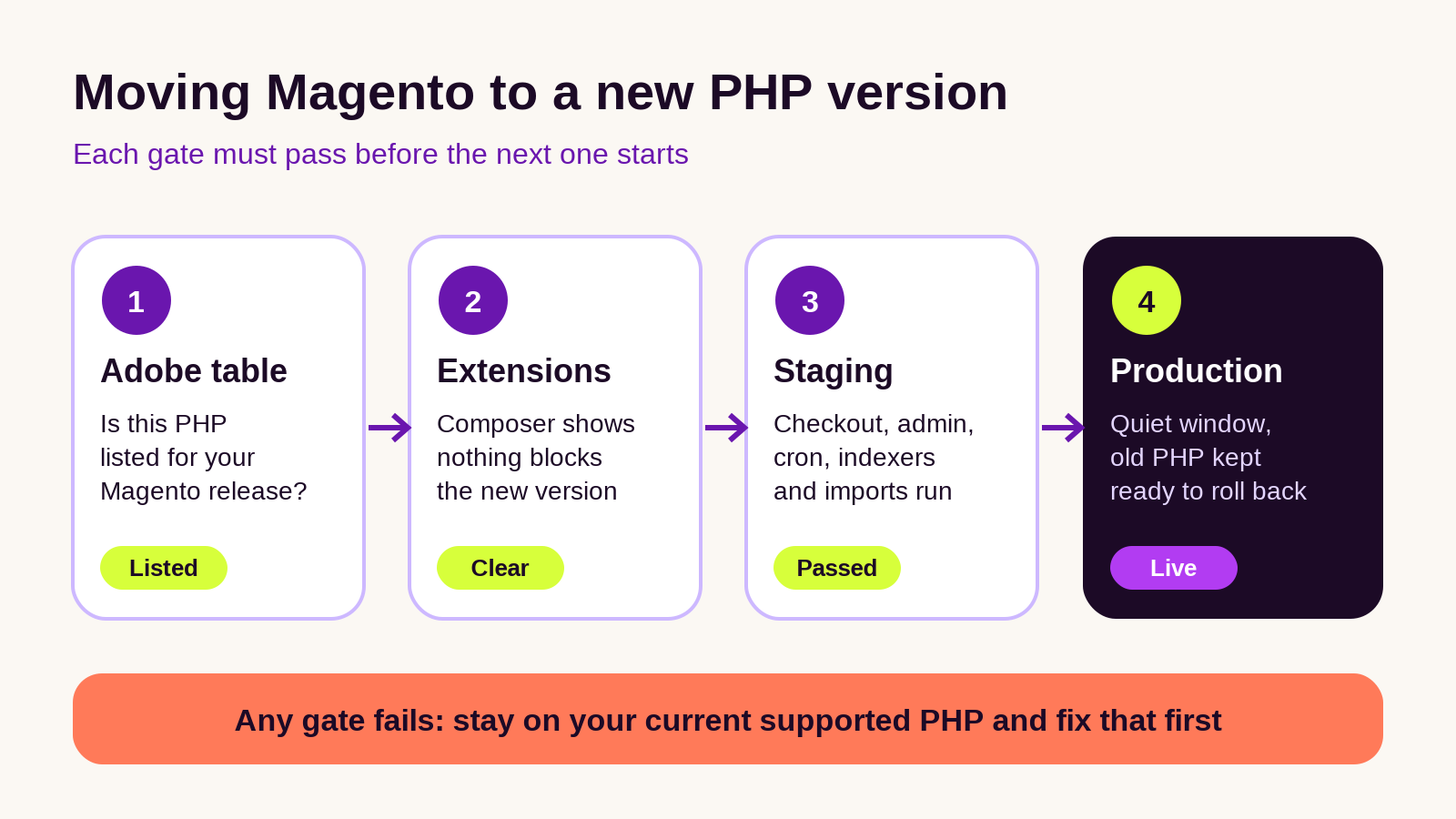
Before any PHP change, work through four gates. First, check Adobe's system requirements table for your exact Magento release. Second, use Composer to see whether any extension blocks the new version. Third, test checkout, the admin, cron, indexers and imports on a staging copy. Fourth, switch production in a quiet window with the old PHP version ready for rollback.
Also pin the PHP platform version in composer.json so a developer's laptop can't pull in packages your server can't run.
If you want help planning the upgrade, our Magento team can review your store and map out the safe path.
If you run a Magento or Adobe Commerce store, this post is for you and for whoever looks after your hosting. PHP 8.6 was released on 19 November 2026, and hosting panels and developers are already asking whether to switch. Here's how a Magento PHP 8.6 upgrade really works: what Adobe supports, which PHP deadline matters more right now, how to check your extensions with Composer, and what to do when an upgrade goes wrong.
The short answer: don't point a live Magento store at PHP 8.6 until Adobe lists it for the Magento release you run. Then use the time to fix the thing that has a real deadline.
The problem: a new PHP version and a store that can't follow yet
Store owners usually hear about a new PHP version in one of three ways. The hosting company adds it to the control panel. A developer mentions the new language features. Or a security scanner starts flagging the version the store runs. All three can lead to the same mistake: changing the PHP version on the server and hoping Magento keeps working.
PHP 8.6 brings real improvements for developers, including partial function application and a new clamp() function. But Magento is a large application built from a long list of Composer packages, plus whatever extensions your store has collected over the years. Every one of those has to run cleanly on the new version, and Adobe only commits to the combinations it has tested.
Many stores face a more pressing date. PHP 8.2 reaches the end of its security support on 31 December 2026. A store still on PHP 8.2 is usually also on an older Magento release, and that's the upgrade worth planning now.
How Magento and PHP versions actually fit together
Each Magento release is tied to a short list of PHP versions. Adobe publishes these in its system requirements table, together with the matching database, search engine, cache and queue versions. Adobe states that it supports only the combinations in that table. At the time of writing, the 2.4.10 pre-release is listed with PHP 8.5, and no Magento release lists PHP 8.6.
Two parts of the compatibility question often get mixed up:
-
What Composer will install. Each package's
composer.jsonsays which PHP versions it accepts. Composer will happily install a package if the constraint matches, even when Adobe hasn't tested that combination. - What Adobe supports. The requirements table is narrower. If something breaks on an unlisted combination, you're outside what Adobe supports, and fixing it is down to you and your developers.
Then there's the part that decides most real upgrades: your extensions. A payment module, an ERP connector or an old custom module can declare a PHP range that stops short of the new version, or it can declare a wide range and still fail at runtime because it uses something the new version changed or deprecated.
How to plan a Magento PHP 8.6 upgrade, step by step
1. Find out exactly what you run today
Ask your developer for three facts: the Magento version (bin/magento --version), the PHP version the web server uses, and the PHP version the command line and cron use. The last two are often different, and that difference causes some of the strangest bugs.
2. Check the requirements table for your release
If your release doesn't list the PHP version you want, the decision is made: you either stay where you are or upgrade Magento first. If you're still on PHP 8.2, the path is normally a Magento upgrade to a current release, then the PHP version Adobe lists for it.
3. Ask Composer what would block the change
Run these from the Magento root on a staging copy, not on production. They change nothing; they only report.
#!/usr/bin/env bash
# Run from the Magento root on a staging copy
php -v | head -n 1
bin/magento --version

# Do the locked packages accept the PHP version running now?
composer check-platform-reqs --lock

# Which packages refuse a given PHP version? Change the version to test.
composer why-not php 8.6.0
composer why-not lists every package whose PHP constraint excludes that version. Each line is either a Magento package (wait for Adobe) or an extension (ask that vendor for a compatible release).
4. Pin the PHP platform in composer.json
This setting tells Composer which PHP version to resolve packages for, whatever version happens to be on the machine running the command. It stops a developer on PHP 8.6 locally from installing packages your PHP 8.5 server can't run.
{
  "config": {
    "platform": {
      "php": "8.5.0"
    }
  }
}
Add it to the existing config section of your project's composer.json, set the version to the one your production server runs, and update it only as part of a planned upgrade.
5. Test on staging, then switch production
On staging, place real test orders with each payment method, run the indexers and cron, run any product or stock imports, and click through the admin areas your team uses daily. Then switch production in a quiet trading window, keep the previous PHP version installed, and agree in advance who decides on a rollback.
What we've learned from PHP upgrades on Magento
The language change itself is rarely the hard part. The work is in extensions nobody has updated for a while, and in server settings that drift apart. We usually recommend that stores upgrade Magento and PHP together as one planned project, rather than chasing every new PHP release as it lands. We wouldn't rush a new PHP version onto a store during a busy sales period, even once Adobe supports it.
For stores on Adobe Commerce Cloud, PHP and service versions are set in project configuration files, and Adobe has its own enforcement dates. We covered those in our post on Adobe Commerce Cloud security enforcement.
Troubleshooting common problems
| Symptom | Likely cause | Fix |
|---|---|---|
| The site works but cron jobs or emails stop | The command line uses a different PHP version from the web server | Point cron at the same PHP binary as the web server and check with php -v as the cron user |
| Composer refuses to install after the switch | An extension's PHP constraint excludes the new version | Run composer why-not php with the version, then update or replace that extension |
| Packages install locally but fail on the server | The developer's machine runs a newer PHP and no platform version is pinned | Add config.platform.php to composer.json and regenerate the lock file |
| Deprecation warnings fill the logs | Older extension code uses features the new PHP version deprecates | Log them on staging, report them to the vendor and keep display of errors off in production |
Questions people ask
Should my Magento store move to PHP 8.6 now?
Not yet. Wait until Adobe lists PHP 8.6 for the Magento release you run and your extension vendors confirm support. Until then, stay on the newest PHP version your release lists.
Is PHP 8.2 still safe to run?
PHP 8.2 gets security fixes until 31 December 2026, and after that it won't receive them from the PHP project. If your store is on it, plan the move to a current Magento release now.
Can my hosting company just change the PHP version for me?
They can flip the switch, but they can't tell whether your extensions and custom code will work. Treat a PHP change as a code change that needs testing on staging first.
Why this matters for your store
A PHP change touches every page, every order and every background job, so a failed switch shows up straight away in sales and support. Planned well, it's a routine piece of maintenance that keeps the store on supported, patched software and makes the next Magento upgrade smaller. If you're also comparing hosting or CDN changes at the same time, our guide to a CDN migration that keeps Googlebot crawling covers that side, and a clear website brief for your agency helps you scope the upgrade.
Summary checklist:
- Record your Magento version and the web and command line PHP versions.
- Check Adobe's requirements table for your exact release.
-
Run
composer why-not phpon staging and list every blocker. -
Pin the platform PHP version in
composer.json. - Test checkout, admin, cron, indexers and imports before switching production.
- If you're on PHP 8.2, plan the Magento upgrade before 31 December 2026.
If you'd like a second pair of eyes on your upgrade path, our Magento and Adobe Commerce development team is happy to talk it through with you.
(over to you)
Planning a build like this?
Tell us what you're building and we'll come back with ideas and next steps.