Shopify fraud rules: set up Protect's new Rule Builder safely
Shopify Protect's Rule Builder (Fall '26 Edition, October 2026) lets you write your own Shopify fraud rules. Where rules run, how to choose between 3D Secure, hold and block, a risk review query, and fixes for common problems.
Shopify fraud rules are now something you can write yourself. In late October 2026, with the Fall '26 Edition, Shopify grouped its fraud tools under Shopify Protect and added the Rule Builder app, which acts at the moment of payment.
Think of it in layers. Shopify Protect screens payments on Shopify Payments before they are authorized. Your own rules then choose signals and one of three actions: request 3D Secure, hold the order for review, or block the payment. After the order exists, risk analysis and Shopify Flow handle tagging and holding fulfillment.
To set it up, confirm you use Shopify Payments and check the app listing. Study your real chargebacks and high-risk orders first. Write one narrow rule per pattern, start with 3D Secure or a hold rather than a block, and preview each rule against past orders before switching it on. Then add a Flow workflow so nothing ships while someone is still checking.
Review your rules regularly, and remember payments through other gateways are not covered. If you want help, a Shopify developer can review your order history and set up rules that match how you sell.
This guide is for Shopify store owners and managers who want tighter control over fraudulent orders without turning away good customers. In late October 2026, as part of the Fall '26 Edition, Shopify brought its fraud and dispute tools together under the name Shopify Protect and introduced the Shopify Protect: Rule Builder app, which lets you write your own Shopify fraud rules without code. Below we explain where those rules sit in the order flow, how to set up your first few safely, and what to do when they misfire.
The problem: one-size fraud settings catch the wrong orders
Most stores reach us with one of two complaints. Either chargebacks keep arriving for orders that looked fine at the time, or a strict fraud app is declining real customers who then email support, annoyed, or simply buy elsewhere.
Both come from the same gap. Generic fraud scoring knows a lot about payments in general but very little about your business: which products get targeted, which order patterns are normal for you, and which customers always ship gifts to a different address. Until now, encoding that knowledge meant a third-party app, a Shopify Flow workflow that only ran after the order was placed, or Shopify Plus checkout customizations. The Rule Builder moves that decision to the point of payment, where you can still ask for proof instead of saying no.
How Shopify fraud rules work now
It helps to think in layers, because each one runs at a different moment and can do different things.
- 1 Shopify Protect screening. For stores on Shopify Payments, Shopify declines payments it considers near-certain fraud before authorization. There's no order created, so nothing to cancel or refund. You don't configure this layer.
- 2 Your Rule Builder rules. You choose signals from the checkout (customer details, addresses, IP and payment information, as Shopify describes it) and one of three actions: block the payment, request 3D Secure, or hold the order for review. These also run at payment time.
- 3 Order risk analysis. Once an order exists, Shopify and any installed fraud apps attach a risk assessment to it: a risk level plus the facts behind it. You see this on the order page.
- 4 Shopify Flow and manual review. After the order, Flow can tag it, notify someone or hold fulfillment while a person checks it.
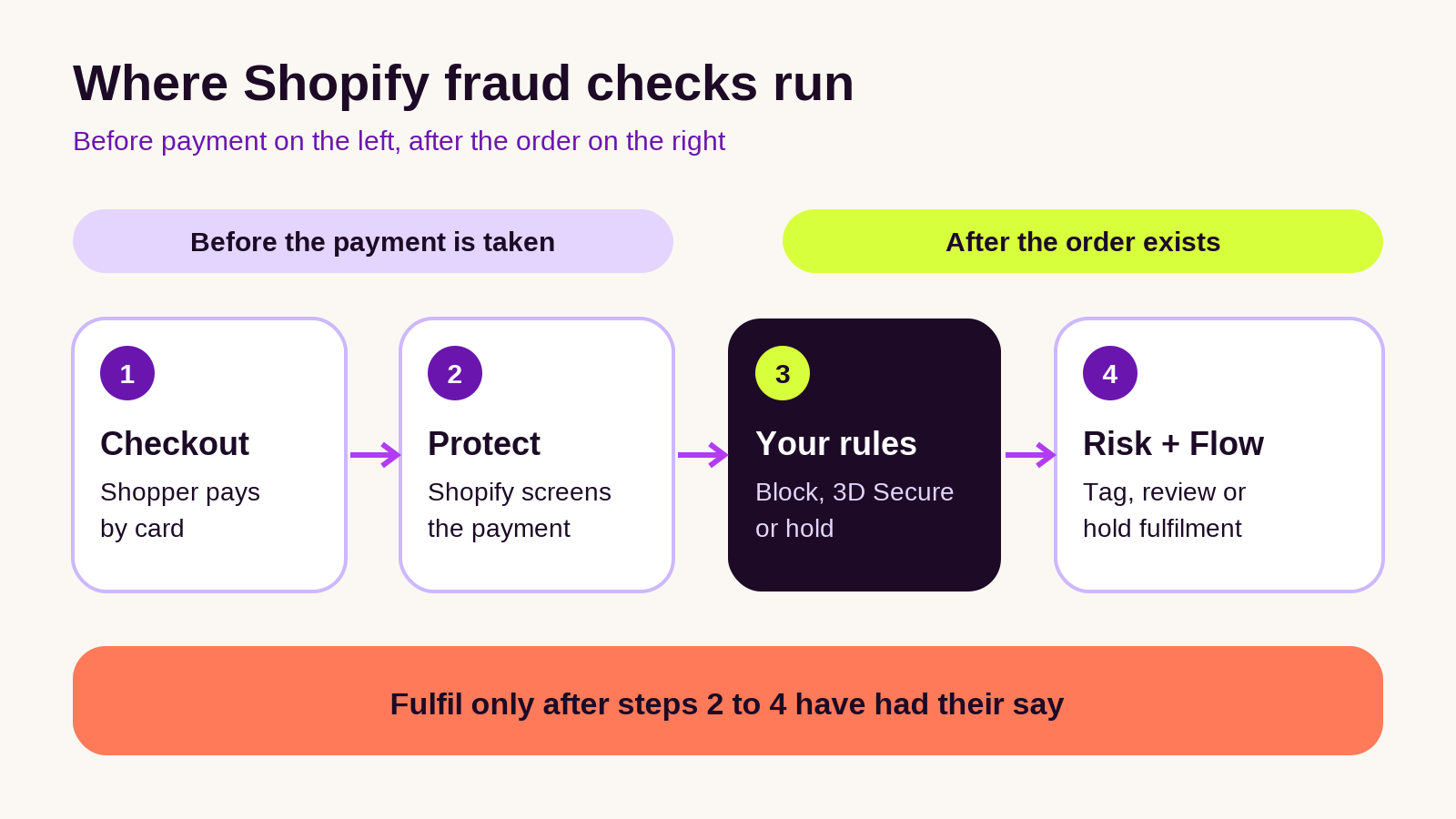
The important shift is timing. A Flow workflow can only clean up after a risky order has been paid for. A Rule Builder rule can stop or challenge the payment itself. That's why we treat rules as the place for patterns you've already seen, and Flow as the place for follow-up and paperwork.
The second point is scope. Shopify says the blocking and challenge features apply to payments that go through Shopify Payments. If some of your card volume runs through another gateway, those payments won't be screened by your rules, and you'll still need that gateway's own tools.
How to set up Shopify fraud rules step by step
1. Check eligibility and pricing first
Confirm the store uses Shopify Payments, then find Shopify Protect: Rule Builder in the Shopify App Store and read the current listing for availability and pricing. Shopify was still rolling Protect out when the Edition launched, so don't assume every store sees it on day one.
2. Look at your real fraud before writing anything
In the admin, open Orders and filter by risk level, then filter by chargeback and inquiry status to pull up recent disputes. Write down what the bad orders have in common. Typical patterns we look for: repeated attempts with different cards from the same email, high-value items with express shipping to an address that doesn't match billing, or many orders in a short window for one resellable product.
3. Write narrow rules, and prefer a challenge to a block
Each rule should describe one pattern. "Every order over a certain value" is not a pattern; "orders for gift cards where the email is brand new and the billing and shipping addresses differ" is. Start with request 3D Secure: a real customer can confirm with their bank in a few seconds, while a stolen card usually fails.
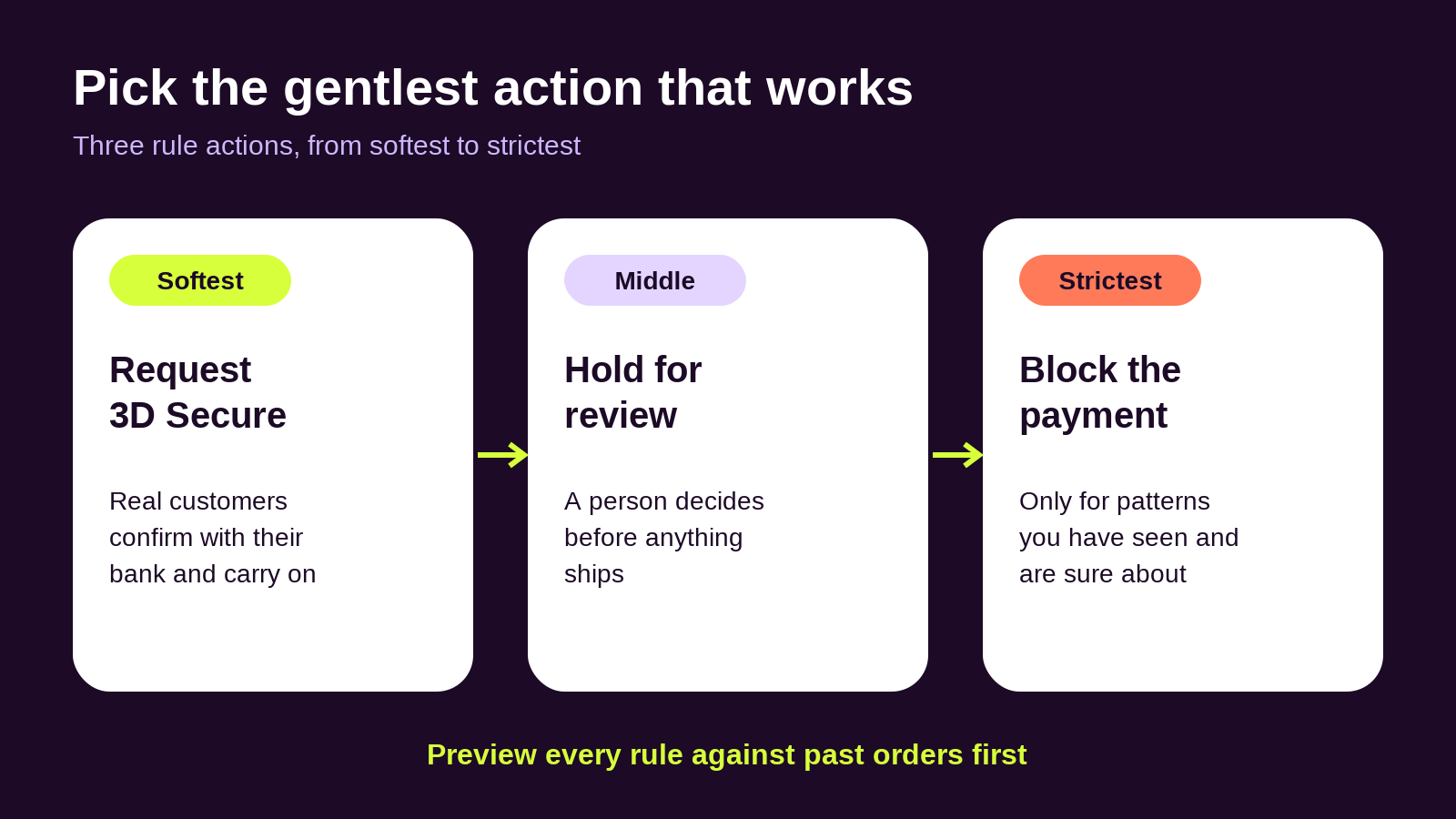
| Action | Use it when | Watch out for |
|---|---|---|
| Request 3D Secure | A pattern is suspicious but often legitimate | Some shoppers abandon at the bank step |
| Hold for review | You need a human judgment, for example on high-value orders | Someone must check the queue daily |
| Block the payment | You've seen the exact pattern cause fraud repeatedly | Real customers get no second chance |
4. Preview every rule against past orders
Shopify lets you preview a rule against your recent order history before it goes live. Read the list of orders it would have caught. If it includes customers you know are genuine, tighten the conditions. If it catches nothing, the rule is either too narrow or describes a pattern you don't actually have.
5. Add a Flow workflow for the follow-up
Rules handle the payment moment. For everything after, a simple Flow workflow helps: when an order's risk is analyzed as high, add a fraud-review tag, hold the fulfillment order and post a message to your team's channel. That way nothing ships while someone is still deciding.
6. Give your developer a review query
If you want a custom report or a daily digest, the GraphQL Admin API exposes the same risk data you see on the order page. This query returns recent high-risk orders with the reasons behind each assessment. Your developer can run it from a custom app with the read_orders scope; change first and the filter to suit.
query RecentHighRiskOrders {
  orders(first: 50, sortKey: CREATED_AT, reverse: true, query: "risk_level:high") {
    nodes {
      name
      createdAt
      displayFinancialStatus
      risk {
        recommendation
        assessments {
          riskLevel
          provider { title }
          facts { description sentiment }
        }
      }
    }
  }
}
The recommendation field gives Shopify's overall advice (accept, investigate or cancel), and facts lists the individual signals, which is what your reviewer actually needs to see.
What we've learned from fraud setups
- Blocking too early costs more than it saves. We almost always start a new rule on 3D Secure or hold, watch it for a couple of weeks, and only then consider a block.
- Rules drift. Fraud patterns change, and so do your products. Put a recurring reminder in the calendar to review every rule and retire the ones that no longer catch anything.
- Don't stack tools blindly. If you already run a fraud app that cancels orders automatically, add Rule Builder rules one at a time so you can tell which tool did what.
- Write down why each rule exists. A one-line note ("added after gift card chargebacks") saves the next person from deleting a rule that matters.
Troubleshooting
Symptom: genuine customers report declined payments. Likely cause: a block rule with broad conditions, such as any address mismatch. Fix: switch the rule to request 3D Secure, add a second condition, and preview again.
Symptom: the review queue keeps growing. Likely cause: a hold rule that catches ordinary orders, or nobody owns the queue. Fix: narrow the rule and assign one person, with a backup, to clear holds daily.
Symptom: a rule shows no matches in the preview. Likely cause: conditions that contradict each other or a pattern your store doesn't actually see. Fix: remove one condition at a time until you see matches, then decide whether the rule is needed at all.
Symptom: fraud still gets through on some orders. Likely cause: those payments ran through a gateway other than Shopify Payments. Fix: check the payment method on the order and use that provider's controls, or the Flow review step, for those orders.
Questions people ask
Is the Rule Builder free?
Shopify includes much of Protect for stores on Shopify Payments, but pricing for individual apps can change. Check the current App Store listing for Shopify Protect: Rule Builder before you plan around it.
Do I still need a third-party fraud app?
Not always. Many stores can cover their real patterns with Protect, a few rules and a Flow workflow. If you sell high-risk goods or take payments through several gateways, a specialist app may still earn its place.
Will 3D Secure hurt conversion?
It adds a step, so some shoppers will drop off. That's why we apply it to specific risky patterns rather than every order.
Why it matters for your store
Every fraudulent order costs you the product, the shipping and the dispute fee, and every wrongly declined customer costs you the sale and often the relationship. Good Shopify fraud rules sit between those two outcomes: they reflect how your store actually sells. That makes them as much a business decision as a technical one, and it's worth setting them up with someone who will read your order history before writing a single condition.
If you're also reviewing your store around peak season, our Shopify BFCM 2026 checklist covers the other settings to check, and our guide to reading Shopify bot traffic in your reports helps you tell automated visits from real demand.
Quick checklist
- Confirm Shopify Payments and check the Rule Builder listing.
- List the patterns in your recent chargebacks and high-risk orders.
- Write one narrow rule per pattern, starting with 3D Secure or hold.
- Preview each rule against past orders before switching it on.
- Add a Flow workflow that tags and holds high-risk orders.
- Review every rule on a regular schedule.
If you'd like a second pair of eyes on your fraud setup, our Shopify development team can review your orders and set up rules that fit how you sell, or you can start a conversation with us.
(over to you)
Planning a build like this?
Tell us what you're building and we'll come back with ideas and next steps.