Webflow Cloud app deploys: what the new CLI changes mean
Webflow CLI v2.16.0 (November 2026) changed how a Webflow Cloud app is deployed. How Webflow Cloud runs Next.js and Astro on your domain, the deploy steps and base path code, and fixes for common problems.
A Webflow Cloud app lets you run a Next.js or Astro app on a path of your Webflow domain, and the way you deploy one changed with Webflow CLI version 2.16, released in November 2026.
The deploy command is now webflow apps deploy. The old webflow cloud deploy command still works, but it is deprecated. Deploys can reuse the environment linked in your project, and the CLI no longer writes your access token into the project's env file.
Under the hood, your app runs on Cloudflare Workers rather than a classic Node server. That means some Node packages won't work, middleware must use the Edge runtime, and every route and fetch call needs the mount path as its base path. The mount path only goes live after you publish the Webflow site.
The common problems are missing base paths, unsupported packages, and pipelines that relied on old tokens.
Next, search your scripts for the old command, move tokens into your CI secrets, and check every dependency against the Workers runtime before you build.
This guide is for marketing and product teams who want a Webflow Cloud app on their Webflow site, such as a quote calculator, a gated portal or a careers page that pulls from an applicant system, and for anyone about to hire a developer to build one. In November 2026 Webflow released CLI v2.16.0, which changed how Webflow Cloud apps are deployed and how login tokens are stored. Below we explain how a Webflow Cloud app actually runs, the deploy steps we use, the mistakes we see, and what to ask your developer.
The problem: your Webflow site needs something Webflow pages can't do
Webflow is very good at marketing pages your team can edit. It runs out of road when a page needs logic: calling a private API with a secret key, checking who is logged in, saving a form to your own database, or building a price from several inputs. Teams used to solve this with a separate app on a subdomain, or with third-party embeds that look and behave differently from the rest of the site.
Webflow Cloud is Webflow's answer: you build a Next.js or Astro app and it runs on a path of your existing Webflow domain, for example yoursite.com/app. Visitors see one site. Your editors keep the Designer for everything else.
The catch is that the deploy process belongs to developers, and it just changed. If your agency built a Webflow Cloud app earlier in 2026, their scripts and pipelines may be using commands that are now deprecated.
What changed in the Webflow CLI in November 2026
Webflow CLI v2.16.0, released in November 2026 and listed in Webflow's developer changelog, brought three changes that matter to anyone running a Webflow Cloud app:
-
One deploy command.
webflow apps deployis now the command for Webflow Cloud. The olderwebflow cloud deploystill works as a deprecated alias, so old scripts won't break today, but they should be updated. -
Linked environments. Deploys accept
--environment-idand reuse the environment already linked in the project'swebflow.json, which makes repeat deploys from a pipeline more predictable. -
No tokens written to .env.
webflow auth loginandwebflow apps initno longer write your access token into the project's.envfile. That removes a common way tokens ended up committed to a repository.
How a Webflow Cloud app actually works
It helps to picture two engines behind one domain. Webflow serves the pages you build in the Designer. When a request arrives on the mount path you chose when creating the environment, Webflow hands it to your app instead.
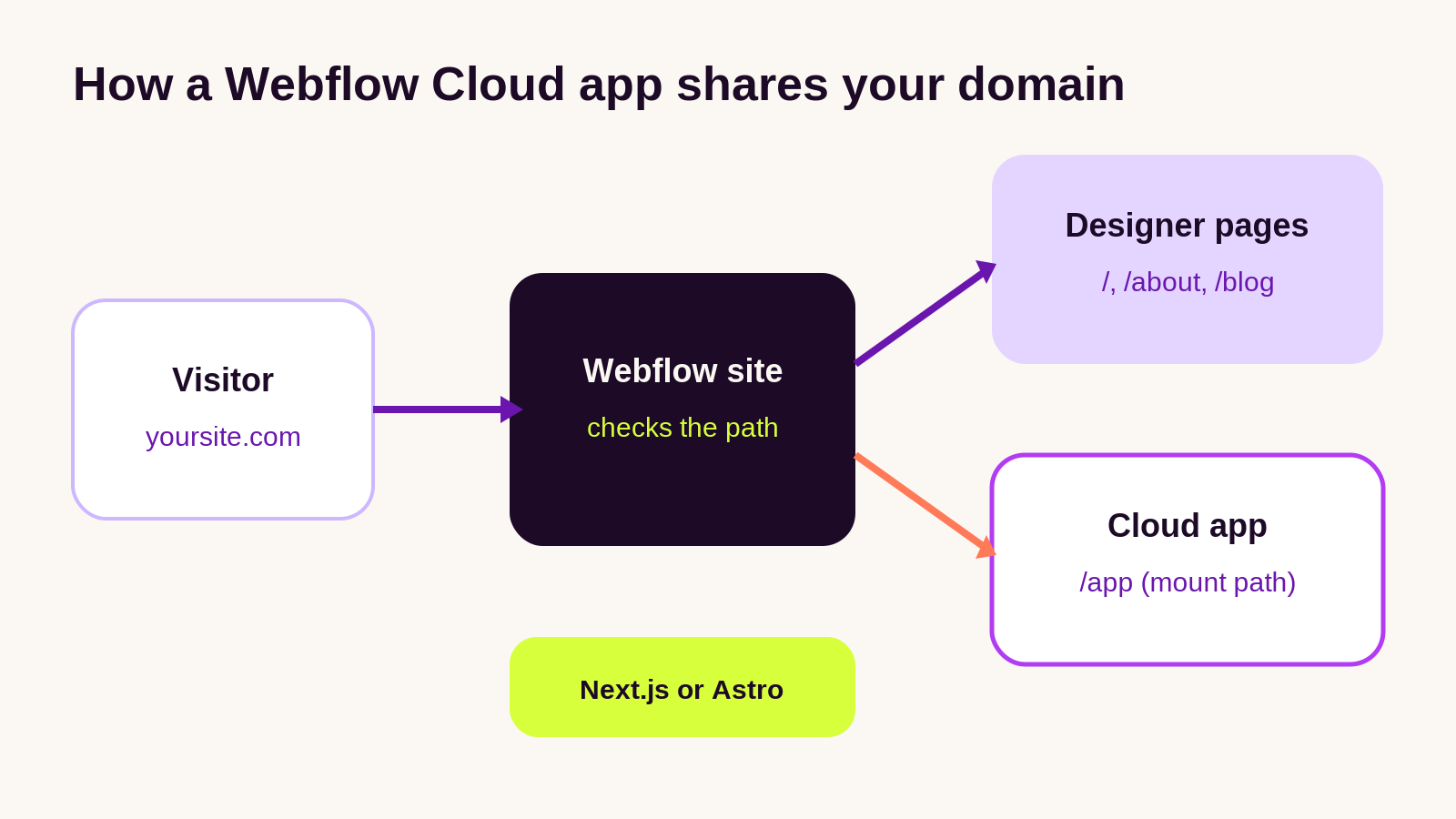
A few details explain most of the behavior we see on real projects:
-
The app runs on Cloudflare Workers, not a classic Node.js server. Next.js is deployed through the OpenNext Cloudflare adapter and Astro through
@astrojs/cloudflare. Many Node.js APIs work, but not all: native image libraries such as sharp are out, and Node-runtime middleware in Next.js is not supported, so middleware must use the Edge runtime. -
Your app lives under a base path. Every route, asset and fetch call has to include the mount path. Next.js adds it to
Linkautomatically oncebasePathis set, but plainfetchcalls from the browser are never rewritten for you. - The mount path is not live until you publish. Creating an environment and deploying the app is not enough; the Webflow site itself has to be published for routing to start.
- Some caching features are still maturing. Webflow's docs mark incremental static regeneration and on-demand revalidation as experimental, so we design pages that don't depend on them.
How to deploy a Webflow Cloud app with the new CLI
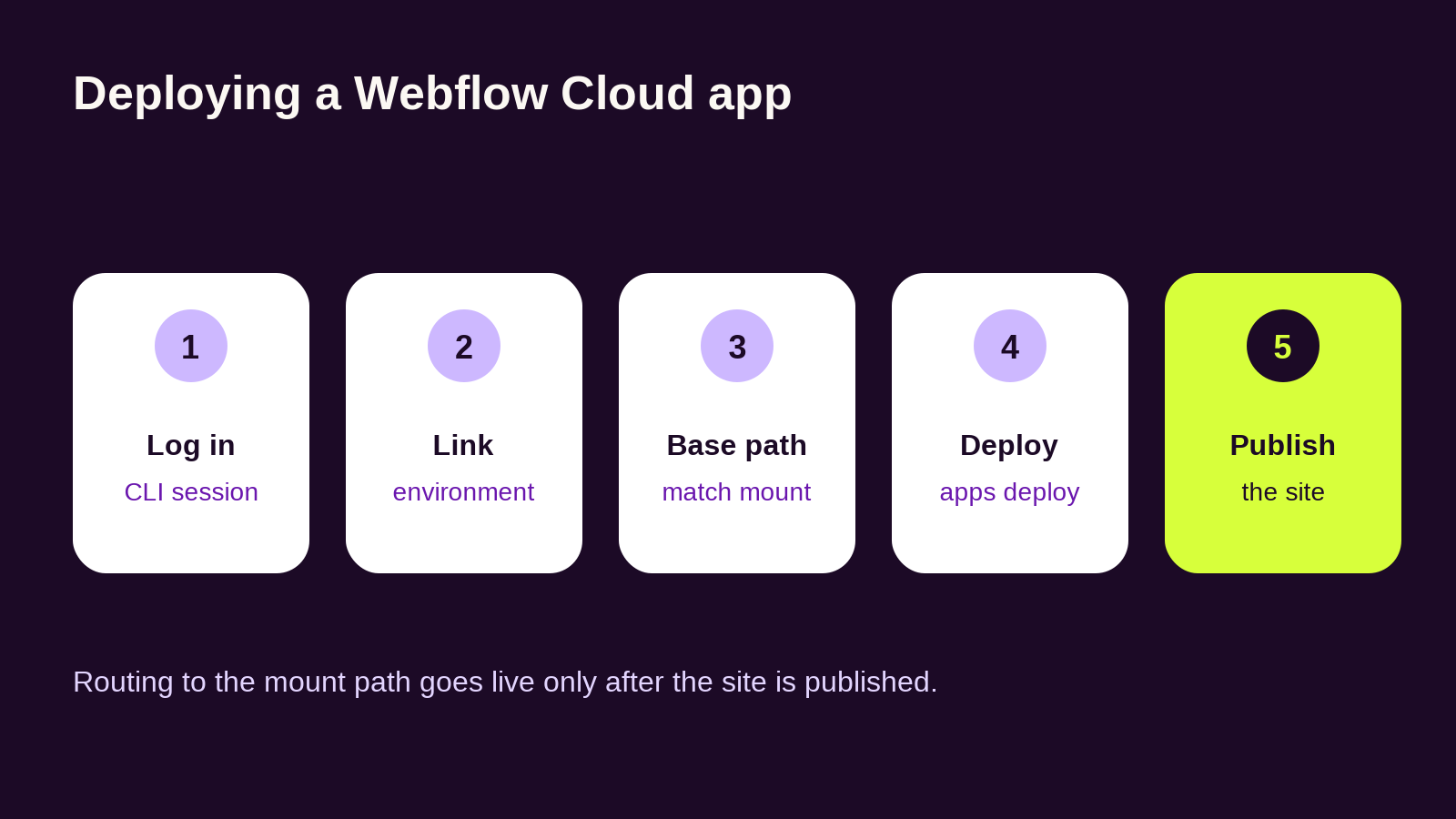
1. Set up the environment in Webflow
In your site settings, open Webflow Cloud, create a project connected to your GitHub repository, then create an environment with a mount path such as /app. Add your secrets (API keys and the like) as environment variables there, never in the repository.
2. Match the base path in your Next.js config
Set NEXT_PUBLIC_BASE_PATH to the mount path in the Webflow Cloud environment variables, and to an empty string on your machine. Then read it in next.config.ts at the project root:
// next.config.ts
import type { NextConfig } from "next";

const basePath = process.env.NEXT_PUBLIC_BASE_PATH ?? "";

const nextConfig: NextConfig = {
  basePath,
  assetPrefix: basePath,
};

export default nextConfig;

// lib/api.ts: browser fetches need the prefix added by hand
export const apiUrl = (path: string) =>
  `${process.env.NEXT_PUBLIC_BASE_PATH ?? ""}${path}`;

// usage: fetch(apiUrl("/api/quote"), { method: "POST", body })
Change nothing except the variable value per environment. This works on Next.js 15 and later, which is what Webflow Cloud supports.
3. Log in and deploy
From the project folder, a developer runs:
webflow auth login
webflow apps deploy --environment-id YOUR_ENVIRONMENT_ID --auto-publish
Replace the placeholder with the environment ID from the Webflow Cloud dashboard. Once the environment is linked in webflow.json, later deploys can reuse it. --auto-publish publishes the site so the mount path routing goes live; leave it off if your content team controls publishing and you'd rather they press the button.
4. Update old scripts and pipelines
Search your repository and CI configuration for webflow cloud deploy and replace it with webflow apps deploy. If any .env file still holds a Webflow token written by an older CLI, remove it, rotate the token in Webflow, and store the new one in your CI secret store.
What we've learned building Webflow Cloud apps
Most problems we see come from treating Webflow Cloud like a full Node.js host. It isn't, and that's fine once you plan for it. We check every dependency against the Workers runtime before we write any features, and we swap Node-only packages for Web-standard ones early (Web Streams instead of Node streams, WASM image tools instead of native ones).
We'd recommend Webflow Cloud when the app is closely tied to the marketing site and your team wants one domain and one vendor. We wouldn't choose it for a large product with heavy background jobs, long-running processes or a database-heavy back end; a dedicated Next.js development setup on its own hosting usually suits that better.
Ownership matters too. The GitHub repository, the Webflow site and the environment variables should sit in accounts your business controls, with the agency invited as a collaborator. Our guide to website ownership when you hire an agency covers what to keep in your name.
Troubleshooting
| Symptom | Likely cause | Fix |
|---|---|---|
| The mount path shows a Webflow 404 after a successful deploy | The site hasn't been published since the environment was created | Publish the Webflow site, or deploy with --auto-publish |
| Pages load but styles, images or API calls fail | Assets and fetch calls are missing the base path | Set basePath and assetPrefix, and wrap browser fetches in a helper like apiUrl() |
| Build passes locally but the deploy fails or crashes at runtime | A dependency needs a Node.js API the Workers runtime doesn't support | Check Webflow's Node.js compatibility page and replace the package with a Web-standard alternative |
| Middleware is ignored or throws on Webflow Cloud | Middleware is set to the Node.js runtime | Move it to the Edge runtime or move the logic into a route handler |
| A pipeline that used to deploy now asks for login | It relied on a token the old CLI wrote to .env |
Store a token in your CI secrets and pass it as an environment variable |
Questions people ask
Do I need a developer to use Webflow Cloud?
Yes. Webflow Cloud runs code you write in Next.js or Astro, and deploys go through the CLI or GitHub. Your marketing team keeps editing the rest of the site in the Designer as usual.
Will my old deploy scripts stop working?
Not straight away. webflow cloud deploy is now a deprecated alias of webflow apps deploy, so it still runs. Deprecated commands tend to be removed eventually, so update them during your next maintenance window.
Is a Webflow Cloud app good for SEO?
It can be, because it sits on your main domain rather than a subdomain. Server-rendered pages are crawlable like any other page; just give them proper titles and metadata, and keep crawler rules consistent with the rest of the site, as in our guide to Webflow robots.txt for search and AI crawlers.
Why a Webflow Cloud app matters for your business
A Webflow Cloud app lets you add real features, such as quotes, portals, gated tools and live data, without splitting your brand across two sites or giving up the editing experience your team already likes. The November 2026 CLI changes make deploys cleaner and safer, but only if your scripts and secrets are updated to match.
Before you start, check three things: which plan your site is on (see our note on Webflow site plan changes for agency-built sites), whether every dependency runs on Workers, and who owns the repository and tokens. Then:
-
Pick a mount path and match it in
basePath. - Keep secrets in Webflow Cloud environment variables and CI secrets only.
-
Use
webflow apps deployand publish the site after the first deploy. -
Replace any
webflow cloud deploycalls and remove old tokens from.env.
If you'd like a hand planning or building one, our Webflow development team is happy to talk through your project.
(over to you)
Planning a build like this?
Tell us what you're building and we'll come back with ideas and next steps.